
GPA Calculation and Grades That Don't Count
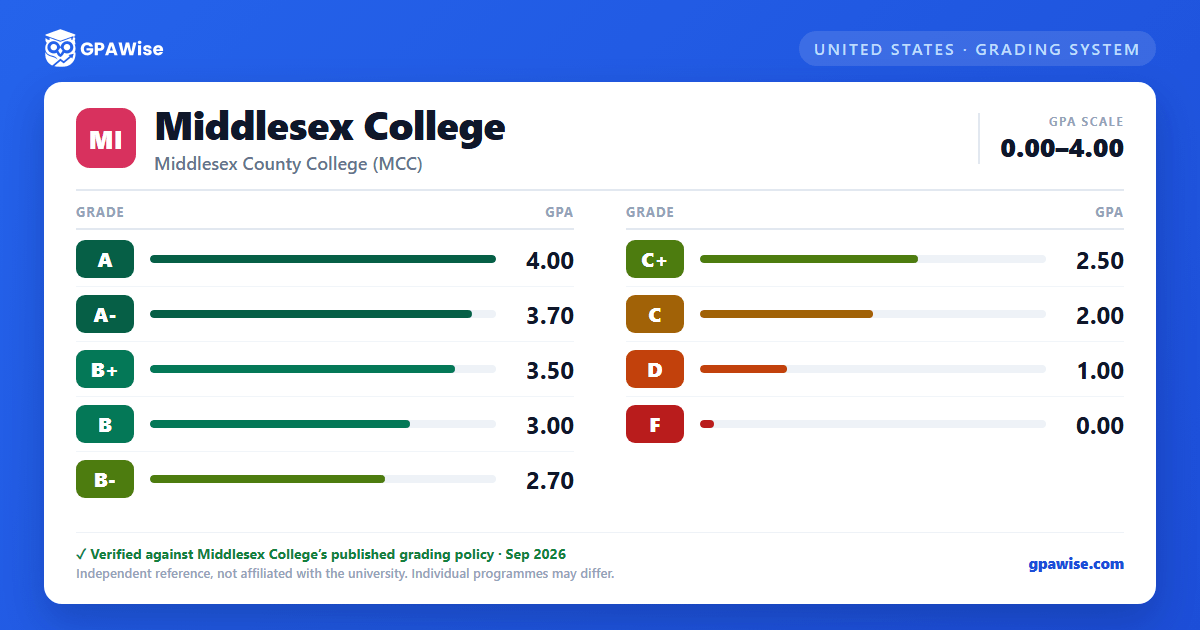
Your cumulative GPA is calculated as total grade points earned (Grade Point Total) divided by total graded credit hours (Graded Hours) — only courses graded A, A-, B+, B, B-, C+, C, D, or F are included in this calculation.
Several grade types are recorded on the transcript but are not included in the cumulative GPA: E (credit by examination), GU (grade unreported by the instructor due to an emergency situation), I (incomplete), IP (course in progress, grade not yet assigned), T (transfer credit from another institution), W (withdrawal from course), and X (audit).
Credit-equivalent courses (marked with a "Q" prefix before the grade, for developmental education) count toward the term GPA but not the cumulative GPA.
If a course is repeated, all attempts remain on the transcript, but only the highest grade earned counts toward the cumulative GPA; the GPA recalculates automatically once grades post at the close of each semester. A written appeal is required to repeat a course more than three times.
Source: Catalog: Academic Standards & Regulations > Grading System (Repeated Courses; Credit Equivalent; Other Grades). — verified Sep 2026
Frequently asked questions
What grading scheme does Middlesex College use?
Where does this Middlesex College grade scale come from?
What are Middlesex College's GPA rules?
Source: Catalog: Academic Standards & Regulations > Grading System (Repeated Courses; Credit Equivalent; Other Grades). — verified Sep 2026
