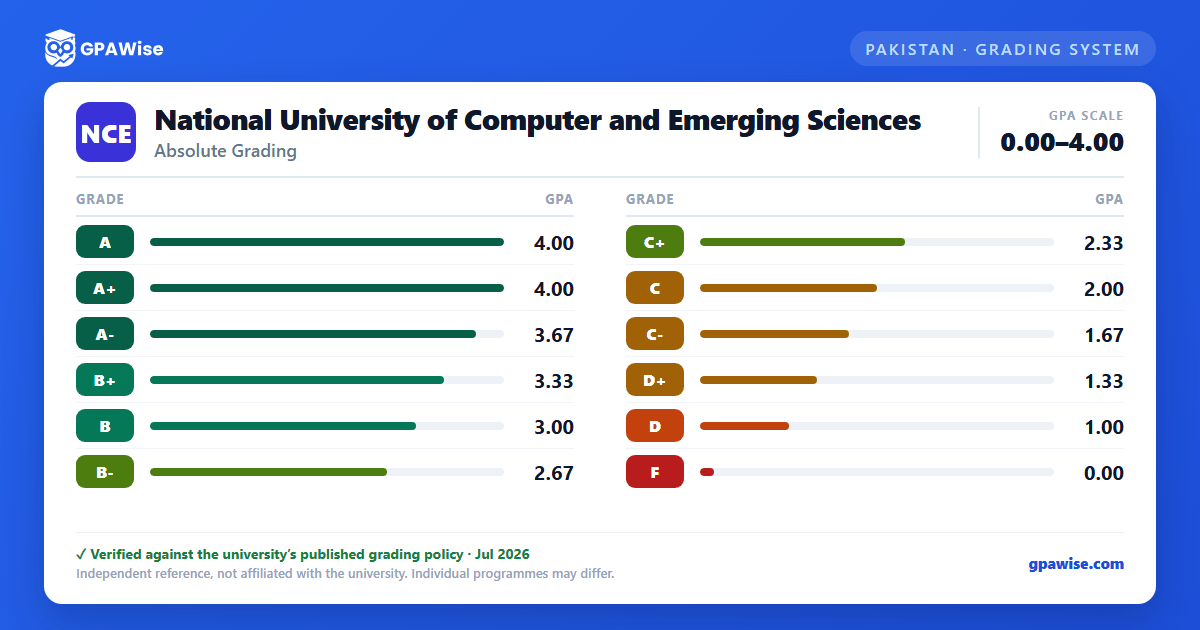

How grading works at FAST-NUCES
FAST-NUCES grades every course with a letter grade on a grade-point scale that runs from 0.00 to 4.00. A course's letter grade reflects the student's overall performance, with semester (sessional) work normally counting for 50% of the marks and the final examination for the other 50%.
The letters run from A down to F. A+ ("Outstanding") and A ("Excellent") are distinct letters that both carry the maximum grade points, whereas F is a fail. The lowest passing grade is D — C-, D+ and D are all pass grades that a student may repeat in order to improve. For the exact grade point attached to each letter, see the Grade Scale Reference on this page.
Source: UG Academic Rules & Regulations 2026 §2.1–2.3, §5.2 — verified Jul 2026
How FAST-NUCES calculates SGPA and CGPA
FAST-NUCES computes two averages: the Semester GPA (SGPA) for the courses of a single semester, and the Cumulative GPA (CGPA) across every semester completed so far.
Both are credit-hour weighted. For the SGPA, each course's grade points are multiplied by that course's credit hours; those products are added together and divided by the total credit hours attempted in the semester. The CGPA applies the same weighted average cumulatively over all courses a student has taken.
When a course is repeated, only the most recent attempt's grade points count toward the CGPA — even if the newer grade is lower than an earlier one. A withdrawn course (grade W) stays on the transcript but does not affect the CGPA.
Source: UG Academic Rules & Regulations 2026 §2.1, §2.4–2.8 — verified Jul 2026
Academic warning and probation at FAST-NUCES
A minimum CGPA of 2.00 is required to stay clear of academic warning at FAST-NUCES.
If a student's CGPA falls below 2.00 at the end of any semester (including a summer semester), an academic warning is issued and the warning count increases by one. If the CGPA remains below 2.00 for three consecutive semesters, the warning count reaches three and the student's admission to the University is automatically closed.
Recovering to a CGPA of 2.00 or above after a first or second warning resets the warning count back to zero.
Source: UG Academic Rules & Regulations 2026 §5.4–5.7 — verified Jul 2026
Minimum CGPA to graduate from FAST-NUCES
A minimum cumulative GPA (CGPA) of 2.00 is required to graduate from an undergraduate program at FAST-NUCES.
A bachelor's degree runs for a minimum of four academic years (eight regular semesters) and must be completed within a maximum of six years — extendable by one further year only with the approval of the University's statutory bodies.
Source: UG Academic Rules & Regulations 2026 §1.23, §1.25 — verified Jul 2026
Honors, medals and distinctions at FAST-NUCES
FAST-NUCES recognizes high-achieving undergraduates in several ways.
- Graduation medals — the Agha Hasan Abedi Gold Medal (first position), Mahboob ul Haq Silver Medal (second) and Akhlaque Hussain Bronze Medal (third) go to the top position holders of each degree program at each campus. A minimum CGPA of 3.00 is required to qualify.
- Rector's List of Honors — awarded for a semester GPA (SGPA) of 4.00 earned with at least 30 credit hours.
- Dean's List of Honors — awarded for an SGPA between 3.50 and 3.99.
- Semester position medals for the top three students in a department require a semester GPA of 3.00 or higher and no failed, repeated or withdrawn course that semester.
Degrees also carry a Latin distinction based on the final CGPA:
| Distinction | CGPA |
|---|---|
| Summa cum laude | 3.90 or above |
| Magna cum laude | 3.75 – 3.89 |
| Cum laude | 3.60 – 3.74 |
Source: UG Academic Rules & Regulations 2026 §7.1–7.11 — verified Jul 2026
Transfer credit and CGPA at FAST-NUCES
Students admitted to FAST-NUCES with credits from another accredited institution may have equivalent courses exempted, subject to several limits.
- Course exemptions cannot exceed 50% of the degree's total credit hours.
- No credit is granted for any course graded below C (below 2.00 on the 4.00 scale). Only relevant courses earned within the last five years, with at least a C grade, are transferable.
- The CGPA earned at the previous institution is not carried over — only the credits transfer, not the grade points.
- Final Year Project (FYP) credits are not transferable.
Source: UG Academic Rules & Regulations 2026 §3.5–3.14 — verified Jul 2026
Frequently asked questions
What grading scheme does National University of Computer and Emerging Sciences (FAST-NUCES) use?
Where does this FAST-NUCES grade scale come from?
What CGPA do you need to graduate from FAST-NUCES?
You need a minimum cumulative GPA (CGPA) of 2.00 to graduate from an undergraduate program at FAST-NUCES.
Source: UG Academic Rules & Regulations 2026 §1.25 — verified Jul 2026
What is the minimum passing grade at FAST-NUCES?
D is the lowest passing grade. C-, D+ and D are all pass grades (a student may repeat the course to improve), while F is a fail. See the Grade Scale Reference on this page for the grade point each letter carries.
Source: UG Academic Rules & Regulations 2026 §2.2–2.3 — verified Jul 2026
Is A+ higher than A at FAST-NUCES?
A+ and A are distinct letter grades, but they carry the same grade points. A+ is interpreted as "Outstanding" and A as "Excellent", yet both sit at the maximum of the 4.00 scale. So A+ ranks above A in distinction, not in grade points — see the Grade Scale Reference for the exact value.
Source: UG Academic Rules & Regulations 2026 §2.2–2.3 — verified Jul 2026
What CGPA puts you on academic warning at FAST-NUCES?
A CGPA below 2.00 at the end of a semester triggers an academic warning. Three consecutive semesters below 2.00 close a student's admission automatically, while recovering to 2.00 or above after a first or second warning resets the warning count.
Source: UG Academic Rules & Regulations 2026 §5.4–5.7 — verified Jul 2026
What CGPA do you need for a gold medal or honors at FAST-NUCES?
A minimum CGPA of 3.00 is required to qualify for a graduation medal (Gold, Silver or Bronze for the top three position holders). Degree distinctions begin at a CGPA of 3.60 (Cum laude), 3.75 (Magna cum laude) and 3.90 (Summa cum laude). For semester honors, the Rector's List needs an SGPA of 4.00 (with at least 30 credit hours) and the Dean's List an SGPA of 3.50 to 3.99.
Source: UG Academic Rules & Regulations 2026 §7.1–7.6 — verified Jul 2026
