
How grading works at SS-CASE-IT
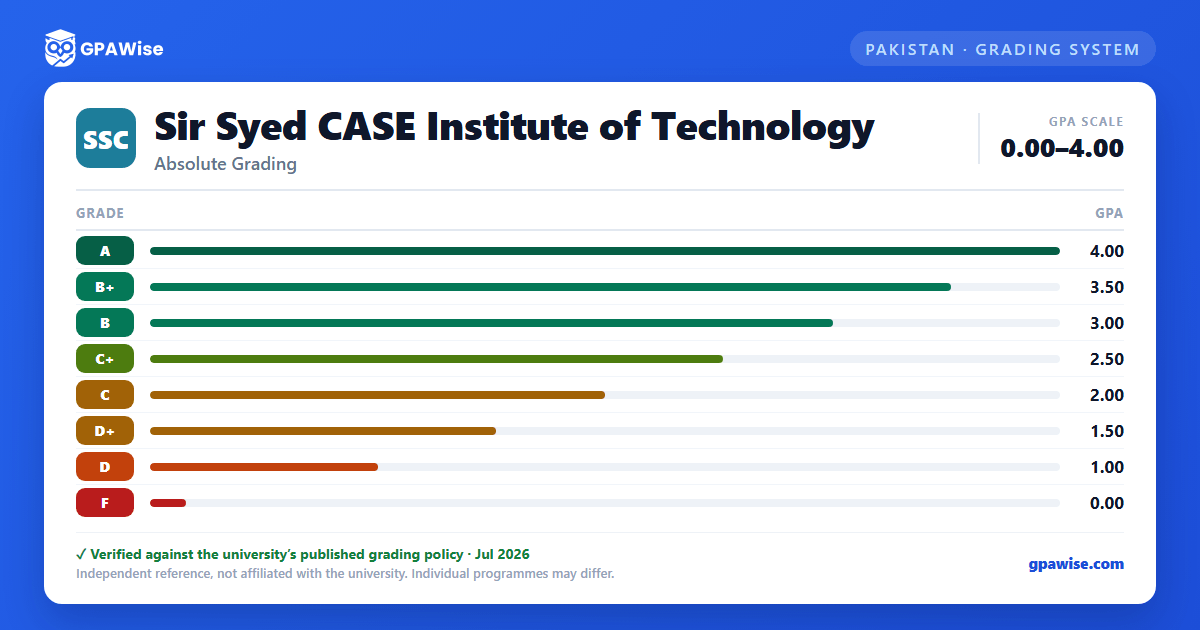
SS-CASE-IT uses relative grading: course grades are awarded based on each student's performance relative to their class, usually applying a normal distribution curve, though the final grading decision rests with the instructor. There is no university-wide percentage-to-letter conversion table — letter grades map directly to grade points on a 0.00–4.00 scale:
- A (Outstanding) — 4.0
- B+ (Excellent) — 3.5
- B (Good) — 3.0
- C+ (Fair) — 2.5
- C (Average) — 2.0
- D+ (Below Average) — 1.5
- D (Unsatisfactory) — 1.0
- F (Fail) — 0.0
SS-CASE-IT does not award A−, B−, or C− grades.
Source: Academic Rules Undergraduate, "GRADES" section — verified Jul 2026
How SS-CASE-IT calculates GPA and CGPA
The Semester Grade Point Average (GPA) is calculated by multiplying each course's grade points by its credit hours, summing those products across the semester, and dividing by the semester's total credit hours. The Cumulative GPA (CGPA) applies the same calculation across all semesters completed so far.
- A W (Withdrawal) grade, assigned for withdrawals made between the 7th and 12th week of a semester, does not count in the GPA calculation.
- An I (Incomplete) grade is granted only when a student misses a final exam or final project for a genuine reason. It must be resolved in the following semester — if not, it is automatically converted to an F.
Source: Academic Rules Undergraduate, "GRADE POINT AVERAGE", "COURSE DROP POLICY", "INCOMPLETE (I) GRADE" — verified Jul 2026
Academic warning, probation, and dismissal at SS-CASE-IT
SS-CASE-IT reviews academic standing every semester:
- Warning — placed for the next semester if the student's semester GPA falls below 2.0, or their CGPA is below 2.0. A student on warning must register for a reduced course load.
- Probation — a student already on warning who earns another semester GPA below 2.0 is placed on probation, as is a student whose CGPA is below 2.0 and who also earns a semester GPA below 2.0. Probation also carries a reduced course load, and a warning letter is sent to the student's parents/guardians.
- Dismissed — a student already on probation who again earns a semester GPA below 2.0 is expelled, as is any student whose CGPA is below 1.70 at the end of their first two semesters.
Source: Academic Rules Undergraduate, "ACADEMIC STANDINGS" (Warning, Probation, Dropped) — verified Jul 2026
Degree completion requirements at SS-CASE-IT
To be declared "Passed" and awarded a bachelor's degree, an SS-CASE-IT student must:
- Complete the total credit hours required for their degree (for engineering programs: 126 credit hours of coursework plus 9 credit hours of senior design project, 135 in total).
- Reach the required cumulative GPA floor at completion of coursework.
- Fulfil the degree requirements within 4 to 6 years (the normal duration is 4 years; the absolute maximum permitted is 7 years).
- Have no outstanding financial obligations to the Institute.
Source: Academic Rules Undergraduate, "ACADEMIC STANDINGS" (Passed) and "STUDY DURATION" — verified Jul 2026
Academic honours at SS-CASE-IT
SS-CASE-IT recognizes strong semester performance with tiered honours, each requiring a normal-or-above course load and no active warning, probation, or disciplinary action:
| Honour | Semester GPA | CGPA floor |
|---|---|---|
| Faculty Honours | 3.90–4.00 | 3.50 |
| High Distinction | 3.75 to <3.90 | 3.50 |
| Distinction | 3.50 to <3.75 | 3.25 |
| Good standing | 2.75–3.50 | 2.50 |
| Satisfactory | 2.00 to <2.75 | 2.00 |
Source: Academic Rules Undergraduate, "ACADEMIC STANDINGS" (Faculty Honours, High Distinction, Distinction, Good, Satisfactory) — verified Jul 2026
Frequently asked questions
Can I save my semesters and track my CGPA at SS-CASE-IT?
How do I convert SGPA to CGPA at SS-CASE-IT?
Can I add past semester GPAs without entering every course?
Is my CGPA tracker data sent to your servers?
Is this Sir Syed CASE Institute of Technology (SS-CASE-IT) GPA calculator free?
Does SS-CASE-IT use relative or absolute grading?
Relative. SS-CASE-IT grades students against their class's performance, usually on a normal distribution curve, rather than against fixed percentage cut-offs — the instructor's final decision governs each course's grade distribution.
Source: Academic Rules Undergraduate, "GRADES" — verified Jul 2026
What is the grading scale at SS-CASE-IT?
SS-CASE-IT uses eight letter grades on a 0.00–4.00 scale: A (4.0), B+ (3.5), B (3.0), C+ (2.5), C (2.0), D+ (1.5), D (1.0), and F (0.0). There are no A−, B−, or C− grades.
Source: Academic Rules Undergraduate, "GRADES" — verified Jul 2026
What GPA keeps you out of academic warning at SS-CASE-IT?
You need a semester GPA of at least 2.0 and a CGPA of at least 2.0 to remain in good academic standing. Falling below either places you on academic warning for the next semester.
Source: Academic Rules Undergraduate, "ACADEMIC STANDINGS" (Warning) — verified Jul 2026
What happens if you don't resolve an Incomplete (I) grade at SS-CASE-IT?
An Incomplete (I) grade must be resolved in the semester immediately following the one it was awarded in. If it isn't, it is automatically converted to an F.
Source: Academic Rules Undergraduate, "INCOMPLETE (I) GRADE" — verified Jul 2026
Does a W (Withdrawal) grade affect your GPA at SS-CASE-IT?
No. A W grade — assigned when a student withdraws from a course between the 7th and 12th week of a semester — does not count toward the GPA. The student must repeat the course at a later stage.
Source: Academic Rules Undergraduate, "COURSE DROP POLICY" — verified Jul 2026
When can a student be dismissed from SS-CASE-IT?
A student already on probation who earns another semester GPA below 2.0 is dismissed. A student is also dismissed if their CGPA is below 1.70 at the end of their first two semesters.
Source: Academic Rules Undergraduate, "ACADEMIC STANDINGS" (Dropped) — verified Jul 2026
