
How grading works at ACU
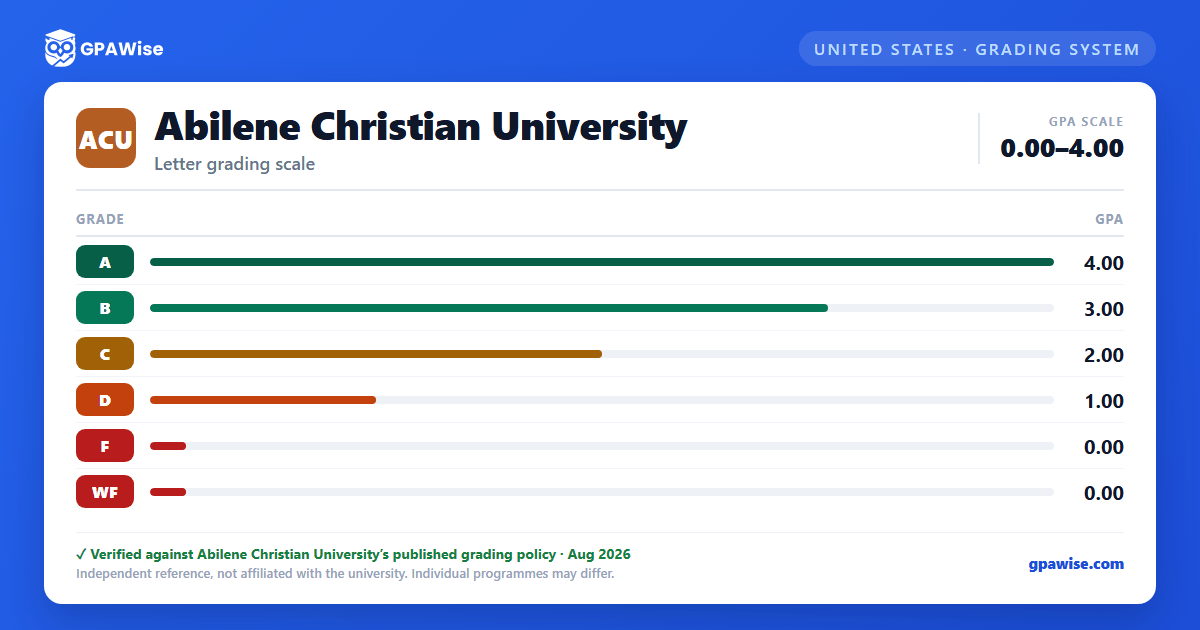
ACU grades undergraduates on a 4.0 scale with grade points assigned per credit hour: A (4.0), B (3.0), C (2.0), D (1.0), and F (0.0). ACU does not use plus/minus grading — there is no A+, A-, B+, or any other modified letter grade at the undergraduate level.
A WF (Withdrawn Failing) grade also carries a point value of 0.0, the same as F.
Source: ACU Catalog, Undergraduate Academic Information (Grading: Grade Definitions and Points) — verified Aug 2026
How your GPA is calculated at ACU
Your GPA is Quality (Grade) Points divided by GPA Hours. Quality points are hours attempted multiplied by the grade points awarded for each course. GPA hours include every graded hour, including F and WF grades — but exclude ungraded hours from CR (Credit) or P (Passing) grades.
"Current GPA" is your GPA for a single term; "Cumulative GPA" is your overall GPA across all terms enrolled as an undergraduate at ACU.
Source: ACU Catalog, Undergraduate Academic Information (Grade Point Average; Calculating Grade Point Average) — verified Aug 2026
Academic standing and probation at ACU
You're in good standing if both your term and cumulative GPA are at least 2.0 (some majors require higher). Good standing isn't noted on your transcript.
You're placed on academic probation after any semester where your semester GPA falls below 2.0, or where your cumulative GPA falls between 1.0 and 1.999.
Source: ACU Catalog, Undergraduate Academic Information (Academic Standing: Good Standing; Academic Probation and Suspension) — verified Aug 2026
Dean's Honor Roll and Latin honors at ACU
You'll be named to the Deans' Honor Roll for any fall or spring term where you achieve a current term GPA of 3.6 or above, are registered for 12 or more hours, and have no F or WF grades that term.
To graduate with Latin honors (summa cum laude, magna cum laude, or cum laude), you must have completed at least 60 hours of coursework at ACU, in addition to meeting the required GPA, evaluated at the time of Commencement.
Source: ACU Catalog, Undergraduate Academic Information (Deans' Honor Roll; Grade Point Average) — verified Aug 2026
Frequently asked questions
What grading scheme does Abilene Christian University (ACU) use?
Where does this ACU grade scale come from?
Does ACU use plus/minus grading (A+, A-, B+, etc.)?
No. ACU's Grade Definitions and Points table lists only whole-letter grades — A (4.0), B (3.0), C (2.0), D (1.0), and F (0.0) — with no plus or minus modifiers at the undergraduate level.
Source: ACU Catalog, Undergraduate Academic Information (Grading: Grade Definitions and Points) — verified Aug 2026
Does a WF (Withdrawn Failing) grade affect my GPA at ACU?
Yes. WF carries a grade point value of 0.0, the same as F, and is explicitly counted in your GPA hours: "GPA hours are all hours graded (including grades of 'F' and 'WF')." A plain W (Withdrawn, without the failing designation) carries no point value and is not counted.
Source: ACU Catalog, Undergraduate Academic Information (Grading: Grade Definitions and Points; Calculating Grade Point Average) — verified Aug 2026
Do CR, P, I, NC, NG, or W grades affect my GPA at ACU?
No. ACU's grade table marks Incomplete (I), Passing (P), Credit by Examination (CE), Credit (CR), No Credit (NC), No Grade Recorded (NG), and Withdrawn (W) as "Not counted." The GPA-hours formula separately confirms that CR and P hours are excluded from the GPA-hours denominator entirely.
Source: ACU Catalog, Undergraduate Academic Information (Grading: Grade Definitions and Points; Calculating Grade Point Average) — verified Aug 2026
