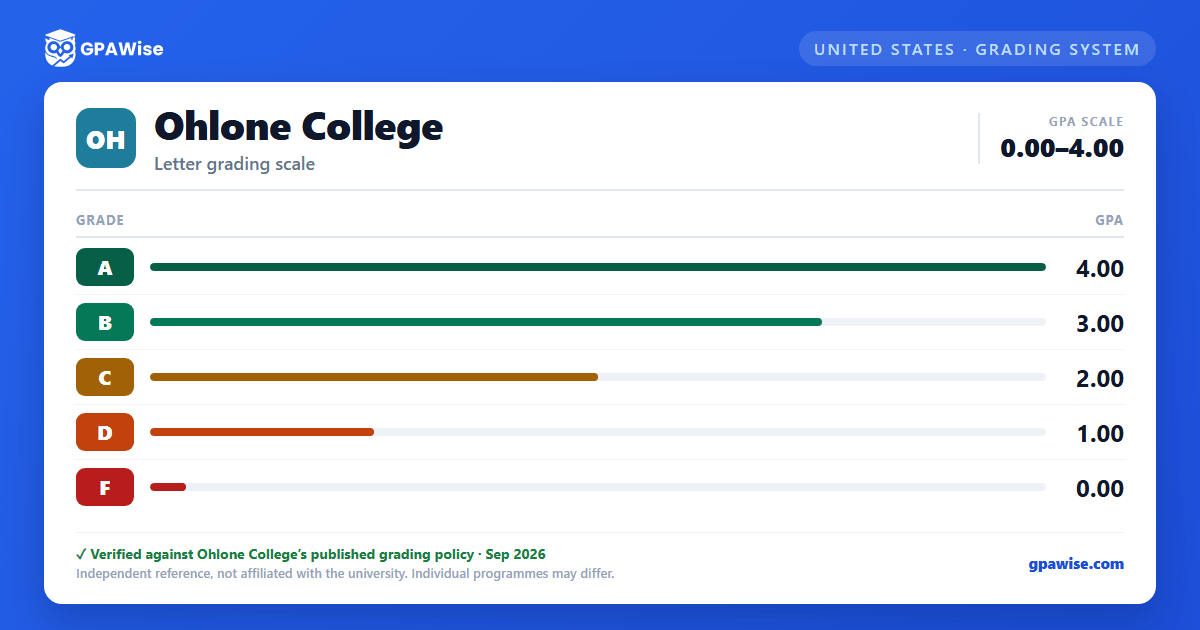

Grade Point Average (GPA)
GPA is computed by dividing the number of grade points earned in classes where grades were awarded by the number of units attempted in those classes.
Units earned with a Pass/No Pass grade, or with a grade of I (Incomplete), IP (In Progress), RD (Report Delayed), W (Withdrawal), EW (Excused Withdrawal), MW (Military Withdrawal), or SP (Satisfactory Progress), are not included in the GPA calculation.
Source: 2026-2027 catalog, ch.5 Academic Regulations, "Grade Point Average (GPA)" — verified Sep 2026
Academic Standing
Students are in Clear Standing when their last completed semester GPA and cumulative GPA are 2.00 or higher and their accumulated units of Withdrawal (W), No Pass (NP), and/or Incomplete (I) do not reach or exceed 50 percent.
Students who have attempted 12 or more semester units are placed on Academic Probation 1 when a cumulative GPA below 2.00 is earned during a Fall or Spring Semester, and are removed from probation once the cumulative GPA reaches 2.00 or higher. A separate Progress Probation track applies when the percentage of attempted units graded W, NP, and/or I reaches or exceeds 50%.
Students are placed on Dismissal after a cumulative GPA below 2.00 for three consecutive semesters, and may petition for reinstatement under specified conditions, including an improving semester GPA.
Academic Renewal (excluding up to 24 substandard units from the GPA) is available once at least 12 degree-applicable units have since been completed with a 3.00 GPA (or 18 units at 2.50, or 24 units at 2.00) at a regionally accredited college or university.
Source: 2026-2027 catalog, ch.5 Academic Regulations, "Academic Standing" / "Academic Renewal" — verified Sep 2026
Pass/No Pass and Graduation Units
A Pass (P) grade counts toward the 60 units required for graduation but does not affect the student's GPA. A No Pass (NP) grade earns no units, does not apply toward graduation, and does not affect GPA. Up to 15 units of Pass/No Pass coursework may be applied toward general education for the associate degree.
Source: 2026-2027 catalog, ch.5 Academic Regulations, "Pass/No Pass Grade (P/NP)" — verified Sep 2026
Graduation Honors
Students graduate "With Honors" with a cumulative GPA of 3.20–3.49 in all degree-applicable courses, and "With Highest Honors" with a cumulative GPA of 3.50–4.00. Both notations are printed on the Ohlone diploma and transcript.
Source: 2026-2027 catalog, ch.5 Academic Regulations, "Honors" — verified Sep 2026
Frequently asked questions
What grading scheme does Ohlone College use?
Where does this Ohlone College grade scale come from?
What are Ohlone College's GPA rules?
Source: 2026-2027 catalog, ch.5 Academic Regulations, "Grade Point Average (GPA)" — verified Sep 2026
What are Ohlone College's academic standing rules?
Source: 2026-2027 catalog, ch.5 Academic Regulations, "Academic Standing" / "Academic Renewal" — verified Sep 2026
What does Ohlone College require to graduate?
Source: 2026-2027 catalog, ch.5 Academic Regulations, "Pass/No Pass Grade (P/NP)" — verified Sep 2026
How are honors and awards decided at Ohlone College?
Source: 2026-2027 catalog, ch.5 Academic Regulations, "Honors" — verified Sep 2026
