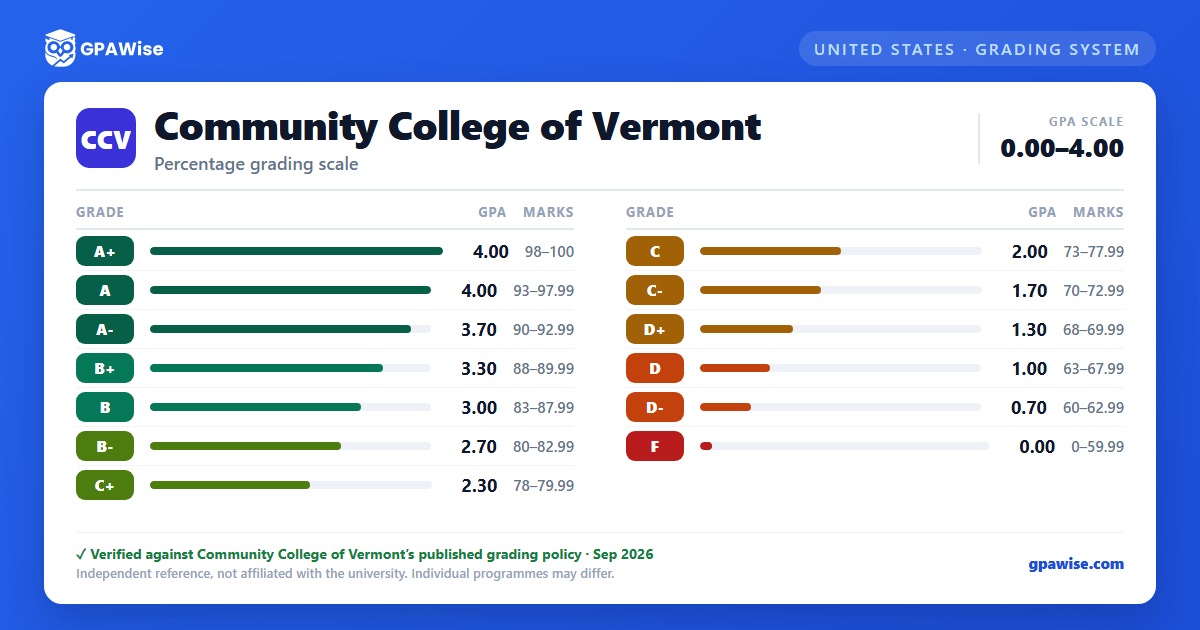

How grading works at CCV
For each college-level course, you choose to be evaluated either by a letter grade (A+ through F, with plus/minus) or by Pass/No Pass (P/NP) — you must pick before the end of the add/drop period, and the choice can't be changed after that.
A+ carries the same 4.00 grade point value as A — it is not a higher value. Grades of W, P, and NP carry no grade point value and are not factored into your GPA, though they still count as attempted credits.
Source: CCV Evaluation System Policy (rev. Jul 2020) + Academic Standing Policy (rev. Oct 2019) — verified Aug 2026
How your GPA is calculated at CCV
Grades of W, P, and NP are excluded from your GPA entirely, though they still count toward attempted credits. An Incomplete (I) isn't counted while you're still within the time allowed to finish the work, but automatically reverts to an F after seven weeks past the end of the semester it was given in.
If you repeat a course, the grade from your most recent attempt (including a W) becomes your grade of record for GPA and program-requirement purposes — the earlier attempt stays on your transcript but no longer counts toward your cumulative GPA.
Source: CCV Academic Standing Policy, rev. Oct 3, 2019 — verified Aug 2026
Academic standing, notice, and suspension at CCV
You're in Good Academic Standing if you maintain a cumulative GPA of 2.0 or better (2.0 drops to 1.75 if you've attempted fewer than 30 credits), and you satisfactorily complete at least 50% of any basic skills courses you attempt that semester.
Falling short puts you on Academic Notice, requiring a meeting with an academic advisor before you can register again. Staying on notice for two consecutive semesters without a term GPA of 2.0 or higher in either one leads to suspension from the college for up to 12 months. After suspension, you must complete all courses with a grade of C or above in your first semester back, or you're permanently dismissed.
Source: CCV Academic Standing Policy, rev. Oct 3, 2019 — verified Aug 2026
What counts toward your program requirements at CCV
A grade of C- or higher generally satisfies course objectives toward your program and general-education requirements. Grades of D+ through D- are passing, but won't count as credit toward specific program or competence-area requirements.
Source: CCV Evaluation System Policy, rev. Jul 1, 2020 — verified Aug 2026
Honors recognition at CCV
Full-time students (12+ college-level credits in a semester) with a 4.0 GPA are named to the President's List; those with a GPA between 3.5 and 3.995 make the Dean's List. Students earning 6–11 college-level credits in a semester with a 4.0 GPA qualify for CCV Student Honors.
Source: ccv.edu, Grading, Attendance, Academic Standing page — verified Aug 2026
Frequently asked questions
What grading scheme does Community College of Vermont (CCV) use?
Where does this CCV grade scale come from?
Is CCV's A+ worth more than a 4.0?
No. CCV's Grade Scheme table lists A+ at 4.00, the same value as a plain A — it does not push your GPA above 4.0.
Source: CCV Academic Standing Policy, rev. Oct 3, 2019 — verified Aug 2026
Do P, NP, or W grades affect my GPA at CCV?
No. Grades of P, NP, and W are explicitly excluded from your GPA calculation, though they're still counted as attempted credits.
Source: CCV Academic Standing Policy, rev. Oct 3, 2019 — verified Aug 2026
What happens to my GPA if I repeat a course at CCV?
Your most recent attempt (including a W) becomes the grade of record used to calculate your GPA. The earlier attempt stays visible on your transcript but is dropped from your cumulative GPA calculation.
Source: CCV Academic Standing Policy, rev. Oct 3, 2019 — verified Aug 2026
