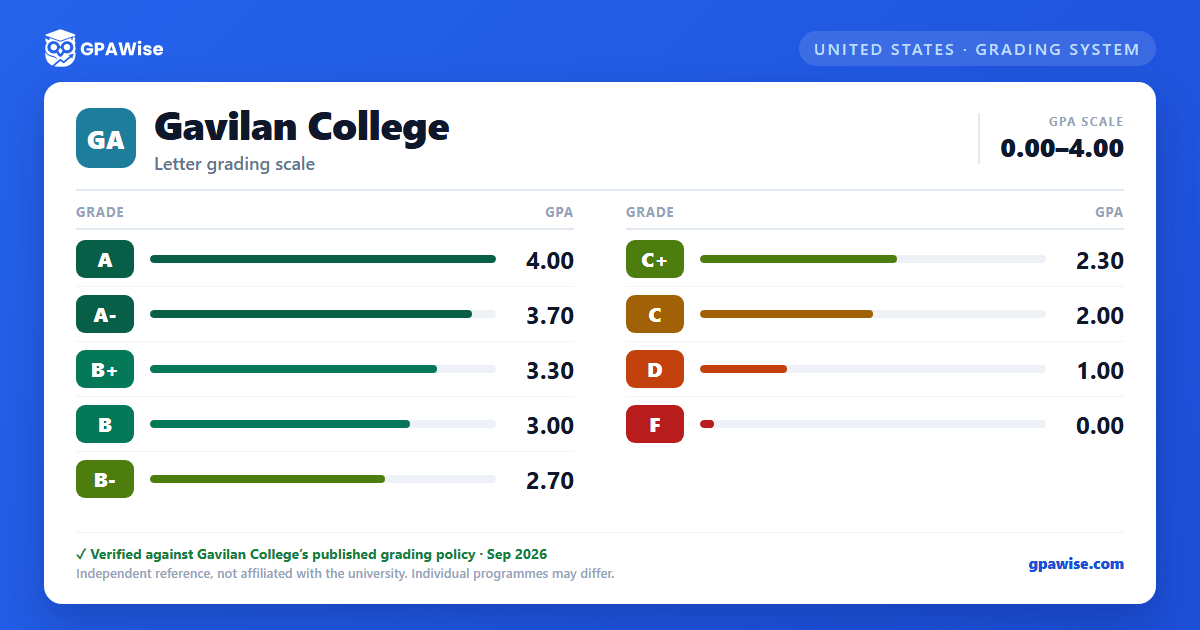

How Your GPA Is Calculated
Your GPA is computed by dividing the total grade points earned by the total number of units attempted. It is calculated at the end of each semester and cumulatively across all semesters; grades from other colleges are not included.
- Pass (P) and No Pass (NP) units are not included in the GPA, though they are considered for progress probation and dismissal purposes.
- If a course is repeated after a grade of D, F, NC, or NP, the transcript and GPA reflect only the last grade received; the earlier grade and units remain on the record but are annotated as no longer computed in the GPA.
- Repeating a course after a grade of C or better requires a Request to Repeat a Course Under Special Circumstances, and the repeated units/grade points are excluded from the GPA unless the repeat meets a legally mandated training requirement for continued employment.
- Academic renewal lets a student petition to exclude up to three terms of substandard coursework from the GPA once two years have elapsed and specified subsequent coursework (e.g. 30 units at 2.0 GPA, 24 units at 2.5, or 18 units at 3.0) is completed; the coursework stays on the record but is annotated as not computed in the GPA.
Source: Gavilan College Student Handbook, Academic Information (ref. AP 4230) — verified Aug 2026
Probation and Dismissal
A student who has attempted at least 12 semester units is placed on academic probation if their cumulative GPA falls below 2.0, and is removed once it returns to 2.0 or higher.
A student who has enrolled in at least 12 semester units is placed on progress probation when "W," "I," "NC," and "NP" entries reach or exceed 50% of all units attempted, and is removed once that percentage drops below 50%.
A student on academic probation is subject to dismissal after earning a cumulative GPA below 2.0 in each of three consecutive semesters; a student on progress probation is subject to dismissal if the 50%-or-more W/I/NC/NP pattern persists for three consecutive semesters. A dismissed student may petition a counselor for reinstatement. A student who transfers to Gavilan already deficient in grade points is admitted on probationary status and may remain enrolled as long as a 2.0 or higher GPA is maintained.
Source: Gavilan College Student Handbook, Academic Information — Standards for Probation/Dismissal — verified Aug 2026
Dean's List and President's Honor Roll
Students who accumulate at least 12 graded (A, B, C, D, F) units in a semester and maintain a 3.0 (B) GPA are placed on the Dean's List, noted on the transcript.
Students who accumulate at least 15 graded units in a semester and earn a 3.5 or higher GPA are recognized on the President's Honor Roll, noted on the transcript with additional special recognition.
Pass/No Pass units and courses are not counted toward either honor. Honors at graduation are calculated at the 3.50 GPA level, computed after any academic renewal adjustments.
Source: Gavilan College Student Handbook, Academic Information — Academic Standards — verified Aug 2026
Frequently asked questions
What grading scheme does Gavilan College use?
Where does this Gavilan College grade scale come from?
What are Gavilan College's GPA rules?
Source: Gavilan College Student Handbook, Academic Information (ref. AP 4230) — verified Aug 2026
What are Gavilan College's academic standing rules?
Source: Gavilan College Student Handbook, Academic Information — Standards for Probation/Dismissal — verified Aug 2026
How are honors and awards decided at Gavilan College?
Source: Gavilan College Student Handbook, Academic Information — Academic Standards — verified Aug 2026
