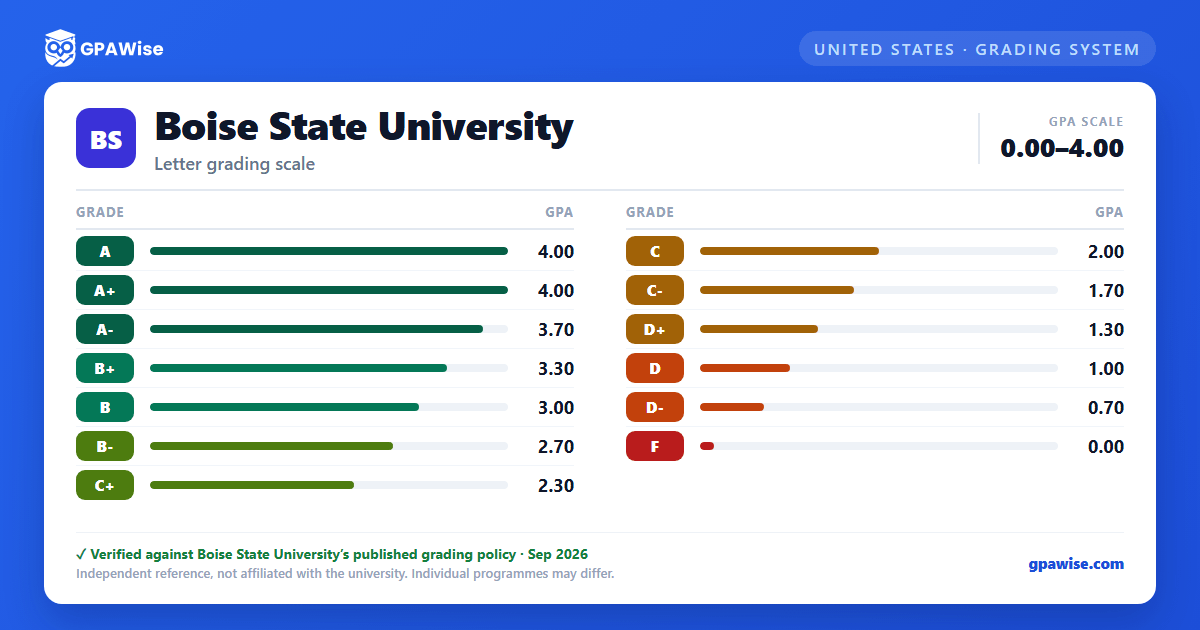

How Boise State Calculates GPA
Boise State calculates and documents three GPAs: Cumulative GPA (Boise State coursework in the student's current career, plus transferred courses graded A, B, C, D, or F), Term GPA (quality points earned and credits attempted that semester), and Boise State University GPA (quality points and credits attempted at Boise State in the student's current career). Each is calculated as total quality points earned divided by total credits attempted, and results are rounded to the third decimal place.
Grades of Pass (P), Withdrew (W), Complete Withdrawal (CW), Incomplete (I), Audited (AUD), Unsatisfactory Audit (UAU), and No Report on record (NR) carry no quality points and are excluded from GPA calculation.
For repeated courses, Boise State has used grade replacement (before fall 1995), grade averaging (fall 1995 through summer 2001), and grade replacement again (fall 2001 onward, currently in effect) — only the most recent grade counts toward the cumulative GPA.
Source: Policy 3230, sections 4 and 5 — verified Aug 2026
Excluded Grades Still Count Toward Honors
Grades excluded from GPA calculation (P, W, CW, I, AUD, UAU, NR) are not used toward the cumulative or Boise State University GPA. However, per University Policy 3160 (Grade Exclusion), those grades are still used in the determination of graduation honors.
Source: Policy 3230, section 5(e) — verified Aug 2026
Transfer Course Grades
Courses transferred from other post-secondary institutions with a grade of A, B, C, D, or F are used in the Boise State GPA calculation. Boise State honors the grade policy of the institution from which the student transferred courses.
Source: Policy 3230, section 3(a) and (c) — verified Aug 2026
Frequently asked questions
What grading scheme does Boise State University use?
Where does this Boise State University grade scale come from?
What are Boise State University's GPA rules?
Source: Policy 3230, sections 4 and 5 — verified Aug 2026
How are honors and awards decided at Boise State University?
Source: Policy 3230, section 5(e) — verified Aug 2026
How does Boise State University treat transfer credit?
Source: Policy 3230, section 3(a) and (c) — verified Aug 2026
