
Pass/No-Pass and Academic Renewal
Pass (P) and No-Pass (NP) grades do not affect a student's GPA at Golden West College, though NP grades — along with W (Withdrawal) and I (Incomplete) — are used in determining academic and progress probation. A maximum of 15 units of Pass/No-Pass coursework may count toward an Associate degree.
Under the district's Academic Renewal Policy (BP 4240/AP 4240), up to 30 semester units of substandard coursework (grades of D, F, or NP) may be disregarded from a student's cumulative GPA for graduation or transfer purposes, provided the student has since completed at least 15 semester units elsewhere with a GPA of at least 2.0, at least 12 months have passed since the most recent renewal request, and no more than two such requests are made district-wide. The disregarded coursework remains visible on the transcript but is annotated as excluded from GPA computation, and the renewal cannot be reversed once granted.
Source: Coast Community College District BP 4240/AP 4240, Golden West College 2026-2027 Catalog — verified Aug 2026
Academic and Progress Probation
A student is placed on Academic Notice after attempting at least 12 semester units at a college in the Coast Community College District with a cumulative GPA below 2.0, or on Progress Notice when 50% or more of attempted units carry a W, I, or NP grade. Notice is removed once cumulative GPA reaches 2.0 or higher, or the W/I/NP percentage drops below 50%.
Under the district's Academic Pause Policy (BP 4250/AP 4250), a student who remains on Academic Notice for three consecutive semesters (or on Progress Notice with the W/I/NP threshold met in three consecutive semesters) is subject to dismissal for a minimum of one semester from all colleges in the district. Reinstatement requires completing an online Notice/Pause Workshop before registering again.
Source: Coast Community College District BP 4250/AP 4250, Golden West College 2026-2027 Catalog — verified Aug 2026
Frequently asked questions
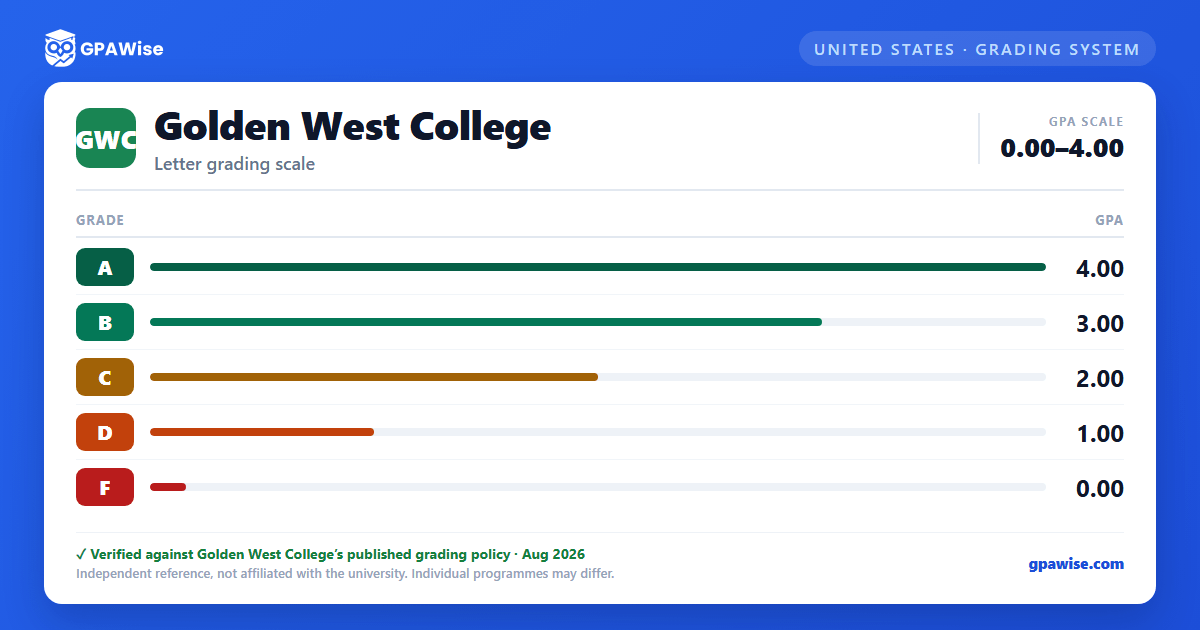
What grading scheme does Golden West College (GWC) use?
Where does this GWC grade scale come from?
What are GWC's GPA rules?
Source: Coast Community College District BP 4240/AP 4240, Golden West College 2026-2027 Catalog — verified Aug 2026
What are GWC's academic standing rules?
Source: Coast Community College District BP 4250/AP 4250, Golden West College 2026-2027 Catalog — verified Aug 2026
