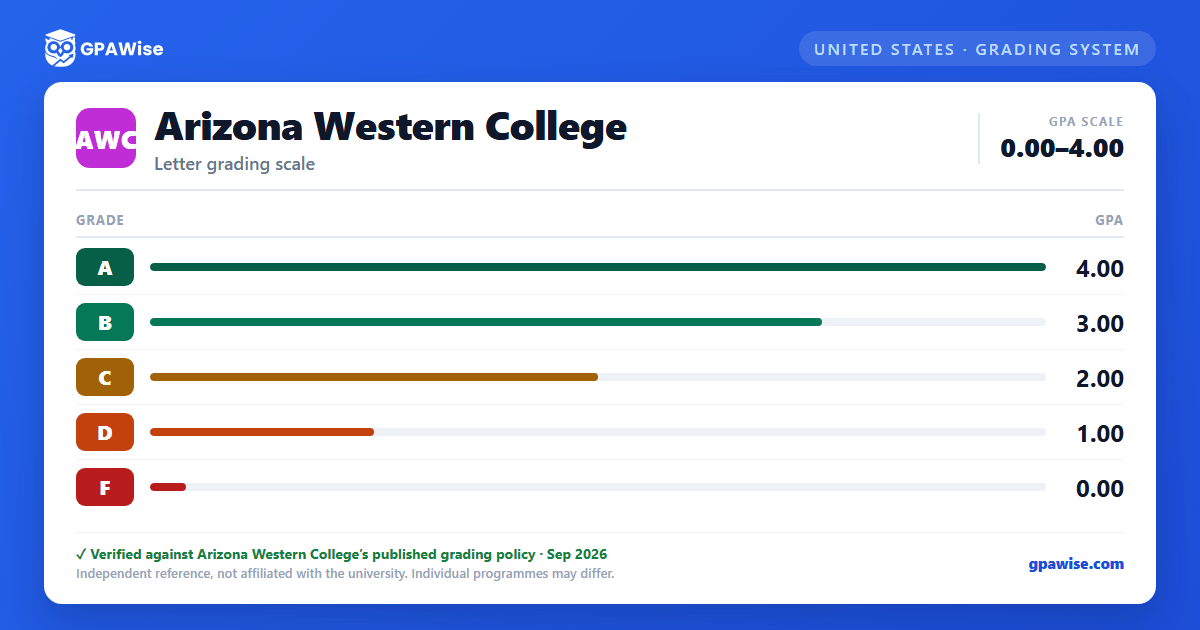

How AWC grades work
Arizona Western College lets students choose between two grading tracks at registration. Grading System I is the standard letter-grade system (A, B, C, D, F) and is the only track counted toward a student's cumulative GPA. Grading System II records Credit (CR) or No Credit (NC) instead of a letter grade and is not computed into the GPA; earning "CR" requires work equivalent to a "C" or higher. A student may switch between the two systems up to the mid-point of a course.
Other transcript marks -- Audit (AU), Incomplete (I), Withdrawal (W), Administrative Withdrawal (AW), No Show (NS), Repeat (R), and In Progress (IP) -- are not calculated into the GPA under either system.
Source: AWC 2026-2027 Catalog, Grading System, p.27 — verified Aug 2026
Repeating courses and academic renewal
When a student repeats a course to earn a better grade, only the best grade is figured into the GPA and the credits are counted once. Courses that are designed to be repeated for additional credit (such as recurring performance or activity courses) count every attempt's grade and credits toward the GPA.
A returning student who has been away for at least one year and completes 12+ credits after returning may apply for Academic Renewal: grades of "D" or "F" earned before the break are excluded from the cumulative GPA and total credits (though they remain on the transcript). Academic Renewal may be granted only once per student.
Source: AWC 2026-2027 Catalog, Academic Renewal Policy / Repeat, pp.26, 28 — verified Aug 2026
Academic standing and probation
Once a student has attempted 12 or more credits at AWC, a cumulative GPA of at least 2.000 must be maintained. Standing is recalculated each Fall, Spring, and Summer term.
- Academic Warning: cumulative GPA falls below 2.0.
- Academic Probation: GPA is still below 2.0 after a term on Academic Warning; enrollment is capped at 12 credits (Fall/Spring), 6 (Summer), 3 (Winter), plus an improvement plan and advisor meetings.
- Continued Academic Probation: semester GPA stays below 2.0 while on probation; enrollment is capped further to 6 credits (Fall/Spring), 3 (Summer), 3 (Winter).
Source: AWC 2026-2027 Catalog, Academic Standing, p.26 — verified Aug 2026
GPA requirement for graduation
To graduate, a student must meet the degree or certificate's course requirements with a minimum grade of "C" and a minimum cumulative GPA of 2.0 in all courses counted toward the degree program.
Source: AWC 2026-2027 Catalog, Graduation, p.29 — verified Aug 2026
Academic Distinction at graduation
Students completing a degree with a cumulative GPA of 3.400 or higher receive Academic Distinction, awarded in three tiers: Distinction (3.400-3.599), High Distinction (3.600-3.899), and Highest Distinction (3.900-4.000).
AWC's Honors Program (Liberal Arts, General Studies, and Discretional tracks) additionally requires a cumulative GPA of 3.5 or higher at completion, no grade below "C" in the overall program, and no grade below "B" in Honors-credit courses.
Source: AWC 2026-2027 Catalog, Honors Program Options / Academic Distinction, pp.29-30 — verified Aug 2026
How transfer credit affects GPA
Grades from other institutions are neither transferred nor calculated into a student's AWC GPA -- only the credits transfer. AWC accepts transfer credit only for courses graded "A," "B," "C," "CR" (Credit), or "P" (Passing); courses numbered 99 or lower do not transfer.
Source: AWC 2026-2027 Catalog, transferring credits policy, p.12 — verified Aug 2026
Frequently asked questions
What grading scheme does Arizona Western College (AWC) use?
Where does this AWC grade scale come from?
What are AWC's GPA rules?
Source: AWC 2026-2027 Catalog, Academic Renewal Policy / Repeat, pp.26, 28 — verified Aug 2026
What are AWC's academic standing rules?
Source: AWC 2026-2027 Catalog, Academic Standing, p.26 — verified Aug 2026
What does AWC require to graduate?
Source: AWC 2026-2027 Catalog, Graduation, p.29 — verified Aug 2026
How are honors and awards decided at AWC?
Source: AWC 2026-2027 Catalog, Honors Program Options / Academic Distinction, pp.29-30 — verified Aug 2026
How does AWC treat transfer credit?
Source: AWC 2026-2027 Catalog, transferring credits policy, p.12 — verified Aug 2026
