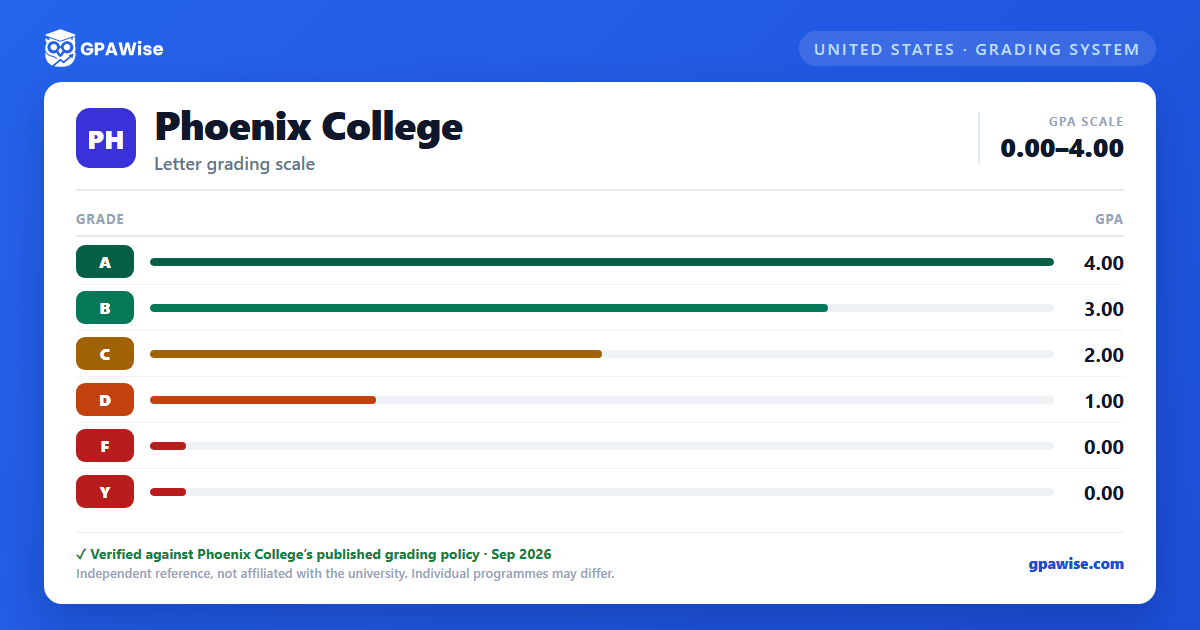

How Phoenix College Grades Are Calculated
A grade is assigned at the conclusion of each course under Maricopa County Community College District (MCCCD) policy. MCCCD uses a 4.0 grading scale and does not weight GPA calculations for Honors or Advanced Placement coursework.
Source: MCCCD Administrative Regulation 2.3.3, Grading — verified Sep 2026
GPA Calculation and Repeating a Course
Phoenix College calculates three GPA types: a semester GPA (courses taken that semester at one Maricopa college), an overall cumulative GPA (all courses taken at one Maricopa college), and a graduation GPA (all courses applied toward a specific degree or certificate, including accepted transfer credit).
Students may repeat a course up to three additional times (four attempts total) to improve their GPA. The lower grade is automatically excluded from the GPA calculation when the repeat is at the same college; a repeat at a different Maricopa college requires a student request to exclude the lower grade. Academic Renewal coursework is excluded from the GPA the same way.
Source: MCCCD AR 2.3.3 Grading and AR 2.3.7 Academic Renewal — verified Sep 2026
Academic Standing, Warning, and Probation
Students in academic good standing hold a cumulative GPA of 2.0 or higher. A student who has not reached a 2.0 cumulative GPA after 11 or fewer credit hours is placed on academic warning; after 12 or more credit hours below 2.0, the student is placed on academic probation.
Students on academic probation may take no more than 12 credit hours per semester without an approved appeal; students on continued probation may be limited to 6 credit hours.
Source: MCCCD Administrative Regulation 2.3.4, Academic Standing, Warning, and Probation — verified Sep 2026
General Graduation Requirements
Candidates for a degree or certificate must earn a minimum GPA of 2.0 on the 4.0 scale in the 100-level-and-above coursework used to satisfy degree or certificate requirements, in addition to completing the required minimum number of credits (at least 120 for a bachelor's degree, 60 for an associate degree).
Residency requirements apply at the awarding college: at least 30 credits for a bachelor's degree, 15 credits for an associate degree, and a proportional minimum for certificates.
Source: MCCCD Administrative Regulation 2.3.9, General Graduation Requirements — verified Sep 2026
Honors Recognition
Phoenix College's President's Honor List recognizes students who complete 12 or more credit hours in residence, in courses numbered 100 or higher, with a semester GPA of 3.75 or higher.
Graduation With Honors is a separate, distinct recognition tied to MCCCD's General Graduation Requirements (AR 2.3.9), and the Honors Program offers its own scholarships, including the Chancellor's, Foundation's, and President's Scholarships and the Honors Achievement Award.
Source: MCCCD Administrative Regulation 2.3.8, Honors Opportunities & Recognition — verified Sep 2026
Transfer Credit
Coursework from other accredited postsecondary institutions can be evaluated for transfer credit once official transcripts reach the Admissions and Records/Enrollment Services Office; only courses recognized by the Council for Higher Education Accreditation (CHEA) or the U.S. Department of Education are considered.
Only courses graded 2.0 or better on the 4.0 scale are transferable. Credits recorded in quarter or trimester systems convert to semester credit hours (quarter credits convert at 0.67 semester credits each).
Source: MCCCD Administrative Regulation 2.2.4, Transfer Credit and Prior Learning Assessment — verified Sep 2026
Frequently asked questions
What grading scheme does Phoenix College use?
Where does this Phoenix College grade scale come from?
What are Phoenix College's GPA rules?
Source: MCCCD AR 2.3.3 Grading and AR 2.3.7 Academic Renewal — verified Sep 2026
What are Phoenix College's academic standing rules?
Source: MCCCD Administrative Regulation 2.3.4, Academic Standing, Warning, and Probation — verified Sep 2026
What does Phoenix College require to graduate?
Source: MCCCD Administrative Regulation 2.3.9, General Graduation Requirements — verified Sep 2026
How are honors and awards decided at Phoenix College?
Source: MCCCD Administrative Regulation 2.3.8, Honors Opportunities & Recognition — verified Sep 2026
How does Phoenix College treat transfer credit?
Source: MCCCD Administrative Regulation 2.2.4, Transfer Credit and Prior Learning Assessment — verified Sep 2026
