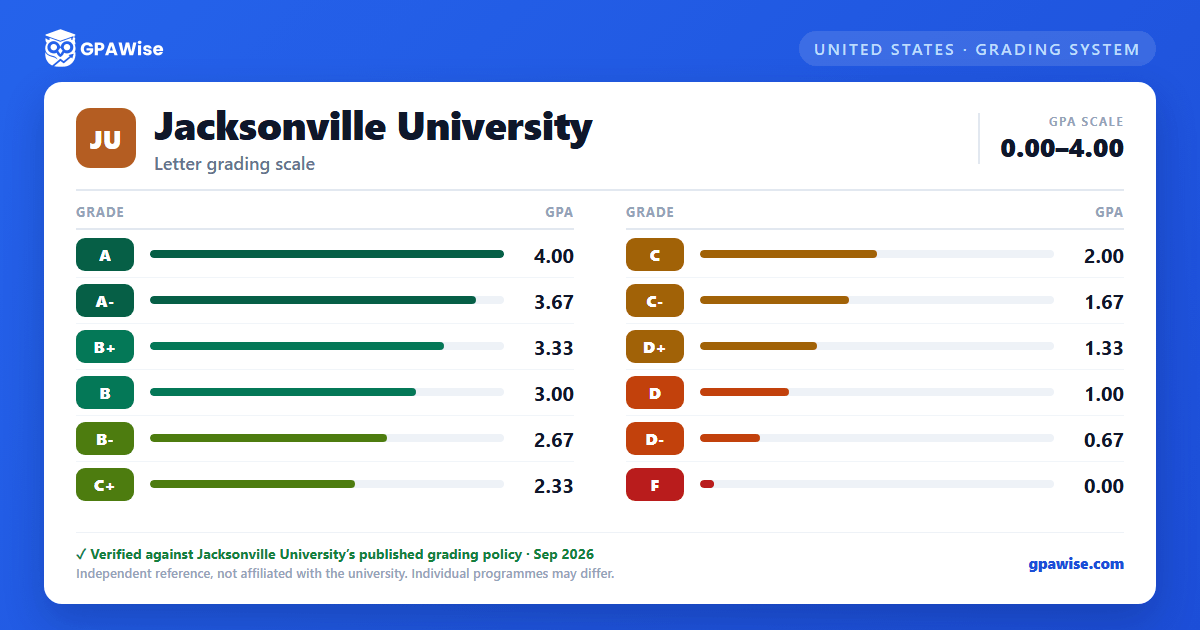

How GPA Is Calculated
GPA is calculated as total grade points earned divided by total credit hours attempted (for example, 45 grade points ÷ 15 credit hours attempted = 3.0 GPA).
An Incomplete ("I") grade is not included in GPA. If the coursework is not completed by the end of the fourth week of the next semester/term, the "I" changes to an "F," which is included in the GPA.
When a course is repeated, both attempts are included on the transcript and in the GPA computation, including an earlier "F" even if the course was later passed. If a course is not designated as repeatable for credit in the catalog, the repeat grade still counts in the GPA, though no additional degree credit is earned.
Undergraduate students may request up to two grade substitutions. A substitution that results in a "W" or "F" still counts as one of the two allowed, and a resulting "F" replaces the original grade in the cumulative GPA even if the original grade was passing. Graduate students are not eligible for grade substitution.
A Pass/Fail grading option is available to degree-seeking undergraduates who have earned at least 28 credit hours and are not on probation, for a maximum of 12 credit hours (up to 4 per semester). A "P" does not affect GPA; an "F" earned under this option affects GPA as a regular failing grade. The option is not available to graduate students.
Source: Registrar Grading Information: GPA Formula, Repeating a Class, Grade Substitutions, Pass/Fail Option sections — verified Aug 2026
Minimum GPA to Avoid Academic Action
Undergraduate students must maintain a 2.0 cumulative GPA to avoid adverse academic action.
Graduate students must maintain a 3.0 cumulative GPA to avoid adverse academic action.
Graduate students do not receive "C-," "D+," "D," or "D-" grades in graduate courses; any grade below "C" in a graduate course is recorded as "F." This rule does not apply to graduate students enrolled in undergraduate courses.
Source: Registrar Grading Information: Graduation GPA Requirements, Graduate Student Grades sections — verified Aug 2026
GPA Requirements to Graduate
Undergraduate students must maintain a 2.0 cumulative GPA to qualify for graduation. Graduate students must maintain a 3.0 cumulative GPA to qualify for graduation.
For all bachelor’s degrees, students must maintain a minimum "C" (2.0) average for all coursework taken at JU, a "C" (2.0) average in the major, and a "C" (2.0) average in the minor. Freshman English (ENGL 103) requires a minimum grade of "C-" (1.67).
Source: Registrar Grading Information: Graduation GPA Requirements, General Grade Requirements for all Bachelor Degrees — verified Aug 2026
Frequently asked questions
What grading scheme does Jacksonville University (JU) use?
Where does this JU grade scale come from?
What are JU's GPA rules?
Source: Registrar Grading Information: GPA Formula, Repeating a Class, Grade Substitutions, Pass/Fail Option sections — verified Aug 2026
What are JU's academic standing rules?
Source: Registrar Grading Information: Graduation GPA Requirements, Graduate Student Grades sections — verified Aug 2026
What does JU require to graduate?
Source: Registrar Grading Information: Graduation GPA Requirements, General Grade Requirements for all Bachelor Degrees — verified Aug 2026
