
Non-Standard Grade Designators
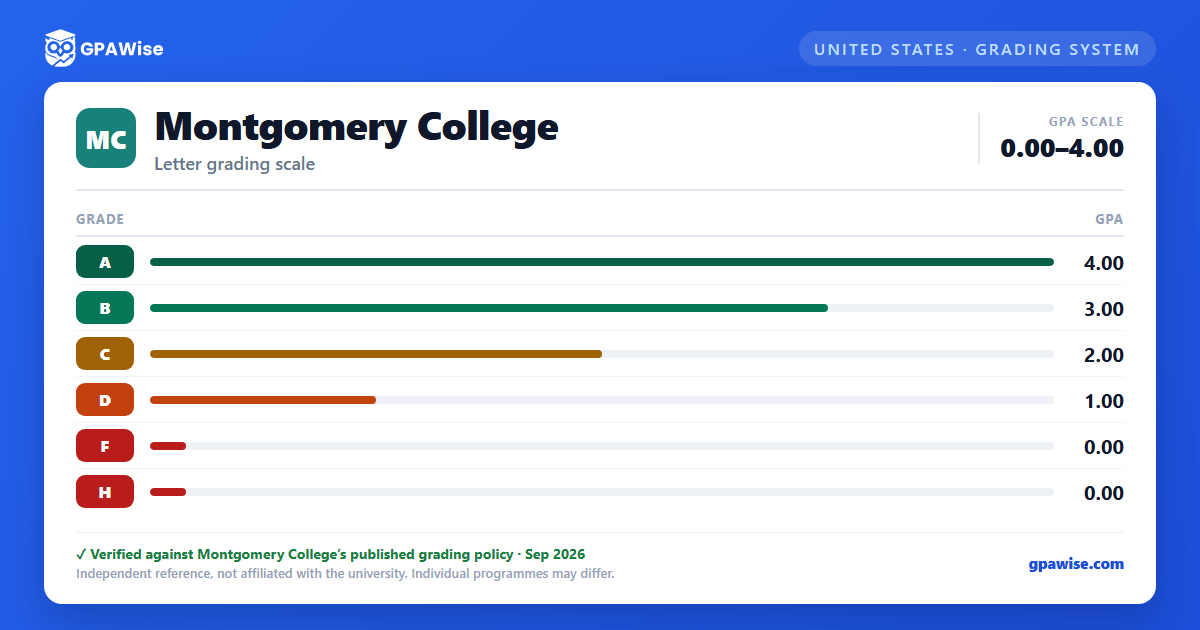
Beyond the standard letter grades, Montgomery College uses several designators that carry no assigned grade points and are excluded from GPA calculation: I (Incomplete), IC (Incomplete due to Crisis), P (Pass, awarded for credit-by-examination), AU (Audit), W (Withdrawn), WC (Withdrawn due to Crisis), and S/U (Satisfactory/Unsatisfactory Progress). An additional grade, H, is awarded for successful completion of the first half of a developmental "Math Prep" course (MATH017, MATH020, MATH045, or MATH098) and carries a grade-point value of 0.
Source: official document — verified Sep 2026
How GPA Is Calculated
Grade point average is calculated by multiplying the grade-point value of each earned grade by the number of GPA hours for that course to produce quality points, then dividing total quality points by total GPA hours. A semester GPA covers a single term; the cumulative GPA covers all semesters and summer/winter sessions. Only credit-bearing courses with an assigned grade-point value count toward GPA hours.
When a course is repeated, only the GPA hours from the most recent attempt are used in the GPA computation, though every attempt remains on the transcript. A course may be attempted up to three times unless the catalog states otherwise. Grades for courses transferred from other institutions are not included in computing the GPA.
Source: official document — verified Sep 2026
Academic Standing
To remain in good academic standing, students must maintain a cumulative GPA of 2.0 or higher. A student with a cumulative GPA below 2.0 who is not on restriction or suspension is on academic alert. Students who have accumulated at least 12 GPA hours with a cumulative GPA below 1.75 are placed on academic restriction, limited to two college-level courses or six credit hours per semester until their cumulative GPA reaches 1.75 or higher. Students who have accumulated at least 30 GPA hours with a cumulative GPA below 1.25 are placed on academic suspension and barred from enrolling in college-level courses for a full fall or spring semester; suspension is lifted once the cumulative GPA reaches 1.25 or higher, though the student returns at restriction status.
Source: official document — verified Sep 2026
Minimum GPA for Certificate or Degree
To qualify for a certificate or an associate's degree, students must have a minimum cumulative GPA of 2.0 and a 2.0 GPA in the courses of their specific curriculum. The Associate of Arts in Teaching (A.A.T.) program requires a higher minimum cumulative GPA of 2.75, along with qualifying teacher-certification test scores.
Source: official document — verified Sep 2026
Dean's List
To be eligible for the Dean's List, a student must earn a semester GPA of 3.50 or higher while completing six or more GPA hours, excluding developmental courses, courses for non-native speakers of English, and non-credit courses. The Dean's List designation appears on the academic transcript.
Source: official document — verified Sep 2026
Transfer Credit and GPA
Credit earned at other institutions is accepted for advanced standing on a course-by-course basis, but grades for transferred courses are not included in computing a student's Montgomery College grade point average. Credit for a course graded "D" at the sending institution is accepted only if the student earned a cumulative GPA equivalent to at least a "C" there.
Source: official document — verified Sep 2026
Frequently asked questions
What grading scheme does Montgomery College (MC) use?
Where does this MC grade scale come from?
What are MC's GPA rules?
Source: official document — verified Sep 2026
What are MC's academic standing rules?
Source: official document — verified Sep 2026
What does MC require to graduate?
Source: official document — verified Sep 2026
How are honors and awards decided at MC?
Source: official document — verified Sep 2026
How does MC treat transfer credit?
Source: official document — verified Sep 2026
