
Grade Notations Not Included in GPA
Beyond the letter grades used in GPA calculations, the college's official transcript uses several notations that carry no quality points and are not counted in the GPA: I (Incomplete), IP (In Progress), NG (No Grade), P (Passing), S (Satisfactory), W (Student Withdrew — non-punitive, counts as an attempt), WN (Withdrawn for Never Attending — non-punitive, counts as an attempt), X (Audit — does not count as an attempt), and XC (Changed to Audit After Schedule Adjustment Period — counts as an attempt).
Source: Academic and Grading Policies, nwfsc.edu — verified Sep 2026
How GPA Is Calculated
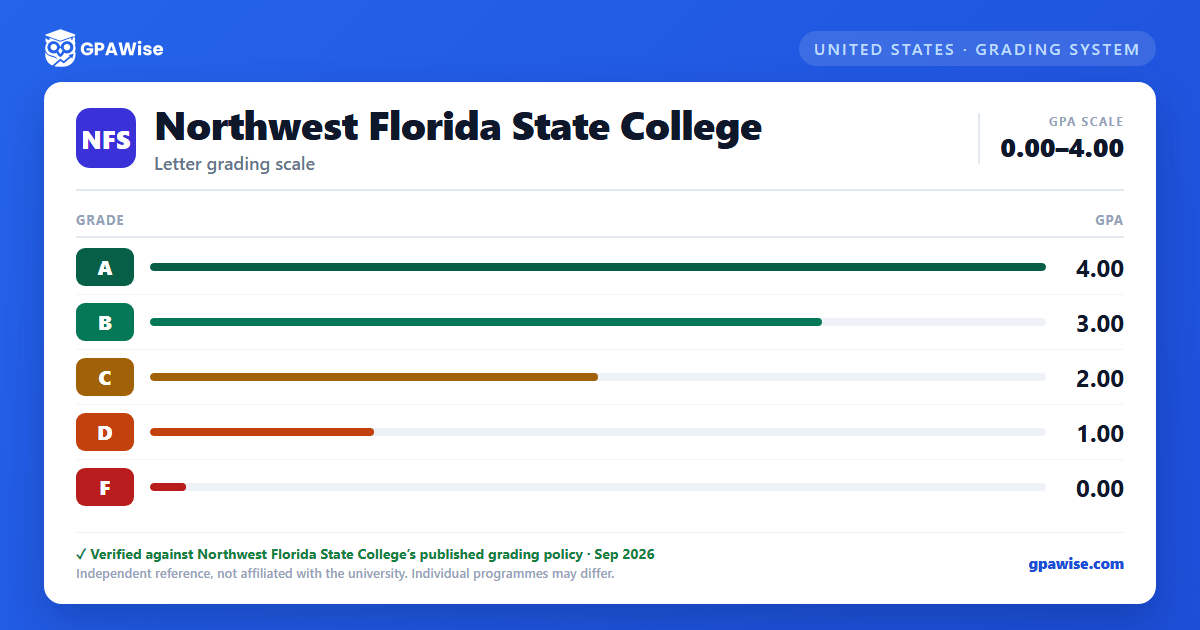
GPA is calculated by multiplying the quality points for each grade by the credit hours for that course, summing the results, then dividing by the total GPA hours attempted (courses graded W, I, or Audit are excluded from GPA hours attempted). College preparatory courses are excluded from all GPA calculations. Vocational-level and undergraduate-level GPAs are calculated separately.
Repeating a course: students may not repeat a course for credit if they earned an A, B, or C in it, or after three attempts at the college (Florida Rule 6A-14.0301). Students who earn an F or W (or a D in a course requiring a C or higher) may repeat it up to two times to improve the grade; only the grade from the last attempt is used in computing the GPA. A third or fourth attempt requires an academic appeal.
A grade of Incomplete ("I") must be resolved by the end of the next 16-week term or it automatically reverts to an F. Students whose GPA was affected by D or F grades five or more years old may apply for the Academic History Grade Relief Option, which excludes those older credits and grades from GPA computations (though not from the transcript); this option is unavailable to students who have already graduated.
Source: Academic and Grading Policies, nwfsc.edu — verified Sep 2026
Academic Standing
Academic standing is calculated at the end of each semester based on cumulative GPA. A cumulative GPA of 2.00 or higher is Academic Good Standing.
- Academic Warning: cumulative GPA falls below 2.00 for one semester; removed by achieving a 2.00 cumulative GPA by the end of the next semester.
- Academic Probation: cumulative GPA remains below 2.00 for two successive semesters; requires meeting with a Student Success Navigator before the semester and again after midterm.
- Academic Suspension: cumulative GPA remains below 2.00 for three successive semesters; the student is barred from registration for one semester. A one-time appeal may reduce this back to probation.
This institutional Academic Standing policy is separate from the Satisfactory Academic Progress standards used for federal financial aid eligibility.
Source: Academic and Grading Policies, nwfsc.edu — verified Sep 2026
GPA Requirement for Graduation
Only grades for courses at the 1000 level or above are used to compute the GPA that counts toward graduation.
Source: Academic and Grading Policies, nwfsc.edu — verified Sep 2026
Dean's List and President's List
Students with 9 or more earned college credit hours in a term are recognized on two honor lists based on term GPA in college-level courses: the Dean's List (3.50–3.79 term GPA) and the President's List (3.80–4.00 term GPA).
Source: Academic and Grading Policies, nwfsc.edu — verified Sep 2026
Transfer Credit and GPA
As of Fall 2015, grades for courses transferred from other institutions are no longer included in the calculation of a student's cumulative GPA.
Source: Academic and Grading Policies, nwfsc.edu — verified Sep 2026
