
How Oxnard College Calculates Your GPA
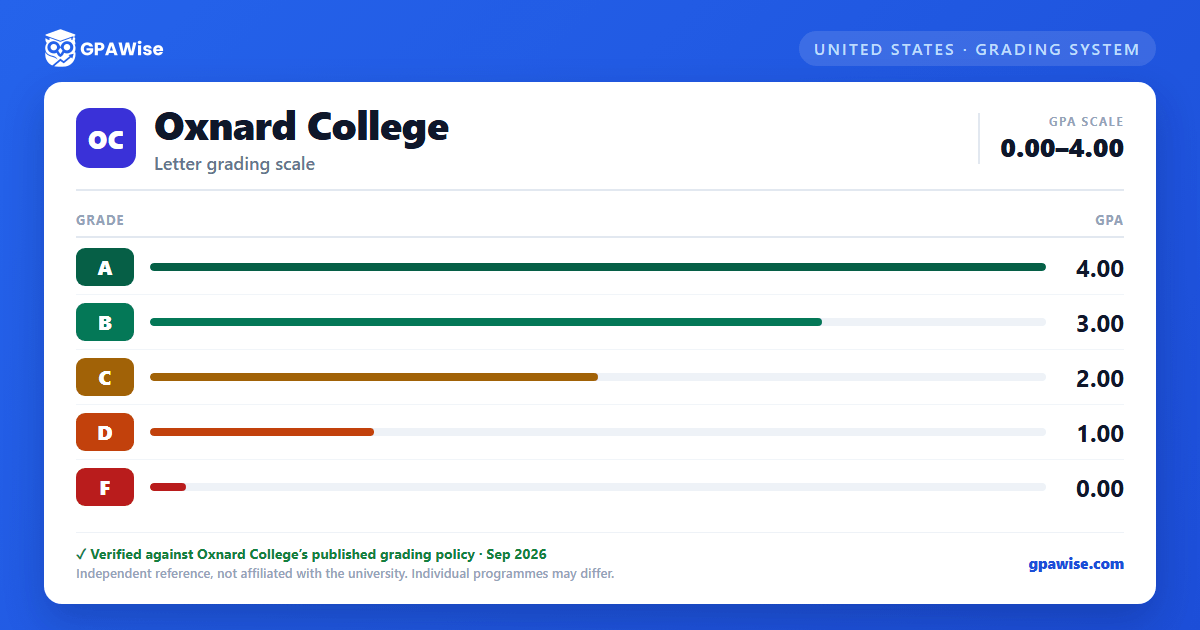
Grade point averages are calculated by dividing the number of grade points earned by the number of units attempted. In calculating a student's degree-applicable GPA, grades earned in non-degree courses are not included.
Some grades are not counted in the GPA at all: P (Pass) and NP (No Pass) units are excluded from both grade points and units attempted, as are Credit by Exam (CRE) units and the noncredit-only Satisfactory Progress (SP) symbol.
Students are permitted a total of three enrollment attempts to achieve a standard grade (A, B, C, P, or CR) in a given course; once a grade of C, P, or CR or better is earned, the course generally may not be repeated.
Source: Oxnard College catalog, Grades and Course Repetition sections — verified Sep 2026
Academic Notice and Pause
A student who has attempted at least 12 semester units and has a cumulative grade point average below 2.0 is placed on Academic Notice, which limits enrollment to no more than 12 units the following term (Academic Notice I). If the GPA remains below 2.0 for a second consecutive semester, the unit limit drops to 6 (Academic Notice II).
A student on Academic Notice is subject to Academic Pause if their cumulative GPA remains below 2.00 in each of three consecutive semesters. A student returns to good standing once their cumulative GPA reaches 2.0 or higher.
Source: Appendix XIII (Academic/Progress Notice, Pause and Readmission — BP/AP 4250/4255), Oxnard College catalog — verified Sep 2026
GPA Requirement for an Associate Degree
To earn an Associate Degree, a student must achieve a cumulative grade point average of 2.0 or better in degree-applicable college credit coursework. If additional units taken beyond degree requirements lower a student's overall GPA below 2.0, the District may instead compute the GPA using only the coursework applied to the degree.
Source: Earn an Associate Degree, Oxnard College catalog — verified Sep 2026
Dean's List and Graduation Honors
Students who complete 12 or more units of letter-graded coursework with a 3.50 GPA or higher in a semester are placed on the Dean's List.
Graduation honors are based on overall GPA, with at least 30 units of coursework completed (18 or more as letter grades): Honors at 3.5 GPA, High Honors at 3.75 GPA, and Highest Honors at 4.0 GPA (Highest Honors also requires all letter grades to be an A).
Source: Dean's List and Honors, Oxnard College catalog — verified Sep 2026
Frequently asked questions
What grading scheme does Oxnard College (OC) use?
Where does this OC grade scale come from?
What are OC's GPA rules?
Source: Oxnard College catalog, Grades and Course Repetition sections — verified Sep 2026
What are OC's academic standing rules?
Source: Appendix XIII (Academic/Progress Notice, Pause and Readmission — BP/AP 4250/4255), Oxnard College catalog — verified Sep 2026
What does OC require to graduate?
Source: Earn an Associate Degree, Oxnard College catalog — verified Sep 2026
How are honors and awards decided at OC?
Source: Dean's List and Honors, Oxnard College catalog — verified Sep 2026
