
Non-GPA Grade Notations
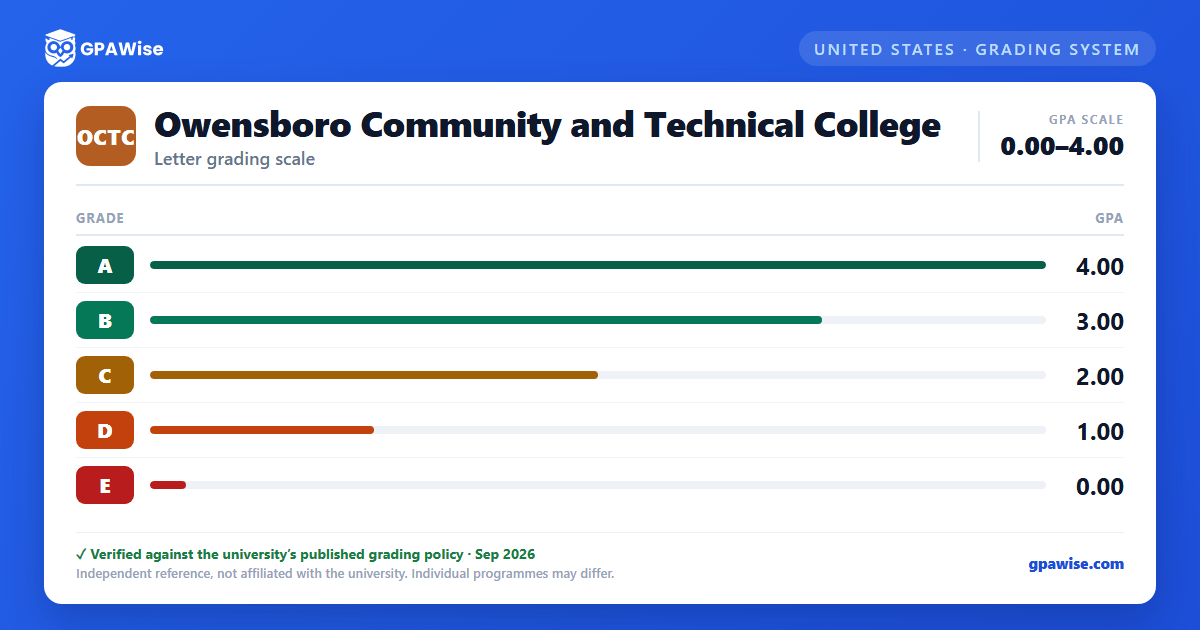
Beyond the five GPA-bearing letter grades, OCTC's catalog defines several notations that carry no grade-point value and are not counted in the GPA: W (withdrawal), I (incomplete — automatically converts to a failing grade if not resolved within one year), IP (in progress, for courses spanning beyond the standard term), and AU (audit).
For courses taken on a pass/fail basis, students receive P (pass) or F (fail) instead of a letter grade; neither counts toward the GPA. MP (Making Progress) may be assigned only in developmental courses when a student has made significant progress but needs more time, and likewise carries no GPA value.
Source: official document — verified Sep 2026
How GPA Is Calculated
Cumulative GPA is the ratio of total grade points earned to total credit hours attempted, excluding courses taken on a pass/fail basis and courses graded W, I, or IP.
When a course is repeated, only the highest grade earned counts toward the cumulative GPA; credit is awarded only once.
A student readmitted after being out for two or more years, who completes at least 12 credit hours with a 2.0 GPA or better after readmission, may elect academic bankruptcy: excluding all pre-interruption coursework from the GPA calculation (credit already earned for passing grades is retained). This option may be used only once.
Source: official document — verified Sep 2026
Academic Probation, Suspension, and Reinstatement
A cumulative GPA below 2.0 at the end of a term places a student on academic probation; a student returns to good standing by raising their cumulative GPA to at least 2.0.
A student on probation for two consecutive terms who fails to reach a 2.0 cumulative or term GPA in the third term is academically suspended and may not enroll in courses counting toward a KCTCS degree.
A suspended student may be reinstated after sitting out at least one 16-week semester (two semesters after a second suspension), and is placed back on probation upon reinstatement.
Source: official document — verified Sep 2026
Graduation GPA Requirement
All KCTCS degrees, diplomas, and certificates require a cumulative grade-point average of at least 2.0 in the required coursework, in addition to completing at least 25 percent of the credential's credits at the KCTCS college that grants it.
Source: official document — verified Sep 2026
Dean's List and Graduation Honors
The Dean's List recognizes students who earn a semester GPA of 3.5 or higher in 12 or more credit hours numbered 100 or above.
Students completing at least 45 credit hours toward a degree (or 30 toward a diploma) graduate "With High Distinction" at a 3.60 or higher GPA, or "With Distinction" at a 3.40-3.59 GPA, on all work attempted.
Source: official document — verified Sep 2026
Frequently asked questions
What grading scheme does Owensboro Community and Technical College (OCTC) use?
Where does this OCTC grade scale come from?
What are OCTC's GPA rules?
Source: official document — verified Sep 2026
What are OCTC's academic standing rules?
Source: official document — verified Sep 2026
What does OCTC require to graduate?
Source: official document — verified Sep 2026
How are honors and awards decided at OCTC?
Source: official document — verified Sep 2026
