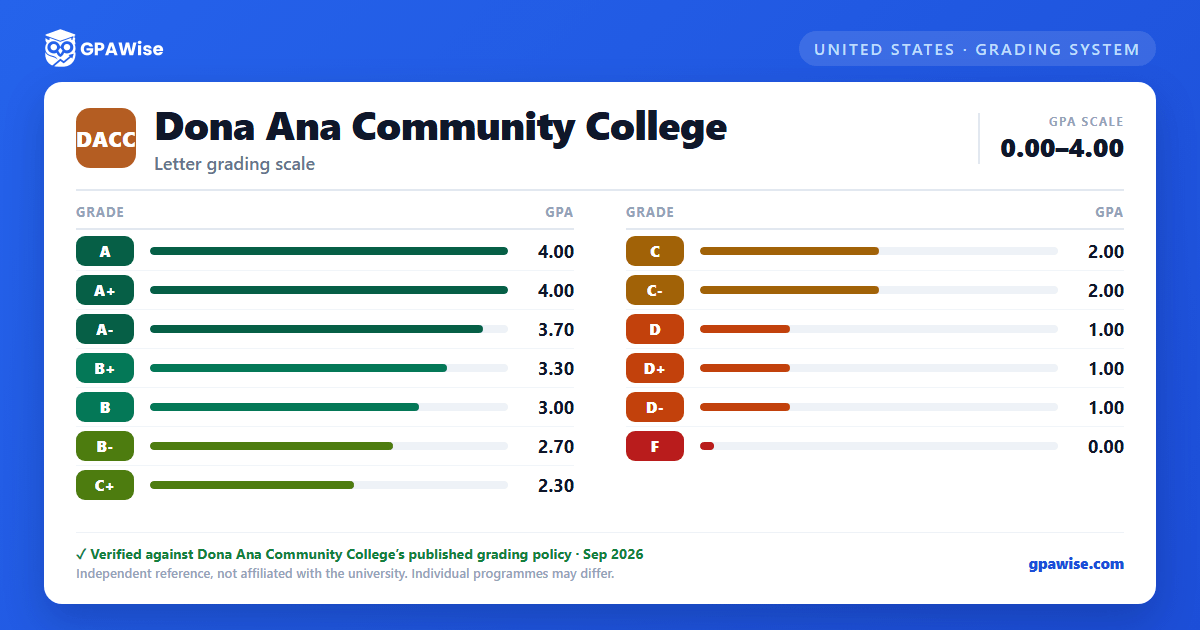

How the GPA is calculated
Grade point average (GPA) calculations are based solely on courses taken at NMSU or under an approved National Student Exchange.
Undergraduate students may repeat a course for a change in grade only when the original grade earned was a D or F. Once a grade of C- or better is earned, that grade replaces the original in the GPA calculation and the course can no longer be repeated for change-of-grade purposes. The transcript continues to show every attempt, but only the higher grade counts toward the GPA. If a student repeats a D and receives an F, the second grade does not replace the original.
Source: NMSU System Academic Regulations, "Grade Point Average" and "Repeating Courses for a Change in Grade" sections — verified Aug 2026
Academic Standing
Undergraduate academic standing progresses through four stages as cumulative and semester GPA stay below 2.0: Academic Warning, Academic Probation I, Academic Probation II, and Academic Suspension.
- Academic Warning is issued only once, the first time a student's cumulative GPA falls below 2.0 while in good standing.
- Academic Probation I follows if the cumulative GPA remains below 2.0 after a semester on Academic Warning.
- Academic Probation II follows if the cumulative GPA remains below 2.0 after a semester on Academic Probation I.
- Academic Suspension follows if the cumulative GPA remains below 2.0 after a semester on Academic Probation II. Students under suspension may not take NMSU courses and must sit out a minimum of one semester before applying for re-admission.
At each stage, a student returns to good standing once the cumulative GPA reaches 2.0 or higher.
Source: NMSU System Academic Regulations, "Undergraduate Academic Standing" section — verified Aug 2026
Minimum GPA for Graduation
Undergraduate degrees require a cumulative GPA of 2.0 or higher for degree completion. Although D+, D, or D- can be considered passing, some departments set higher grade requirements for courses within their program.
Source: NMSU System Academic Regulations, "Minimum Grade Requirement for Undergraduate Students" section — verified Aug 2026
Transfer Credit and GPA
Credit hours earned through transfer work are listed on the NMSU transcript as the equivalent course, but the grades themselves are not transferred and are not used to calculate the NMSU grade point average.
Source: NMSU System Academic Regulations, University Student Records / transcript section — verified Aug 2026
Frequently asked questions
What grading scheme does Dona Ana Community College (DACC) use?
Where does this DACC grade scale come from?
What are DACC's GPA rules?
Source: NMSU System Academic Regulations, "Grade Point Average" and "Repeating Courses for a Change in Grade" sections — verified Aug 2026
What are DACC's academic standing rules?
Source: NMSU System Academic Regulations, "Undergraduate Academic Standing" section — verified Aug 2026
What does DACC require to graduate?
Source: NMSU System Academic Regulations, "Minimum Grade Requirement for Undergraduate Students" section — verified Aug 2026
How does DACC treat transfer credit?
Source: NMSU System Academic Regulations, University Student Records / transcript section — verified Aug 2026
