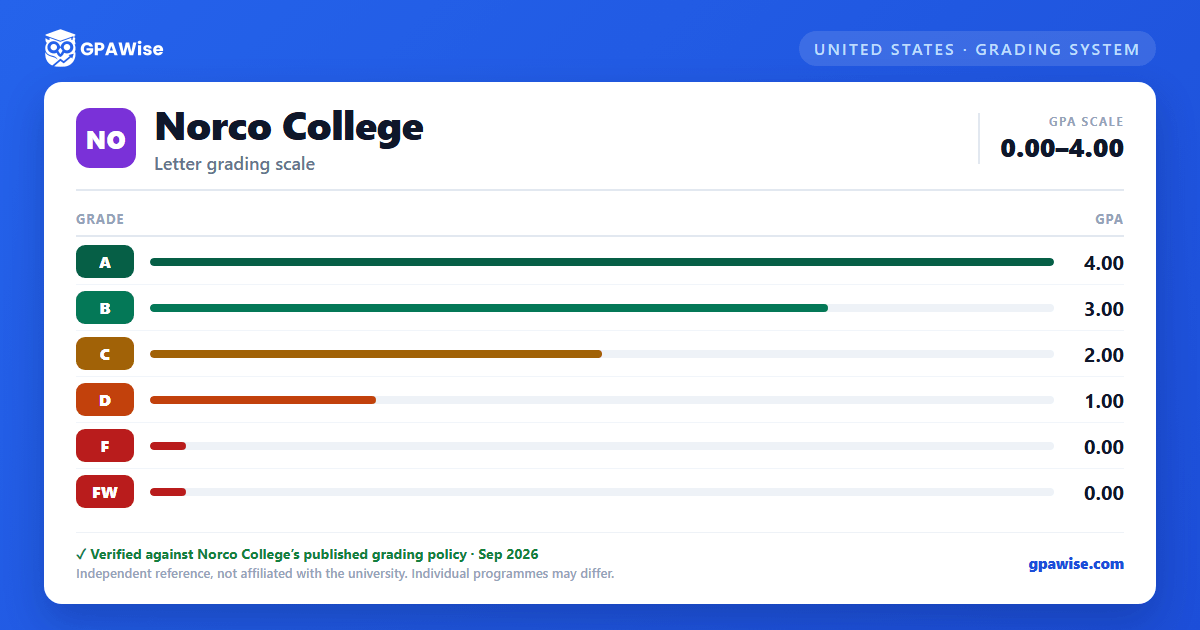

How the GPA is calculated
Grade point averages are not rounded up. Units attempted are not charged, and grade points are not awarded, for grades of "I" (Incomplete), "W" (Withdrawal), "NP" (No Pass), "P" (Pass), "IP" (In Progress), "RD" (Report Delayed), "EW" (Excused Withdrawal), or "MW" (Military Withdrawal) — these do not affect the GPA.
If coursework taken at one or more accredited colleges is used to satisfy degree requirements, the overall cumulative GPA includes the combination of all grades from all transcripts used.
Source: 2023-2024 Norco College catalog, Grading System / Grade Points — verified Sep 2026
Probation and dismissal
A student who has attempted at least 12 semester units is placed on academic probation if their cumulative GPA falls below 2.0 in units graded on the RCCD grading scale. A student on academic probation returns to good standing once their cumulative GPA reaches 2.0 or higher.
A student on academic probation is subject to dismissal after earning a cumulative GPA below 2.0 in each of two consecutive full-term (fall/spring) semesters. Students on probation or dismissal status are limited to a maximum of 13 units per fall/spring semester.
Separately, "progress probation" and its dismissal track are based on the percentage of units recorded as unsuccessful (F, FW, W, I, NC, NP), not on GPA directly.
Source: 2023-2024 Norco College catalog, Standards of Scholarship: Probation and Dismissal — verified Sep 2026
Minimum GPA for the associate degree
A student must have a minimum cumulative grade point average of 2.0 ("C" average) in degree-applicable coursework taken at Riverside Community College District. If coursework from one or more other accredited colleges is used to satisfy degree requirements, the overall cumulative GPA (combining all transcripts used) must also not be less than 2.0.
Source: 2023-2024 Norco College catalog, Grade Point Average Requirement — verified Sep 2026
Dean's List and graduation honors
Each semester, students completing at least 12 units of credit-graded work (in one semester, or across one academic year excluding summer) with a GPA of 3.0 or better are recognized on the Dean's List.
Honors at commencement go to students with a cumulative GPA of 3.30 or higher: 3.30 GPA earns the Associate Degree with Distinction, and 3.70 GPA earns it with Great Distinction. Coursework from the final spring semester is not counted toward this calculation, and GPAs are not rounded up.
Source: 2023-2024 Norco College catalog, Dean's List / Scholastic Honors at Commencement — verified Sep 2026
Transfer coursework and the GPA
When coursework from another accredited institution is used to satisfy degree requirements, the overall cumulative GPA includes the combination of all grades from every transcript used. If the other institution graded on a "+/-" scale, the original grade points it assigned (as shown on that institution's own transcript) are used in the calculation — Norco's own scale, by contrast, has no plus/minus grades.
Source: 2023-2024 Norco College catalog, Grade Point Average Requirement — verified Sep 2026
Frequently asked questions
What grading scheme does Norco College use?
Where does this Norco College grade scale come from?
What are Norco College's GPA rules?
Source: 2023-2024 Norco College catalog, Grading System / Grade Points — verified Sep 2026
What are Norco College's academic standing rules?
Source: 2023-2024 Norco College catalog, Standards of Scholarship: Probation and Dismissal — verified Sep 2026
What does Norco College require to graduate?
Source: 2023-2024 Norco College catalog, Grade Point Average Requirement — verified Sep 2026
How are honors and awards decided at Norco College?
Source: 2023-2024 Norco College catalog, Dean's List / Scholastic Honors at Commencement — verified Sep 2026
How does Norco College treat transfer credit?
Source: 2023-2024 Norco College catalog, Grade Point Average Requirement — verified Sep 2026
