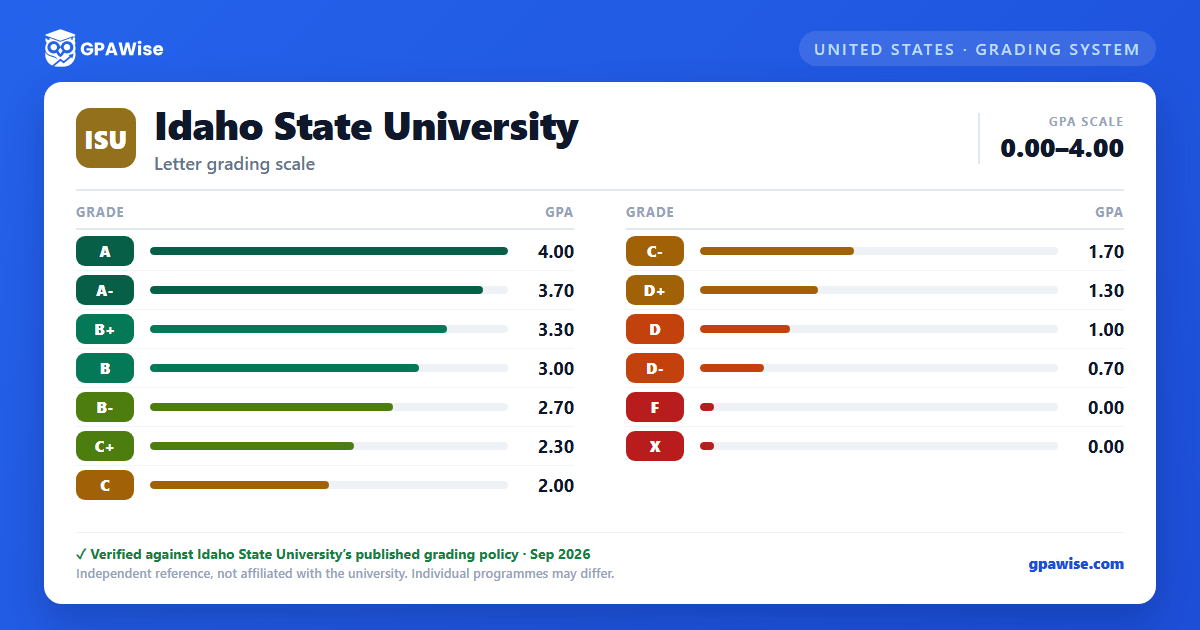

Repeat Courses and GPA Exclusion
A course in which an F grade is earned must be repeated if that course is required for graduation; a course in which a D grade is earned must be repeated only if the major department requires it. If a course is repeated at ISU, the latest grade is used in computing the grade point average, unless the course description caps the number of credits for which it may be repeated.
Pass/No Pass (P/NP) and Satisfactory/Unsatisfactory (S/U) grades are excluded from all GPA calculations. Incomplete (I) and Withdrawal (W) grades carry no grade points.
Undergraduate students may petition for a one-time Grade and Credit Exclusion, disregarding one or more consecutive past semesters from cumulative GPA and credit totals; the grades remain on the transcript but are not calculated into the cumulative GPA.
Source: Credit and Grading Policies, ISU Academic Catalog 2026-27 — verified Aug 2026
Academic Standing
To maintain good academic standing and avoid academic warning, academic probation, or academic dismissal, a student must maintain a minimum Idaho State University GPA of 2.0.
Source: Credit and Grading Policies, ISU Academic Catalog 2026-27 — verified Aug 2026
Transfer Credit and GPA
Idaho State University accepts college-level coursework from institutionally accredited institutions. Transfer course grades are converted to the ISU equivalent with no corresponding grade point value — transfer grades and credits are not used in calculating the Idaho State University GPA. Transferred lower-division (1000- or 2000-level) credits may not count as upper-division (3000- or 4000-level) credits, regardless of course-content equivalency.
Source: Credit and Grading Policies, ISU Academic Catalog 2026-27 — verified Aug 2026
Frequently asked questions
What grading scheme does Idaho State University (ISU) use?
Where does this ISU grade scale come from?
What are ISU's GPA rules?
Source: Credit and Grading Policies, ISU Academic Catalog 2026-27 — verified Aug 2026
What are ISU's academic standing rules?
Source: Credit and Grading Policies, ISU Academic Catalog 2026-27 — verified Aug 2026
How does ISU treat transfer credit?
Source: Credit and Grading Policies, ISU Academic Catalog 2026-27 — verified Aug 2026
