
Withdrawal, Audit, and Incomplete Grades
A grade of W (Authorized Withdrawal) indicates a student withdrew from a class during the first 25 days of classes, before any basis for evaluation was established. WP (Authorized Withdrawal, Passing) and WF (Authorized Withdrawal, Failing) indicate withdrawal from the University after the first 25 days but before the last 10 days of a semester or summer session, depending on whether the student was making satisfactory progress at the time. AU (Audit) indicates a student registered on an audit basis, earning no letter grade or credit hours. An I (Incomplete) grade must be resolved by the last day of classes of the next semester (excluding summer term); if unresolved, it automatically defaults to the alternative grade specified by the instructor, or to F if none was indicated.
Source: JSU Undergraduate Catalog 2024-2025, Grades and Quality Points — verified Aug 2026
Academic Standing
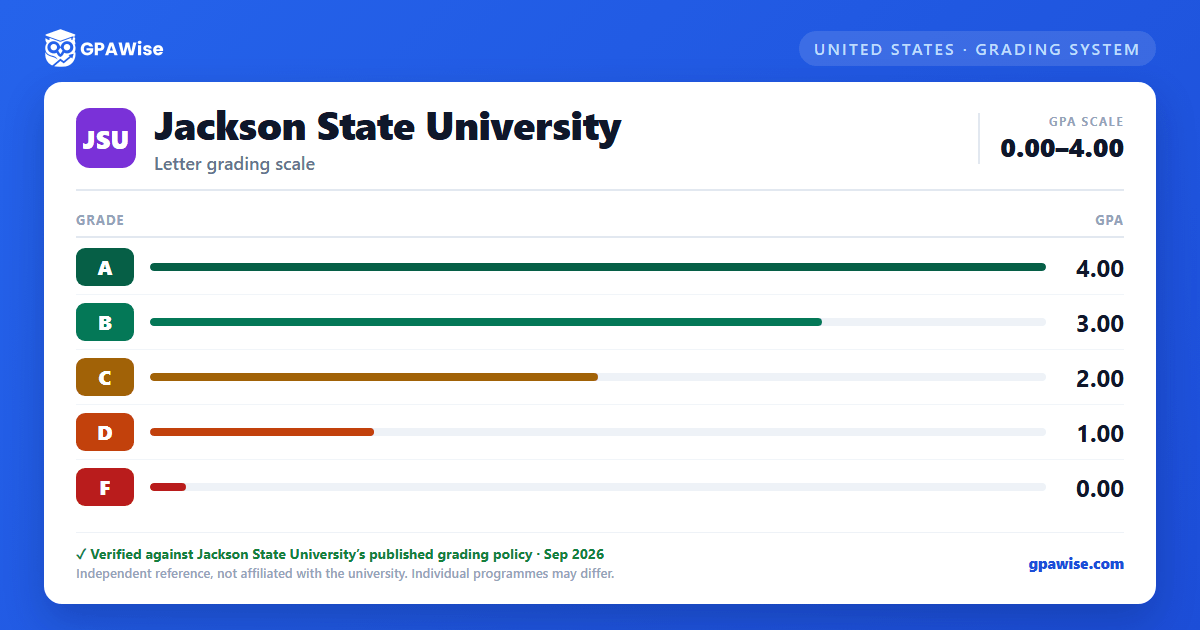
Grade point averages at Jackson State University are determined on a 4.00 scale. Students with a cumulative grade point average of 2.00 or better are in good academic standing. Students falling below the 2.00 average are placed on academic probation.
Source: JSU Undergraduate Catalog 2024-2025, Grades and Quality Points — verified Aug 2026
Transfer Grades and GPA
Transfer grades are not counted in computing the Jackson State University grade point average.
Source: JSU Undergraduate Catalog 2024-2025, Grades and Quality Points — verified Aug 2026
Frequently asked questions
What grading scheme does Jackson State University (JSU) use?
Where does this JSU grade scale come from?
What are JSU's academic standing rules?
Source: JSU Undergraduate Catalog 2024-2025, Grades and Quality Points — verified Aug 2026
How does JSU treat transfer credit?
Source: JSU Undergraduate Catalog 2024-2025, Grades and Quality Points — verified Aug 2026
