
Grading System
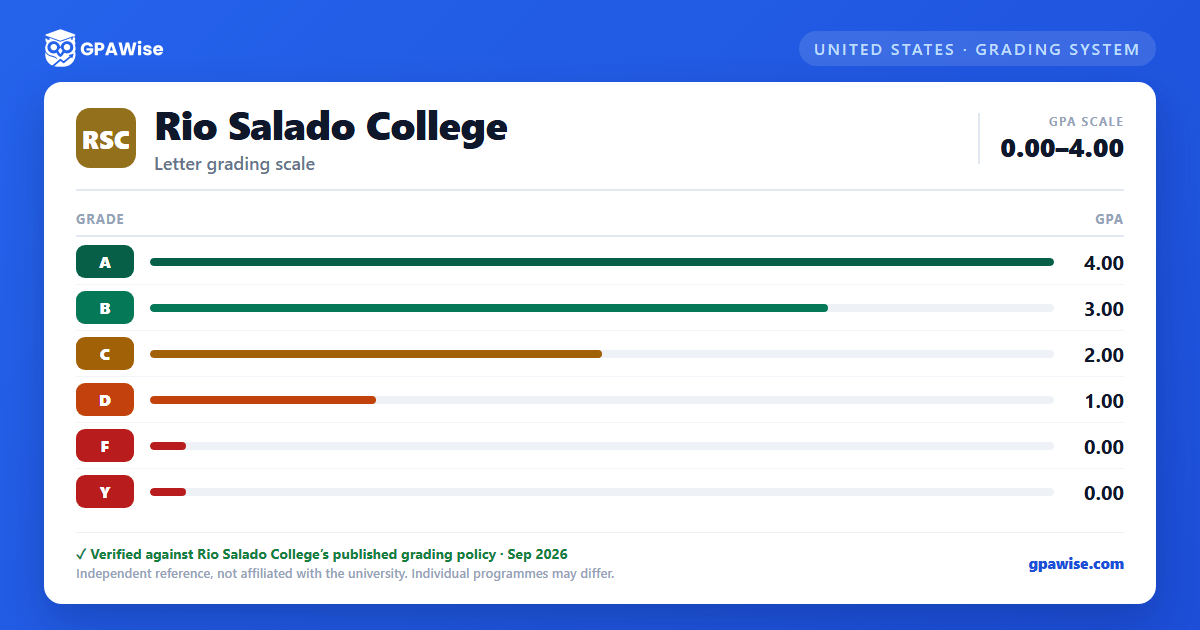
Rio Salado College follows the Maricopa County Community College District (MCCCD) districtwide grading policy. In addition to the standard letter grades, MCCCD recognizes several non-GPA notations: I (Incomplete), IP (Course in Progress), N (Audit), W (Withdrawn, Passing), P (Credit, judged equivalent to a grade of C or higher), and Z (No Credit) — none of these are calculated into the GPA.
Students may repeat a course up to three additional times after the initial attempt (four attempts total) to improve a grade. The lower grade from a repeat at the same college is automatically excluded from the GPA; a repeat completed at a different Maricopa college requires the student to submit an exclusion request.
An Incomplete ("I") grade must be resolved within seven months of the last date of class, under a written contract with the instructor, or the grade reverts per that contract.
Courses offered on a Credit/No Credit (P/Z) basis are not computed in the GPA. Students may request to switch between standard and credit/no-credit grading within the first fourteen days of the term.
Source: MCCCD AR 2.3.3 Grading, 2.3.6 Withdrawal — verified Sep 2026
GPA Calculation
MCCCD calculates three types of GPA: Semester GPA (courses taken in one semester at a single college), Overall Cumulative GPA (all courses taken at a single college), and Graduation GPA (all courses applied toward a specific degree or certificate, including accepted transfer credit).
GPA is calculated by multiplying each course's credit hours by its grade-point value, summing those totals, and dividing by the total credit hours attempted. MCCCD uses an unweighted 4.0 scale — honors and advanced-placement coursework are not weighted. All GPAs are truncated to three decimal places.
Under Academic Renewal, a student may request that grades of D, F, or Y (and their credits) be excluded from the cumulative GPA — up to 24 credits, usable once, and not revocable once approved. Grades of A, B, and C are never excluded this way.
Source: MCCCD AR 2.3.3 Grading (GPA Calculation), 2.3.7 Academic Renewal — verified Sep 2026
Academic Standing, Warning, and Probation
Academic Good Standing requires a cumulative GPA of 2.0 or higher. A student who has not reached a 2.0 cumulative GPA after 11 or fewer credit hours is placed on Academic Warning. After 12 or more credit hours below a 2.0 cumulative GPA, a student is placed on Academic Probation and is limited to 12 credit hours per semester absent an approved appeal. A student who remains below 2.0 while on probation is placed on Continued Probation and may be limited to 6 credit hours per semester.
Source: MCCCD AR 2.3.4 Academic Standing, Warning, and Probation — verified Sep 2026
General Graduation Requirements
Degrees require a minimum of 120 credits for a bachelor's degree or 60 credits for an associate degree, with at least 30 (bachelor's) or 15 (associate's) of those credits completed in residence at the awarding college. Certificate residency requirements scale with certificate length.
Candidates must earn a minimum cumulative GPA of 2.0 on the 4.0 scale in the 100-level-and-above coursework used to satisfy their degree or certificate, whether completed in residence or accepted in transfer; some awards specify a different minimum.
Graduation honors (distinction) are awarded at the 3.50–3.69 ("with distinction"), 3.70–3.89 ("with high distinction"), and 3.90–4.0 ("with highest distinction") cumulative GPA bands; the GPA used is fixed at the time of the graduation petition and is not later recalculated. Certificate programs are not eligible for institutional graduation honors.
Source: MCCCD AR 2.3.9 General Graduation Requirements — verified Sep 2026
Honors Opportunities & Recognition
Each Maricopa college operates its own Honors Program, offering scholarships including the Chancellor's, Foundation's, and President's Scholarships, and the Honors Achievement Award.
The President's Honor List recognizes students who complete 12 or more credit hours in courses numbered 100 or higher in a given semester with a semester GPA of 3.75 or higher.
Graduation honors (distinction) are separately awarded based on cumulative GPA at graduation — see General Graduation Requirements.
Source: MCCCD AR 2.3.8 Honors Opportunities & Recognition — verified Sep 2026
Transfer Curriculum Agreements & Official Transcripts
The Arizona General Education Curriculum (AGEC) is a common transferable general-education structure agreed upon by Arizona's public community/tribal colleges and three public universities. A student must earn at least 12 AGEC credits at MCCCD for the AGEC to post on the official transcript; up to 20 transfer or Prior Learning Assessment credits may also count toward it.
Students transferring from a California community college with a certified Intersegmental General Education Transfer Curriculum (IGETC) or California State General Education Pattern (CSUGE) satisfy most of MCCCD's general education and additional requirements, covering Written Communication, Oral Communication, Quantitative Reasoning, Arts & Humanities, and Social & Behavioral Sciences; Natural Sciences and "Institutions in the Americas" requirements are verified separately.
An official transcript is issued by the College Registrar on request and payment of the transcript fee, is signed, dated, and bears the college seal; there is no charge for unofficial transcripts or for official transcripts sent between Maricopa colleges.
Source: MCCCD AR 2.3.9 General Graduation Requirements (AGEC/IGETC), 2.3.10 Transcripts for Transfer — verified Sep 2026
Frequently asked questions
What grading scheme does Rio Salado College (RSC) use?
Where does this RSC grade scale come from?
What are RSC's GPA rules?
Source: MCCCD AR 2.3.3 Grading (GPA Calculation), 2.3.7 Academic Renewal — verified Sep 2026
What are RSC's academic standing rules?
Source: MCCCD AR 2.3.4 Academic Standing, Warning, and Probation — verified Sep 2026
What does RSC require to graduate?
Source: MCCCD AR 2.3.9 General Graduation Requirements — verified Sep 2026
How are honors and awards decided at RSC?
Source: MCCCD AR 2.3.8 Honors Opportunities & Recognition — verified Sep 2026
How does RSC treat transfer credit?
Source: MCCCD AR 2.3.9 General Graduation Requirements (AGEC/IGETC), 2.3.10 Transcripts for Transfer — verified Sep 2026
