
Pass/No Pass and non-evaluative symbols
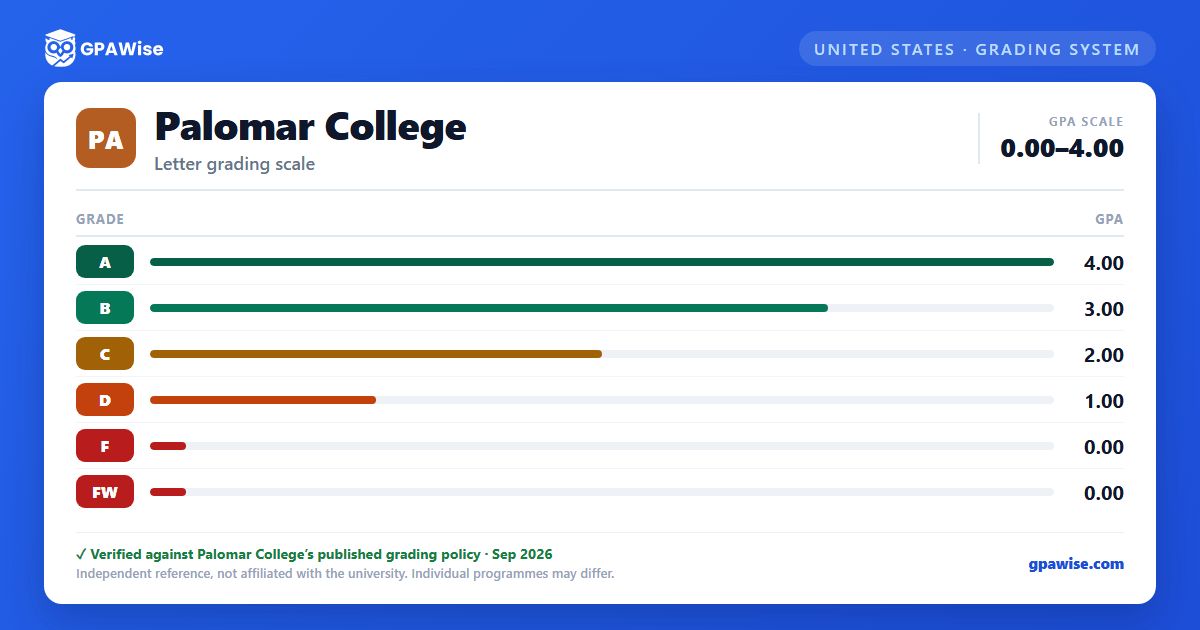
Alongside the letter-grade scale, Palomar College uses several symbols that carry no grade points and are never counted in a student's GPA:
- P (Pass) and NP (No Pass) — a P is granted for performance equivalent to a C or better; units for P or NP are not counted in the GPA.
- I (Incomplete), IP (In Progress), and RD (Report Delayed) — temporary notations, none used in calculating grade points.
- W (Withdrawal), MW (Military Withdrawal), and EW (Excused Withdrawal) — withdrawal symbols, none counted in the GPA.
- SP (Satisfactory Progress) — used only in noncredit courses.
Source: AP 4230, Grading and Academic Record Symbols (Rev. 5/14/24) — verified Sep 2026
Academic renewal and course repetition
Students may petition to have up to thirty (30) units of previous substandard course work (grades of D, F, FW, or NP/NC) disregarded when computing the cumulative GPA, under Palomar's Academic Renewal policy — provided the course work was not already used to fulfill a degree, certificate, or transfer requirement, at least one year has passed, and the student has since completed 24 semester units with a minimum 2.0 GPA.
When a student repeats a previously attempted course, the earlier grade and credit are disregarded in computing the GPA and are annotated on the permanent academic record.
Source: 2026-2027 Catalog, Academic Regulations & Standards — Academic Renewal; Repetition of Courses — verified Sep 2026
Academic and progress probation
To remain in good standing, students must maintain a minimum cumulative GPA of 2.0 and complete more than 50% of attempted units. A student is placed on Academic Probation 1 after attempting at least 12 graded units with a cumulative GPA below 2.0, and moves to Academic Probation 2 if both the cumulative and semester GPA remain below 2.0. A student on Academic Probation 2 is subject to dismissal if their cumulative and semester GPA stays below 2.0 in each of three consecutive semesters. Separate Progress Probation levels apply based on the percentage of attempted units recorded as W, I, NP, or NC.
Source: 2026-2027 Catalog, Academic Regulations & Standards — Probation, Dismissal, and Reinstatement — verified Sep 2026
Minimum GPA for the associate degree
The associate degree requires a minimum cumulative grade point average of 2.0 (a “C” average) or higher for all degree-applicable course work attempted; some programs may require a higher GPA. Grades earned in non-degree-applicable courses (numbered 1–49) are not included when calculating the degree-applicable GPA.
Source: 2026-2027 Catalog, Associate Degree Requirements — II. Grade Point Average (GPA) — verified Sep 2026
Dean's List and Phi Theta Kappa
A student is placed on the Dean's List for completing 12 units in one semester at Palomar College with a GPA of at least 3.5 and no grade of D, F, or FW (Pass/No Pass units do not count toward the 12).
Initial membership in Phi Theta Kappa, the international honor society for two-year institutions, is awarded to students who have completed a minimum of 12 semester units at Palomar College with a GPA of 3.5 or better.
Source: 2026-2027 Catalog, Academic Achievement — Dean's List; Phi Theta Kappa — verified Sep 2026
Frequently asked questions
What grading scheme does Palomar College use?
Where does this Palomar College grade scale come from?
What are Palomar College's GPA rules?
Source: 2026-2027 Catalog, Academic Regulations & Standards — Academic Renewal; Repetition of Courses — verified Sep 2026
What are Palomar College's academic standing rules?
Source: 2026-2027 Catalog, Academic Regulations & Standards — Probation, Dismissal, and Reinstatement — verified Sep 2026
What does Palomar College require to graduate?
Source: 2026-2027 Catalog, Associate Degree Requirements — II. Grade Point Average (GPA) — verified Sep 2026
How are honors and awards decided at Palomar College?
Source: 2026-2027 Catalog, Academic Achievement — Dean's List; Phi Theta Kappa — verified Sep 2026
