
Grading Notations
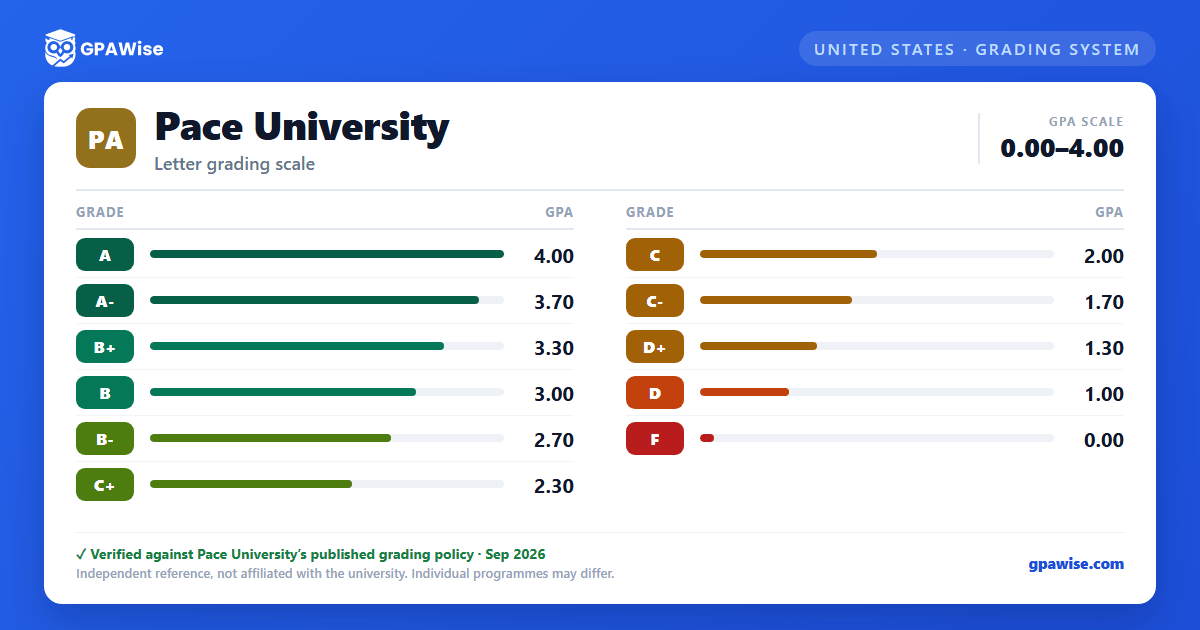
Beyond the standard A–F letter grades (with plus/minus refinements), Pace uses several special notations:
- K (Grade Pending): assigned in specific courses or special circumstances with permission of the assistant/associate dean; the extension may not exceed one year from the end of the semester in which the K grade is assigned.
- I (Incomplete): becomes an F if not made up within six weeks.
- I-F: an unauthorized withdrawal, not eligible for makeup work.
- W (Authorized Withdrawal) and AUD (Auditor): no credit is granted for an audited course.
Source: Grading System page, Pace University Academic Catalog 2026-2027 — verified Sep 2026
Quality Point Average (QPA) Calculation
The quality point average (QPA) is obtained by dividing the total number of quality points earned by the number of credits attempted at Pace. Credits attempted include a grade of "F", but exclude grades of "W", "I-R", "K", "P", "SAT", "UNS", and "AUD".
Source: Quality Point System page, Pace University Academic Catalog 2026-2027 — verified Sep 2026
Minimum GPA for Graduation
A QPA of 2.00 is necessary for graduation.
Source: Quality Point System page, Pace University Academic Catalog 2026-2027 — verified Sep 2026
Frequently asked questions
What grading scheme does Pace University use?
Where does this Pace University grade scale come from?
What are Pace University's GPA rules?
Source: Quality Point System page, Pace University Academic Catalog 2026-2027 — verified Sep 2026
What does Pace University require to graduate?
Source: Quality Point System page, Pace University Academic Catalog 2026-2027 — verified Sep 2026
