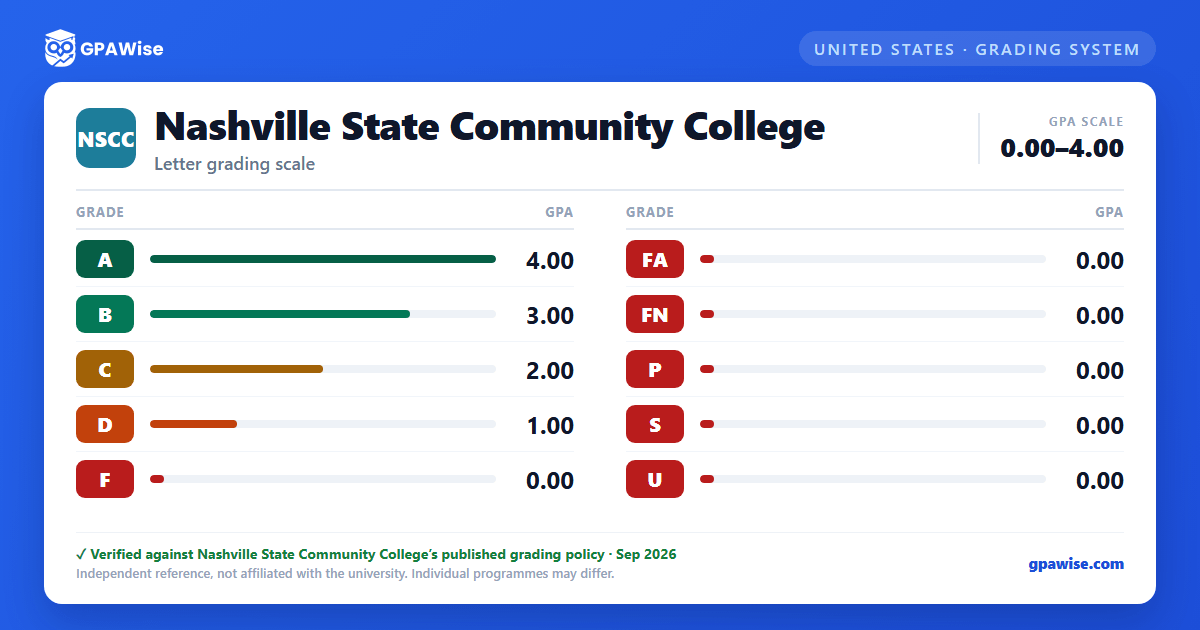

Marks with no grade-point value
In addition to the letter grades used to compute GPA, Nashville State's transcript may show marks that carry no grade points and are not counted in the grade point average: W (withdrawal initiated by the student), I (incomplete, which converts automatically to an F if not resolved by the posted deadline), X (continuation in a remedial/developmental course, capped at 15 semester hours overall), AU (audit, no credit), and NR (no grade reported by the instructor).
Source: 02-17-00 Grading, Reporting, and Record-Keeping Policy — verified Sep 2026
Repeating a course
A student may repeat a course for the purpose of raising a GPA only if the previous grade earned was a C or lower; repeating a course graded B or higher requires approval as an exception to this policy. Credit hours for a repeated course count only once toward the cumulative total, and the grade earned on the third and later attempts is used in calculating the GPA.
Source: 02-17-00 Grading, Reporting, and Record-Keeping Policy — verified Sep 2026
Good standing, probation, and suspension
Students must maintain a cumulative GPA of at least 2.0 to remain in good standing. A student who fails to reach a 2.0 cumulative GPA is placed on academic probation for the next term and must earn at least a 2.0 term GPA while on probation; falling below a 2.0 term GPA while on probation results in a one-term suspension. A student returning from suspension is placed on a post-suspension probationary status, and a further shortfall results in a two-term suspension.
Academic Fresh Start allows a returning student who has been away from higher education for at least four years, has not earned a credential elsewhere, and previously earned credit at Nashville State to have F grades (and D grades that do not count toward the degree) excluded from GPA and earned-hours calculations, while remaining on the academic record. It may be granted only once.
Source: 03-02-00 Academic Standards and Retention — verified Sep 2026
Minimum GPA to graduate
The minimum cumulative quality point average required to earn an associate degree at Nashville State is 2.0.
Source: 03-02-00 Academic Standards and Retention — verified Sep 2026
Dean's List and President's List
Degree- and certificate-seeking students enrolled at least part-time (six credit hours) are named to the Dean's List for a term QPA/GPA of at least 3.5, and to the President's List for a term QPA/GPA of at least 4.0, based on college-level coursework.
Source: 03-02-00 Academic Standards and Retention — verified Sep 2026
Frequently asked questions
What grading scheme does Nashville State Community College (NSCC) use?
Where does this NSCC grade scale come from?
What are NSCC's GPA rules?
Source: 02-17-00 Grading, Reporting, and Record-Keeping Policy — verified Sep 2026
What are NSCC's academic standing rules?
Source: 03-02-00 Academic Standards and Retention — verified Sep 2026
What does NSCC require to graduate?
Source: 03-02-00 Academic Standards and Retention — verified Sep 2026
How are honors and awards decided at NSCC?
Source: 03-02-00 Academic Standards and Retention — verified Sep 2026
