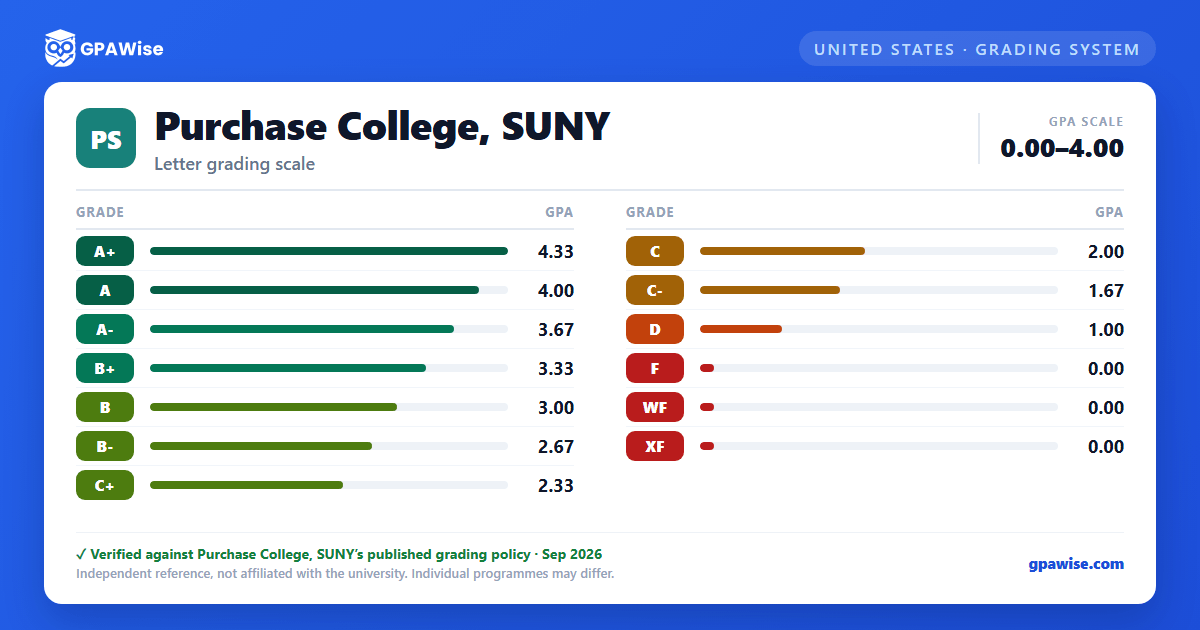

Special and Non-GPA Grade Notations
Final grades are posted online via myHeliotrope on the Current Students portal. Several grade notations carry no quality-point value and are not calculated in the GPA:
- CR (Credit): used for maintenance of matriculation or a SUNY study-abroad program.
- P/NC (Pass/No Credit): students may elect one course per semester (a second if a major course requires the P/NC basis) to be graded P or NC rather than a letter grade; core curriculum courses, senior theses/projects, repeated courses, and most major courses are ineligible. The election deadline is the end of the third week of classes.
- I (Incomplete): an agreement extending the deadline to finish coursework; unresolved four weeks after the end of the semester, it converts to F.
- AU (Audit): available to nonmatriculated continuing-education students with instructor permission; matriculated students may only informally audit and receive no AU grade.
- W (Withdrawal): available through the end of the ninth week of classes.
- SP/UP/NP: reserved for Senior Project I (satisfactory, unsatisfactory, or no progress); Senior Project II is graded A+ through F.
WF (assigned when a student stopped attending without officially withdrawing) and XF (assigned when a student never attended at all) are each calculated as an F toward the GPA. When a course is repeated, all attempts remain on the transcript, but only the highest grade counts toward the cumulative GPA and credit hours; the excluded attempt is annotated "E" and the counted attempt "I."
Source: Office of the Provost and Academic Affairs, Grading System page — verified Sep 2026
GPA Calculation Method
GPA is calculated by converting each grade to quality points, multiplying each course's quality points by its credit hours, summing the results across all courses, and dividing by the total credits attempted.
Credits earned both before and after a change from nonmatriculated to matriculated status count toward the cumulative GPA. Grades earned before a transfer between the School of the Arts and the School of Liberal Arts and Sciences also remain part of the cumulative GPA.
Source: Office of the Provost and Academic Affairs, Grade Point Averages page — verified Sep 2026
Academic Probation Review
The college-wide Academic Review Committee decides the issue of academic probation on a case-by-case basis.
Source: Office of the Provost and Academic Affairs, Grade Point Averages page — verified Sep 2026
Pass/No Credit Toward Graduation
A maximum of 32 credits taken on a Pass/No Credit basis count toward the 120 credits required for graduation.
Source: Office of the Provost and Academic Affairs, Grading System page — verified Sep 2026
Frequently asked questions
What grading scheme does Purchase College, SUNY use?
Where does this Purchase College, SUNY grade scale come from?
What are Purchase College, SUNY's GPA rules?
Source: Office of the Provost and Academic Affairs, Grade Point Averages page — verified Sep 2026
What are Purchase College, SUNY's academic standing rules?
Source: Office of the Provost and Academic Affairs, Grade Point Averages page — verified Sep 2026
What does Purchase College, SUNY require to graduate?
Source: Office of the Provost and Academic Affairs, Grading System page — verified Sep 2026
