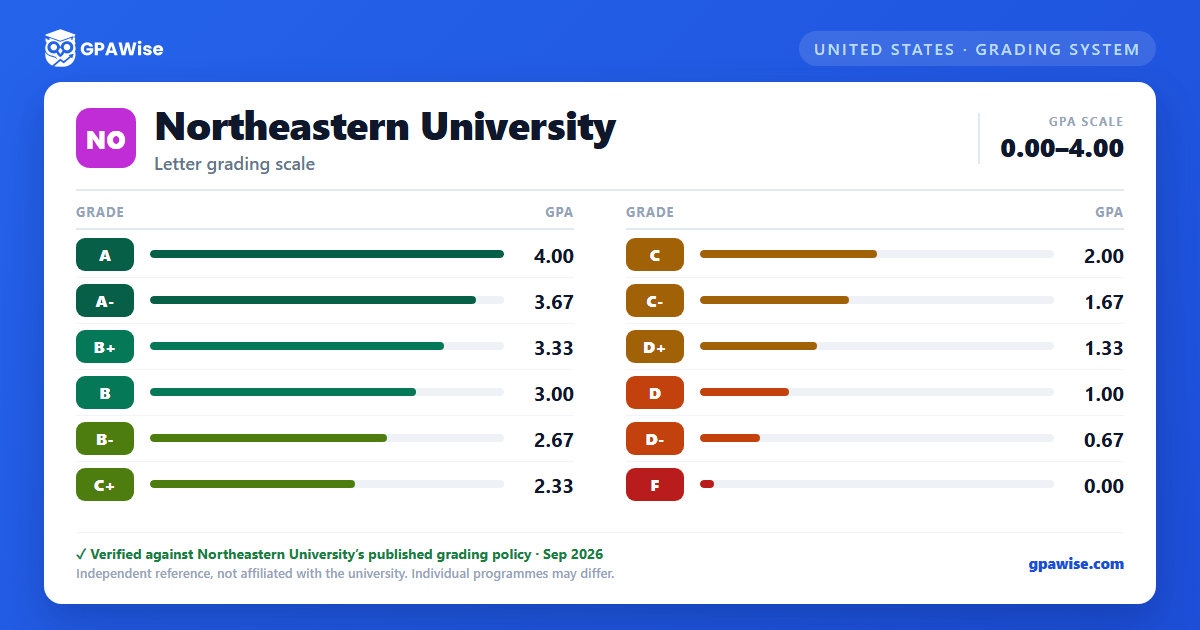

Grade Notations Not Counted in GPA
Beyond the letter grades on the 4.000-point scale, Northeastern records several notations on the transcript that carry no grade-point value and are not included in the GPA:
- I, IP, X — Incomplete. IP is used for courses that extend over several terms; while it remains on the record, it is never included in computing the GPA.
- S, U — Satisfactory / Unsatisfactory. S counts toward total degree requirements but neither is included in the GPA.
- W — Withdrawal, initiated by the student after the add/drop period and before the withdrawal deadline.
- AD, AW — Administrative drop / administrative withdrawal, assigned by the university following an approved academic appeal; neither carries an academic penalty or GPA calculation.
- NE, NG — Not enrolled, or a grade not yet reported by the instructor.
- L, T — Audit (no credit given) and Transfer.
Source: Grade Table and GPA, Undergraduate Academic Policies and Procedures, 2026-2027 catalog — verified Sep 2026
How GPA Is Calculated
GPA is a credit-hour-weighted average: each grade's numerical equivalent is multiplied by the course's semester hours, the products are summed, and the total is divided by the total semester hours attempted.
Grades of I, IP, S, U, and X are not included in the GPA calculation. A course retaken under an approved course substitution is treated the same as a retake in the GPA calculation.
Source: Grade Table and GPA, Undergraduate Academic Policies and Procedures, 2026-2027 catalog — verified Sep 2026
Frequently asked questions
What grading scheme does Northeastern University use?
Where does this Northeastern University grade scale come from?
What are Northeastern University's GPA rules?
Source: Grade Table and GPA, Undergraduate Academic Policies and Procedures, 2026-2027 catalog — verified Sep 2026
