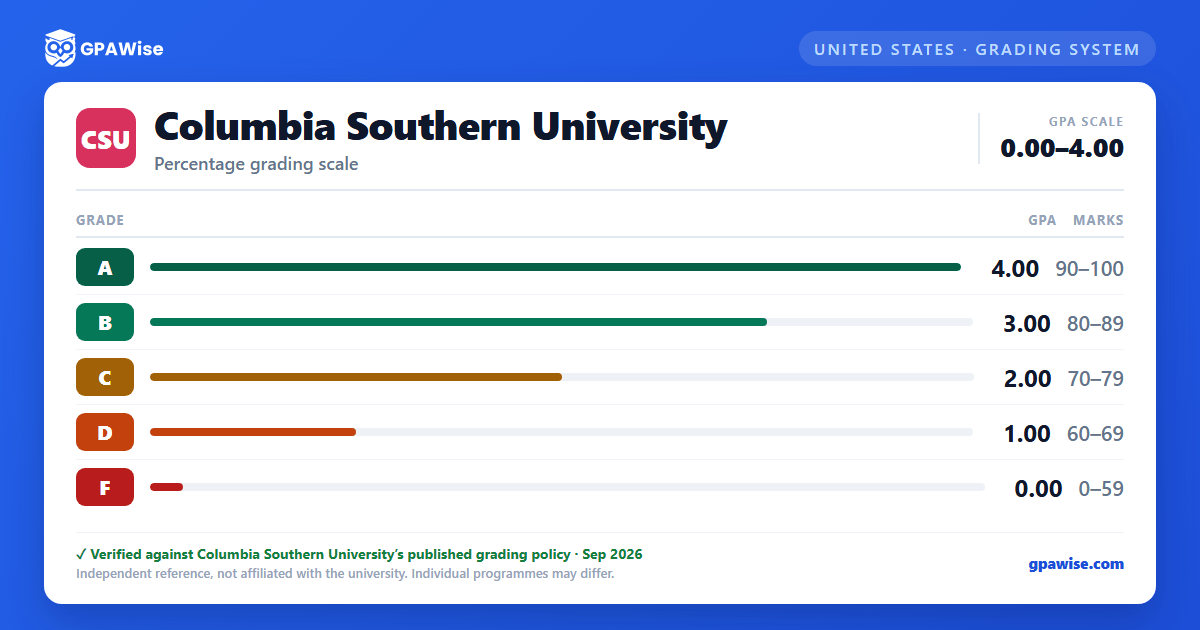

How CSU calculates GPA
Columbia Southern University computes the grade point average (GPA) by dividing the total number of quality points earned by the total number of credit hours completed.
Only A, B, C, D, and F grades generate quality points and count toward the cumulative GPA. Grades of W, I, IP, R, DN, DP, DC, S, and U do not generate quality points and are not included in the cumulative GPA, though several of them (W, I, R, S, U) still count as attempted hours for Satisfactory Academic Progress purposes. A grade of Withdraw/Fail (W/F) is included in the cumulative GPA but, like F, carries no quality points.
Source: 2026-2028 University Catalog, Grading Policies, Table A — verified Aug 2026
Repeated courses
Undergraduate students must maintain a cumulative GPA of 2.0 or higher; graduate students must maintain a cumulative GPA of 3.0 or higher. Students who fall short may be required to repeat a course. When a course is repeated, the original attempt is issued a grade of "R," which carries no quality points and is not included in the cumulative GPA — only the grade earned on the retake is used in the cumulative GPA calculation.
Source: 2026-2028 University Catalog, Course Retake Policy, p.195 — verified Aug 2026
Academic standing: probation and suspension
Good standing requires a minimum cumulative GPA of 2.0 for undergraduates and 3.0 for graduates. A student whose cumulative GPA falls below that minimum after completing 12 credit hours is placed on academic probation for the next 12 credit hours and must develop an academic improvement plan. A student who raises their cumulative GPA to the minimum during the probationary period is returned to good standing; one who reaches 2.5 (undergraduate) or 3.5 (graduate) but not the full minimum may be placed on secondary probation instead.
A student who fails to demonstrate satisfactory progress while on probation is academically suspended for at least 9 weeks (minimum 6 months after a second suspension, 12 months after a third). A student whose GPA falls below 1.0, or who withdraws from most of their courses in their last 12 credit hours, may be dismissed without a probationary period.
Source: 2026-2028 University Catalog, Institutional Academic Progress Policy, p.202-203 — verified Aug 2026
Minimum GPA and credit requirements to graduate
Undergraduate students must complete a minimum of 60 credit hours (associate) or 120 credit hours (bachelor's), complete at least 25 percent of the program at CSU, and maintain a cumulative GPA of 2.0 or higher to be eligible for graduation. Graduate and postgraduate professional students must complete a minimum of 33 percent of their coursework at CSU and maintain a cumulative GPA of 3.0 or higher to be eligible for graduation.
Source: 2026-2028 University Catalog, Graduation Requirements Policy, p.199-200 — verified Aug 2026
Latin honors
Bachelor's degree students may qualify for Latin honors based on a cumulative "honors GPA" combining all coursework attempted at CSU: Cum Laude requires a 3.50–3.79 cumulative GPA, Magna Cum Laude requires 3.80–3.99, and Summa Cum Laude requires a 4.0 cumulative GPA. Eligibility also requires no grade lower than a "C," no Academic Integrity Policy violations, and no CSU course repeated due to a non-satisfactory grade.
Source: 2026-2028 University Catalog, Graduation with Honors, p.200 — verified Aug 2026
Transfer credit limits
CSU evaluates transfer credit from official post-secondary transcripts, ACE-reviewed military and employer training, credit-by-examination scores, and professional training certificates. A minimum of 25 percent of an associate or bachelor's degree, and a minimum of 33 percent of a master's, postgraduate professional, or doctoral program, must be completed at CSU. Transfer credit for experiential learning may not exceed 25 percent of the degree program, cannot be applied toward CSU certificate programs, and CSU does not accept developmental or remedial coursework for transfer.
Source: 2026-2028 University Catalog, Transfer Credit Policy, p.24 — verified Aug 2026
