
Pass/No-Pass and GPA
Units earned on a Pass/No-Pass (P/NP) basis are not counted in the calculation of GPA. Students may take a maximum of 12 units attempted on a pass/no-pass basis, apart from courses that are evaluated only on a pass/no-pass basis. A student may request that a "P" be converted to the letter grade filed with the Registrar, no later than one regular semester after the term in which the "P" was received; units converted this way are used in the GPA calculation and no longer count toward the 12-unit pass/no-pass allowance.
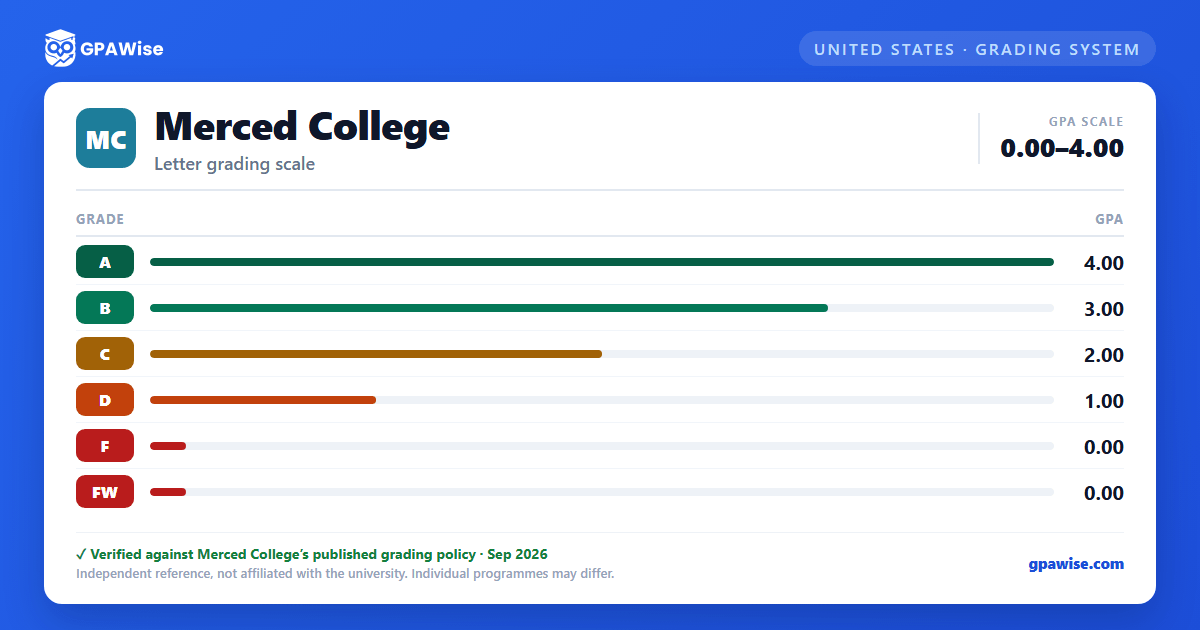
"FW" (Failing, stopped attending) carries 0 grade points, the same as "F."
Source: Merced College Catalog, Grading page, "Taking Courses on a Pass/No-Pass Basis" (accessed 2026-09-03) — verified Sep 2026
NP Grades, Probation, and Repeats
Although "NP" (No Pass) units are not counted in GPA, they are counted as units attempted for probation and dismissal purposes. A student may repeat a course in which an "NP" was received; the repeated course is not counted as units attempted.
Source: Merced College Catalog, Grading page, "Taking Courses on a Pass/No-Pass Basis" (accessed 2026-09-03) — verified Sep 2026
Frequently asked questions
What grading scheme does Merced College (MC) use?
Where does this MC grade scale come from?
What are MC's GPA rules?
Source: Merced College Catalog, Grading page, "Taking Courses on a Pass/No-Pass Basis" (accessed 2026-09-03) — verified Sep 2026
What are MC's academic standing rules?
Source: Merced College Catalog, Grading page, "Taking Courses on a Pass/No-Pass Basis" (accessed 2026-09-03) — verified Sep 2026
