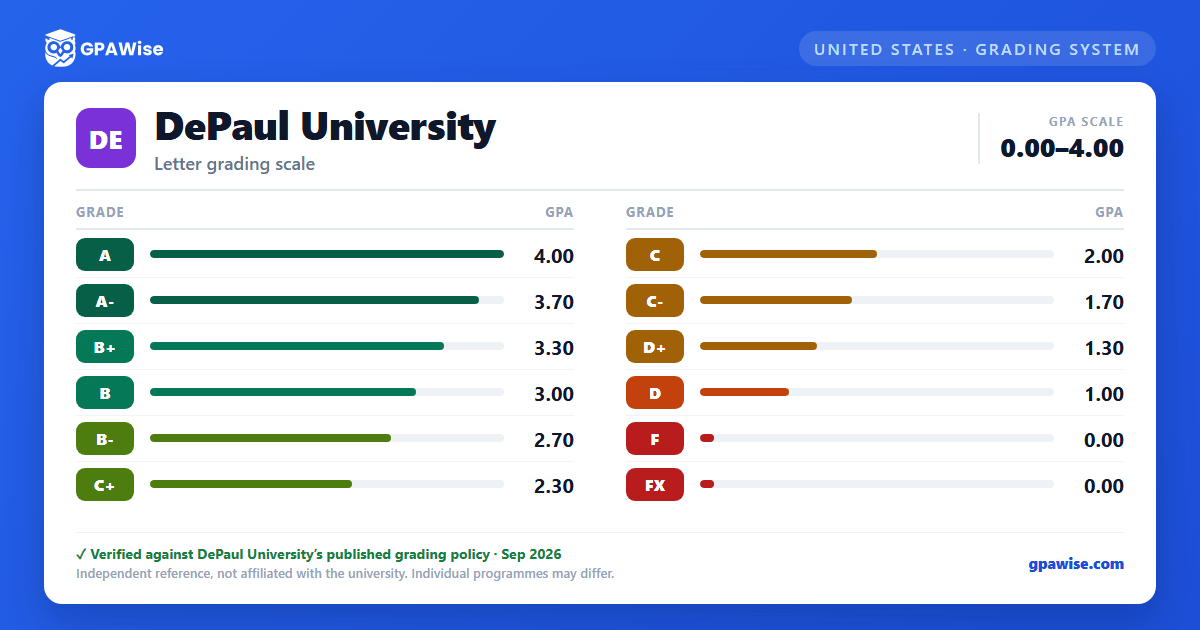

Notations That Don't Carry Quality Points
Several notations appear on a DePaul transcript without any quality-point value, so they never factor into the GPA: IN (Incomplete, a temporary grade requiring a satisfactory record plus instructor permission, which becomes the permanent ING if a graduating student does not resolve it), PA (Passing achievement in a pass/fail course), W (student-initiated withdrawal after the no-penalty period) and WA (administrator-approved withdrawal, limited to two per DePaul career), R (a temporary research-in-progress grade for courses extending beyond a term, which becomes the permanent RG if unresolved at graduation), M (final grade not submitted by the instructor), and AU (audit, no credit earned).
FX is different: it marks a failure due to non-attendance, but unlike the codes above it is calculated into the GPA as an F.
Source: Undergraduate Academic Policies, Grades page (notation key), 2026-2027 Catalog — verified Aug 2026
How the GPA Is Calculated
A student's grade point average is computed by dividing the total number of quality points accumulated by the total number of credit hours attempted with quality points assigned. The GPA is calculated only on grades earned at DePaul University; transfer coursework does not factor in.
When a course is repeated, the original attempt is marked with a "#" on the transcript, and that attempt's grade and credit hours are removed from both the term and cumulative GPA and credit-hour totals.
Source: Undergraduate Academic Policies, Grades page (notation key + Quality Points / Grade Point Average sections), 2026-2027 Catalog — verified Aug 2026
Frequently asked questions
What grading scheme does DePaul University use?
Where does this DePaul University grade scale come from?
What are DePaul University's GPA rules?
Source: Undergraduate Academic Policies, Grades page (notation key + Quality Points / Grade Point Average sections), 2026-2027 Catalog — verified Aug 2026
