
How grading works at UQ
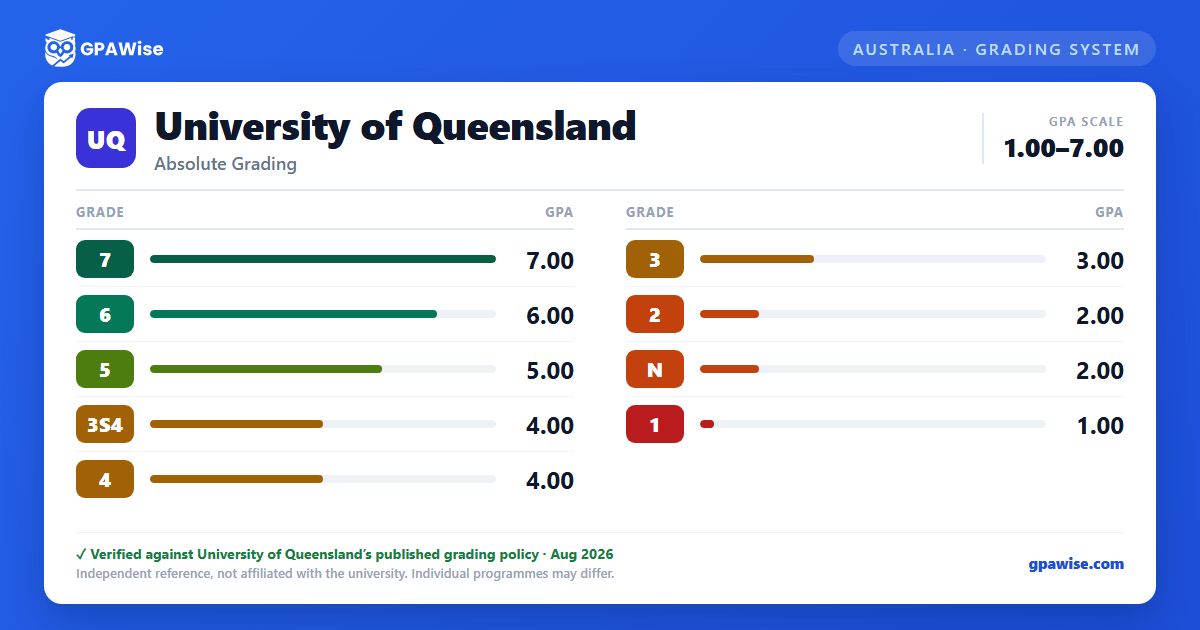
Most UQ courses grade on a numbered scale from 1 to 7, with 7 the highest possible final grade and 1 the lowest — not a letter scale. The number itself is your grade; the words below are UQ's own descriptors for each numeral:
- 7 — High Distinction
- 6 — Distinction
- 5 — Credit
- 4 — Pass
- 3 — Marginal Fail (may be eligible for supplementary assessment)
- 2 — Fail
- 1 — Low Fail
A grade of 3 or lower is a fail. Some courses use non-graded outcomes instead of a number: N (non-graded fail) and P (non-graded pass), approved case-by-case by the Faculty. If you're granted supplementary assessment after a 3 or N, the highest result you can achieve is 3S4 (a grade of 4) or NSP (a P).
UQ does not publish one university-wide percentage-to-grade table — grading is criterion-referenced, and grade cut-offs are set by each course (with Head of School or Associate Dean approval to vary them), not by a fixed marks band.
Source: UQ Policy and Procedure Library, Assessment Procedure Part H 'Grading system', clauses 130-134, 153 — verified Aug 2026
How your UQ GPA is calculated
Your Grade Point Average (GPA) is the unit-weighted average of your final grades: GPA = Σ(G × unit value) ÷ Σ(unit value), where G is the numeral grade (1–7) you received in each course. If you're enrolled in a course but receive no result, that course counts as G = 0.
Worked example (UQ's own): grades of 4, 5, 5 and 7 in courses worth 2, 2, 1 and 1 units — GPA = ((4×2)+(5×2)+(5×1)+(7×1)) ÷ (2+2+1+1) = 30 ÷ 6 = 5.0.
Non-graded results are handled specially: a course graded P is excluded from your GPA calculation entirely, while a course graded N is counted as if it were a 2.
Your GPA is calculated after final grades are released each semester (each trimester at UQ College), and feeds into your academic standing.
Source: UQ Policy and Procedure Library, Assessment Procedure Appendix 2 'GPA'; my.UQ Final Grades page worked example and P/N rule — verified Aug 2026
What your UQ GPA is used for
Beyond tracking your own progress, UQ uses your GPA to help determine part of your academic standing, and your eligibility for a University Medal, a Dean's Commendation for Academic Excellence, scholarships, and changing into a different program.
Source: my.UQ Final Grades page, 'How to calculate your GPA' — verified Aug 2026
Frequently asked questions
Can I save my semesters and track my CGPA at UQ?
How do I convert SGPA to CGPA at UQ?
Can I add past semester GPAs without entering every course?
Is my CGPA tracker data sent to your servers?
Is this University of Queensland (UQ) GPA calculator free?
Does UQ's GPA scale start at 0 or 1?
It starts at 1, not 0. UQ's own grading policy states final grades run from 7 (the highest) down to 1 (the lowest) — there's no 0 on the standard numbered scale.
Source: UQ Policy and Procedure Library, Assessment Procedure Part H, clause 130; my.UQ Final Grades page — verified Aug 2026
Are UQ grades letters (HD, D, C) or numbers?
Numbers. UQ's official grading table lists 7, 6, 5, 4, 3, 2, 1 as the actual final grades; “High Distinction”, “Distinction”, “Credit”, “Pass”, “Marginal Fail”, “Fail” and “Low Fail” are descriptive names for each number, not separate letter grades used on your transcript or in your GPA calculation.
Source: UQ Policy and Procedure Library, Assessment Procedure Part H, clause 130 — verified Aug 2026