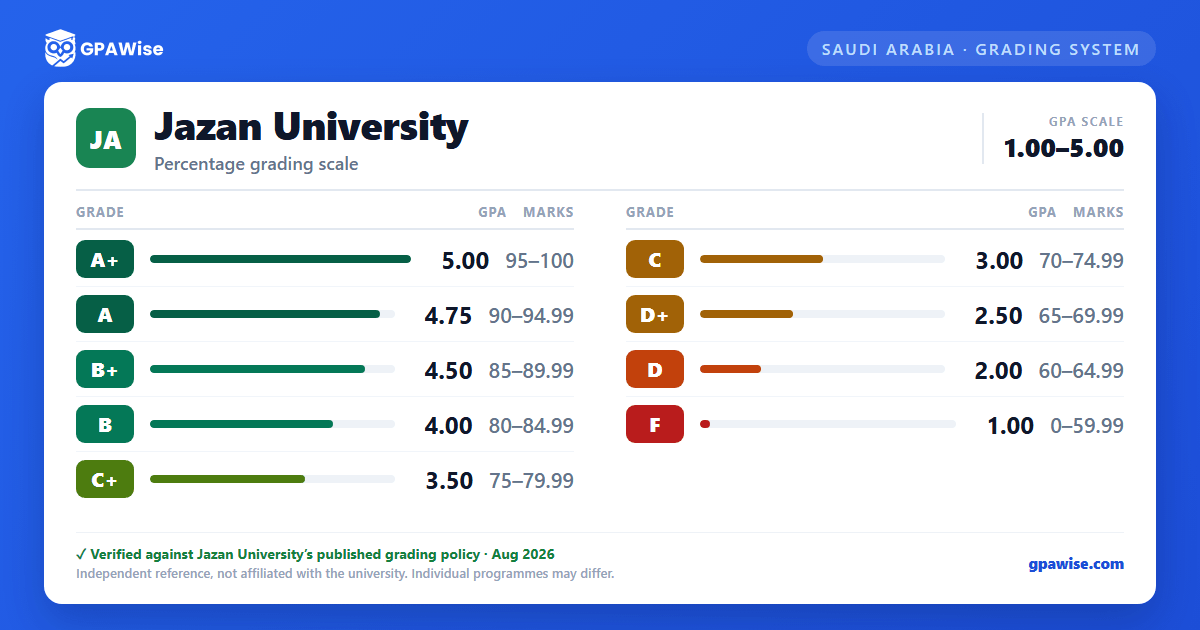

Grading policy at Jazan University
Jazan University grades courses on a point scale under the Council of University Affairs' unified "Study and Examination Regulations for the University Level," in force university-wide from the start of the 1444 AH academic year. The regulation prints two parallel point columns (out of 5.00 and out of 4.00); Jazan's own text applies the 5.00 column throughout, including a fail grade (F) worth 1.00 rather than 0.00.
Several administrative course-status symbols carry no grade-point weight and do not affect the GPA: In-Progress (IP), Incomplete (IC), Denied/Denial (DN), No-grade pass (NP), No-grade fail (NF), Withdrawn (W), and Exemption (E).
Source: Jazan University Study & Examination Regulations (2022 ed.), Appendix 1 (archived copy) — verified Aug 2026
Graduation GPA Classification
At graduation, a student's cumulative GPA out of 5.00 is classified as follows:
- Excellent: 4.50 and above
- Very Good: 3.75 to less than 4.50
- Good: 2.75 to less than 3.75
- Pass: 2.00 to less than 2.75
Source: Jazan University Study & Examination Regulations (2022 ed.), graduation classification provisions (archived copy) — verified Aug 2026
Graduation Honors
First-class honors at graduation requires a cumulative GPA from 4.75 up to 5.00 out of 5.00.
Source: Jazan University Study & Examination Regulations (2022 ed.), honors provisions (archived copy) — verified Aug 2026
Frequently asked questions
What grading scheme does Jazan University (JazanU) use?
Where does this JazanU grade scale come from?
What does JazanU require to graduate?
Source: Jazan University Study & Examination Regulations (2022 ed.), graduation classification provisions (archived copy) — verified Aug 2026
How are honours and awards decided at JazanU?
Source: Jazan University Study & Examination Regulations (2022 ed.), honors provisions (archived copy) — verified Aug 2026
