
How Course Grades Are Assigned
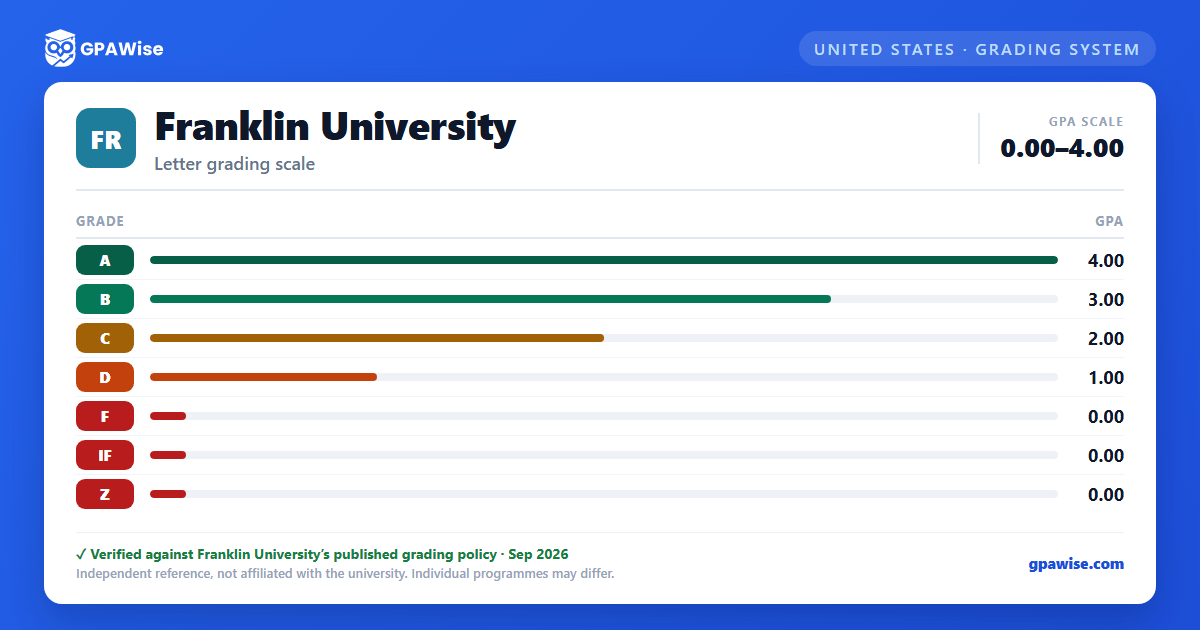
Course-level letter grades are based on the percentage of total possible points earned in the course: A (90–100%), B (80–89%), C (70–79%), D (60–69%), F (below 60%).
Source: Grading Guidelines (UG), Franklin University 2026-2027 Undergraduate Policies catalog — verified Aug 2026
Repeat Courses and the Forgiveness Policy
If a student retakes an identical course, an earlier grade of D changes to DR and an earlier grade of F changes to FR; neither DR nor FR is calculated in the GPA.
The one-time Forgiveness Policy lets a returning student whose cumulative GPA is below 2.00 have their GPA recalculated using only courses completed after the policy takes effect. Credit is granted for prior courses graded C or better, and at least 40 credit hours must be completed after the policy is applied.
Source: Types of Grades (UG) and Forgiveness Policy (UG), same 2026-2027 catalog — verified Aug 2026
Academic Probation, Suspension & Dismissal
An undergraduate student is placed on academic probation when their cumulative GPA falls below 2.00.
Academic suspension (loss of enrollment eligibility for one term) applies when cumulative GPA falls below a minimum tied to credit hours attempted: 1.10 (20–29 hours), 1.50 (30–59 hours), 1.70 (60–89 hours), 1.90 (90–99 hours), 2.00 (100+ hours). Dismissal usually follows suspension, reinstatement, and continued failure to meet required progress.
Source: Academic Standards: Probation, Suspension & Dismissal (UG), 2026-2027 catalog — verified Aug 2026
Undergraduate Degree Requirements
To earn a degree, students must complete all required coursework with a minimum cumulative GPA of 2.00 and a minimum GPA of 2.25 in the major area; each major-area course must be completed with a grade of C or better to count toward degree requirements. Residency and tuition/fee requirements also apply.
Source: Degree Requirements (UG), 2026-2027 catalog — verified Aug 2026
Trimester and Graduation Honors
Students completing 8 or more undergraduate letter-graded hours in a trimester with a 4.00 GPA are named to the President's List; a 3.50–3.99 GPA earns the Dean's List.
Graduation honors (undergraduate cumulative GPA): Summa Cum Laude (3.90+), Magna Cum Laude (3.70–3.89), Cum Laude (3.50–3.69).
Source: Honors, 2026-2027 catalog, Undergraduate Policies — verified Aug 2026
Transfer Credit
Credit transfers for any course completed with a grade of D or higher (including Pass and examination credit), subject to GPA and major requirements. A grade of D is not accepted in major-area courses regardless of where it was taken. Credit is accepted from accredited institutions (or reviewed case-by-case otherwise); some majors restrict transferability of credits more than 10 years old.
Source: Transfer Credit (UG), 2026-2027 catalog — verified Aug 2026
Frequently asked questions
What grading scheme does Franklin University use?
Where does this Franklin University grade scale come from?
What are Franklin University's GPA rules?
Source: Types of Grades (UG) and Forgiveness Policy (UG), same 2026-2027 catalog — verified Aug 2026
What are Franklin University's academic standing rules?
Source: Academic Standards: Probation, Suspension & Dismissal (UG), 2026-2027 catalog — verified Aug 2026
What does Franklin University require to graduate?
Source: Degree Requirements (UG), 2026-2027 catalog — verified Aug 2026
How are honors and awards decided at Franklin University?
Source: Honors, 2026-2027 catalog, Undergraduate Policies — verified Aug 2026
How does Franklin University treat transfer credit?
Source: Transfer Credit (UG), 2026-2027 catalog — verified Aug 2026
