
How Grade Symbols Affect Your GPA
Not every grade symbol counts toward your cumulative GPA. Courses graded P (Pass) or NP (No Pass), including any course taken on a Pass/No Pass basis, earn or deny unit credit but are excluded from GPA calculation entirely.
An I (Incomplete) is also excluded from GPA and units-attempted calculations while outstanding. It must be resolved within one year (extendable by petition), after which it defaults to a pre-agreed letter grade. IP (In Progress, for courses spanning more than one term) and RD (Report Delayed, registrar-assigned only) are likewise excluded from GPA while active.
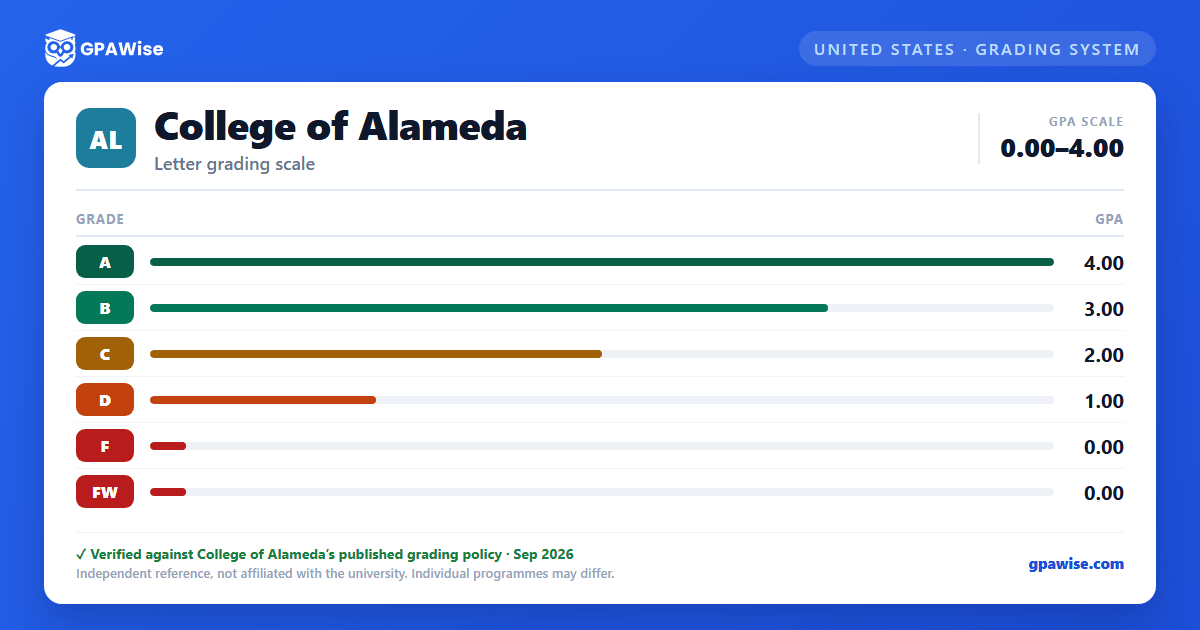
FW (failing withdrawal, assigned when a student stops participating after the withdrawal deadline without an approved withdrawal) is the exception among withdrawal-related symbols: it is counted in GPA calculation in exactly the same way as an F.
Source: Peralta CCD AP 4230, Grading and Academic Record Symbols, section II.B-H — verified Aug 2026
Withdrawal Symbols and Probation
A standard W (Withdrawal) may be recorded between the end of the fourth week and the end of the fourteenth week of instruction (or the equivalent 30%-75% window for non-semester terms). A W does not affect academic probation, but it is used as a factor in progress probation.
MW (Military Withdrawal) and EW (Excused Withdrawal, for documented extenuating circumstances under Title 5 section 55024) are excluded from both progress-probation and dismissal grade-point calculations.
FW, by contrast, is treated the same as an F grade for course-repetition and probation/dismissal purposes, not exempted like the other withdrawal symbols.
Source: Peralta CCD AP 4230, Grading and Academic Record Symbols, section II.B, I-K — verified Aug 2026
Frequently asked questions
What grading scheme does College of Alameda use?
Where does this College of Alameda grade scale come from?
What are College of Alameda's GPA rules?
Source: Peralta CCD AP 4230, Grading and Academic Record Symbols, section II.B-H — verified Aug 2026
What are College of Alameda's academic standing rules?
Source: Peralta CCD AP 4230, Grading and Academic Record Symbols, section II.B, I-K — verified Aug 2026
