
How the GPA Is Calculated
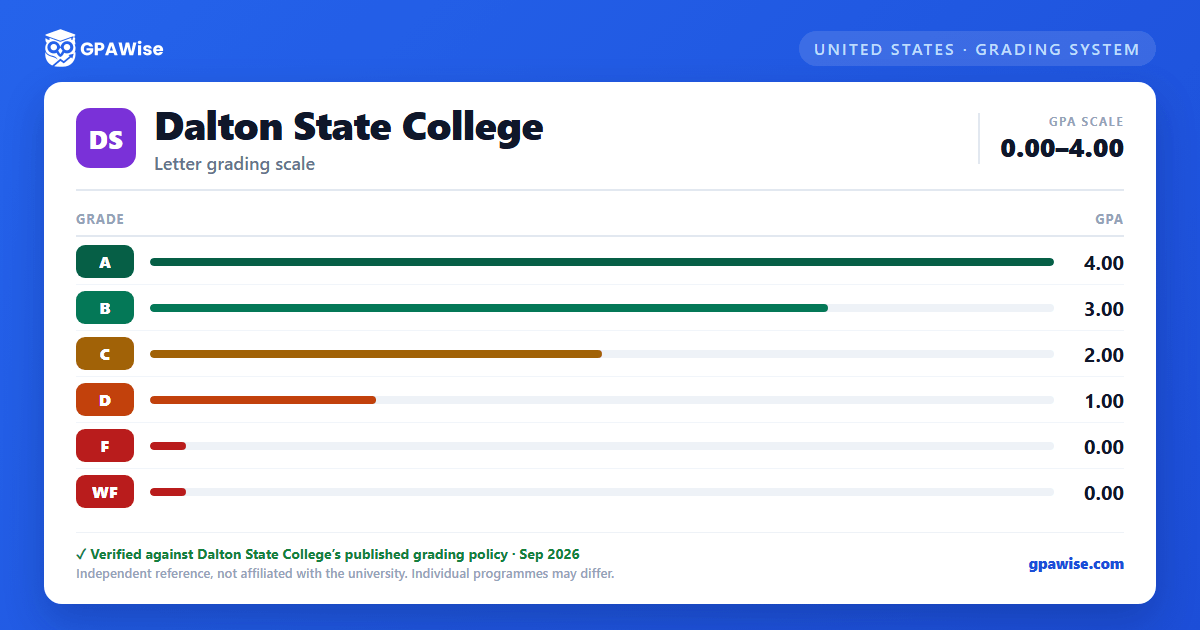
Dalton State's Institutional GPA is computed by dividing total quality points earned by the total semester hours attempted in which a grade of A, B, C, D, F, or WF was received. Grades of I, IP, K, NR, S, U, V, W, WM, and WU carry no quality points and are not counted toward hours attempted. The Regents' GPA/Cumulative Average uses the same formula but excludes all institutional-credit hours and grades (including Learning Support courses), and is the average used for special-honors eligibility and shown on the permanent record.
A separate HOPE Scholarship GPA is computed the same way across every institution attended since high school graduation, for state financial-aid eligibility only — it is not the institutional or degree GPA.
Source: Academic Information and Regulations: GPA: HOPE; Institutional GPA/Graduation Average; Regents' GPA/Cumulative Average — verified Aug 2026
Repeating a Course
Students may attempt the same course up to three times unless a program restricts it further (e.g. Nursing, MLT); a fourth attempt requires the relevant school Dean's approval. When a course taken at Dalton State is repeated at Dalton State, only the highest grade earned counts toward the GPA — excluded attempts stay on the permanent record but are dropped from the GPA calculation.
Source: Academic Information and Regulations: Grade Repeat Policy — verified Aug 2026
Academic Warning, Probation, Suspension, and Dismissal
A student's status changes from Good Standing to Academic Warning when their institutional or term GPA drops below 2.0. A student in exceptional difficulty (term GPA below 1.0) moves directly to Academic Probation, as does a Warning-status student whose term GPA stays below 2.0. Probation status limits enrollment to 9 credit hours and restricts non-traditional course delivery. A Probation-status student who fails to earn a 2.0 or higher GPA in their most recent semester moves to Academic Suspension and cannot enroll the following Fall or Spring semester (appealable). Dismissal follows a repeated failure to reach 2.0 after suspension-readmission, with re-enrollment barred for one calendar year (two years on a second dismissal, unless an accredited associate degree has since been earned).
Academic Renewal offers degree-seeking students with a cumulative GPA of 2.5 or lower a one-time fresh start, computing a new GPA for academic-standing purposes; it must be requested within the first year of re-enrollment and does not override financial-aid satisfactory-progress rules.
Source: Academic Information and Regulations: Academic Progress; Academic Renewal — verified Aug 2026
GPA Requirement for Graduation
Every degree and certificate level (bachelor's, associate's, and certificate) requires a minimum institutional GPA of 2.0 ("C") to graduate, alongside a grade of C or higher in ENGL 1101/1102 and, for bachelor's degrees, in all upper-level and major-required coursework.
Source: Academic Information and Regulations: Graduation Requirements (bachelor's, associate's, certificate) — verified Aug 2026
Honor Lists and Graduation Honors
Each semester, students in good standing completing 12+ semester hours are named to the President's List at a 4.0 semester GPA or the Dean's List at 3.5 or above; those completing 6–11 hours qualify for the Part-Time Dean's List at 3.5. Learning Support coursework is excluded from these GPA calculations.
| Degree Level | Honor | GPA Range |
|---|---|---|
| Bachelor's/Associate's | Cum Laude | 3.50–3.74 |
| Bachelor's/Associate's | Magna Cum Laude | 3.75–3.99 |
| Bachelor's/Associate's | Summa Cum Laude | 4.00 |
| Certificate | With Merit | 3.50–3.74 |
| Certificate | With Distinction | 3.75–3.99 |
| Certificate | With Excellence | 4.00 |
Source: Academic Information and Regulations: Academic Honors; Graduation with Honors — verified Aug 2026
Graduation Requirements for Transfer Students
Transfer students are held to the same academic-progress standards as native students. To graduate, a transfer student needs both a minimum 2.00 GPA on Dalton State coursework used to complete graduation requirements and a minimum 2.00 cumulative GPA combining Dalton State and transfer coursework used to complete those requirements.
Source: Academic Information and Regulations: Graduation Requirements for Transfer Students — verified Aug 2026
Frequently asked questions
What grading scheme does Dalton State College use?
Where does this Dalton State College grade scale come from?
Does a STEM course flag (">") change my Dalton State GPA?
No. The ">" symbol marking an approved STEM course only changes quality points for HOPE Scholarship eligibility calculations (A>=4.0, B>=3.5, C>=2.5, D>=1.5, F>=0.0). For your institutional or Regents' GPA, STEM-flagged courses use the same quality points as any other course on the standard A=4, B=3, C=2, D=1, F=0 scale.
Source: Academic Information and Regulations: Grading Symbols (">" STEM flag) — verified Aug 2026
