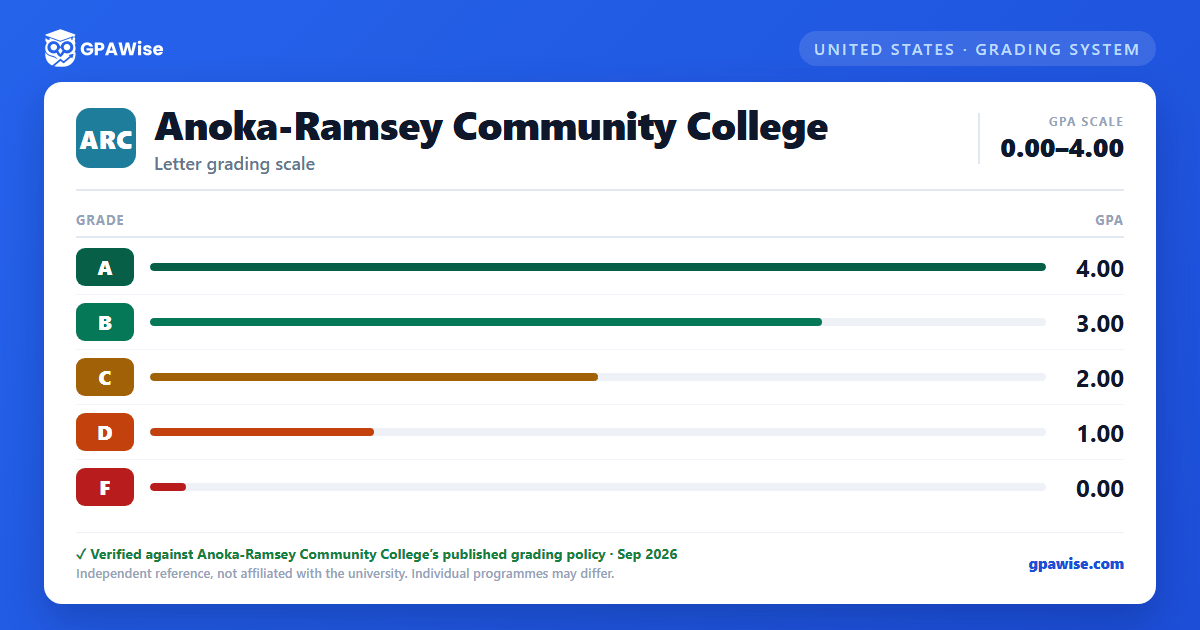

What Counts Toward Your GPA
Only the letter grades A, B, C, D, and F count toward Anoka-Ramsey's GPA. Other grade notations (FN, FW, NC, P, AU, I, W, Z) are excluded from the GPA calculation, though some still count toward registered credits or completion-rate calculations.
GPA is calculated as total grade points earned divided by total grade-point credits attempted.
Source: Anoka-Ramsey Community College, Grades page (Classes & Registration), accessed 2026-08-23. — verified Aug 2026
Frequently asked questions
Can I save my semesters and track my CGPA at Anoka-Ramsey Community College?
Yes. After you calculate a semester's GPA, click "Save as semester" to add it to the built-in CGPA tracker, which then computes your cumulative GPA across every saved semester using the standard weighted formula (Σ SGPA × credits ÷ Σ credits). You can save semesters by course (full breakdown) or quick-add a past semester with just the SGPA and credit hours. Locking, renaming, and deleting saved semesters are all supported, and the tracker shows a running CGPA plus a trend arrow versus your previous semester.
How do I convert SGPA to CGPA at Anoka-Ramsey Community College?
Your CGPA is the credit-weighted average of every semester's SGPA. The formula is: CGPA = (SGPA₁ × credits₁ + SGPA₂ × credits₂ + … + SGPAₙ × creditsₙ) ÷ (credits₁ + credits₂ + … + creditsₙ). On this page, add each semester to the CGPA tracker (either by course or as a quick SGPA + credit-hours entry) and the calculator runs the conversion for you on every save, edit, and delete — no manual arithmetic required.
Can I add past semester GPAs without entering every course?
Yes. On the My CGPA Tracker tab, click "Add semester" and choose the quick-add option. You enter just the SGPA and the credit hours for that semester — no course-by-course breakdown required. It works as a GPA calculator with previous semesters support, or as a GPA calculator without course details when you only remember the SGPA from your transcript. Quick-added and course-by-course semesters can be mixed freely; both contribute to your CGPA using the same credit-weighted formula.
Is my CGPA tracker data sent to your servers?
No. Your saved semesters are stored locally in your browser only — nothing is transmitted to GPAWise. A "Clear all tracker data" button is always available on the tracker tab to wipe the data on demand.
Is this Anoka-Ramsey Community College GPA calculator free?
Yes — GPAWise is completely free to use. There's no signup, no paywall, and your inputs stay in your browser.
