How GPA Is Calculated
GPA is calculated by dividing total points earned by total credit hours attempted. Courses graded Audit (X), Incomplete (I), Withdrawal (W), Pass (P), Progress (N), Satisfactory (S), In Progress (IP), Unsatisfactory (U), or Proficiency Credit (Y) are not counted toward total credit hours attempted, so they do not affect GPA. Credit awarded through articulation agreements, Advanced Placement, CLEP, Career Tech Credit Transfer, DANTES/DSST, or WEBCAPE is not used in GPA calculation at all.
Source:
Sinclair College Grades policy, approved 04/02/2026 — verified Sep 2026
Academic Intervention, Probation & Dismissal
Students must maintain a minimum cumulative GPA of 2.0. A first semester below 2.0 results in Academic Intervention; a second consecutive semester below 2.0 results in Academic Probation; a third consecutive semester below 2.0 results in Academic Dismissal, unless that term's own GPA is 2.0 or higher, in which case the student remains on Academic Probation instead. Good academic standing is restored once cumulative GPA reaches 2.0 or higher. Students on intervention or probation are referred to an academic/faculty advisor, and probation status requires advisor sign-off to register or add classes.
Source:
Sinclair College Grades policy, approved 04/02/2026 — verified Sep 2026
Dean's List
Dean's List recognition for a term requires six or more credit hours of college-level coursework that term, a term GPA of 3.4 or higher with no grade below a C, and good academic standing. Dean's List placement is noted on the student's academic transcript.
Source:
Sinclair College Grades policy, approved 04/02/2026 — verified Sep 2026
Frequently asked questions
What grading scheme does Sinclair Community College use?
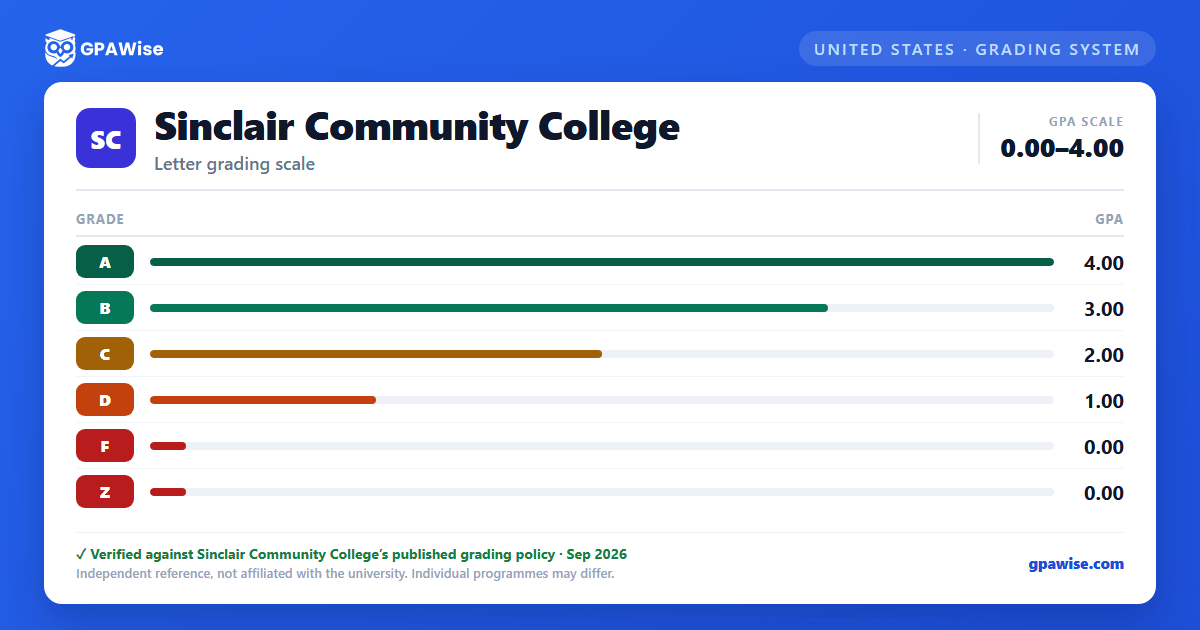
The university uses a letter-grade grading system on a 0.0–4.0 scale with 6 grade levels: A = 4.00, B = 3.00, C = 2.00, D = 1.00, F = 0.00, Z = 0.00.
Where does this Sinclair Community College grade scale come from?
From the university's official grading policy, published at policies.sinclair.edu. The grade table on this page is the one the policy sets out, verified Sep 2026.
What are Sinclair Community College's GPA rules?
GPA is calculated by dividing total points earned by total credit hours attempted. Courses graded Audit (X), Incomplete (I), Withdrawal (W), Pass (P), Progress (N), Satisfactory (S), In Progress (IP), Unsatisfactory (U), or Proficiency Credit (Y) are not counted toward total credit hours attempted, so they do not affect GPA. Credit awarded through articulation agreements, Advanced Placement, CLEP, Career Tech Credit Transfer, DANTES/DSST, or WEBCAPE is not used in GPA calculation at all.
Source: Sinclair College Grades policy, approved 04/02/2026 — verified Sep 2026
What are Sinclair Community College's academic standing rules?
Students must maintain a minimum cumulative GPA of 2.0. A first semester below 2.0 results in Academic Intervention; a second consecutive semester below 2.0 results in Academic Probation; a third consecutive semester below 2.0 results in Academic Dismissal, unless that term's own GPA is 2.0 or higher, in which case the student remains on Academic Probation instead. Good academic standing is restored once cumulative GPA reaches 2.0 or higher. Students on intervention or probation are referred to an academic/faculty advisor, and probation status requires advisor sign-off to register or add classes.
Source: Sinclair College Grades policy, approved 04/02/2026 — verified Sep 2026
How are honors and awards decided at Sinclair Community College?
Dean's List recognition for a term requires six or more credit hours of college-level coursework that term, a term GPA of 3.4 or higher with no grade below a C, and good academic standing. Dean's List placement is noted on the student's academic transcript.
Source: Sinclair College Grades policy, approved 04/02/2026 — verified Sep 2026
How do I convert semester GPA to cumulative GPA at Sinclair Community College?
Your cumulative GPA is the credit-weighted average of your semester GPAs across every semester: (semester GPA₁ × credits₁ + … + semester GPAₙ × creditsₙ) ÷ (credits₁ + … + creditsₙ). Save each semester to the tracker on this page, by course or as a quick semester GPA + credits entry, and it works out your cumulative GPA on every save, edit and delete.
Is this Sinclair Community College GPA calculator free, and is my data private?
Yes. GPAWise is free, with no signup, and your courses and saved semesters stay in your browser: nothing is sent to our servers. "Clear all tracker data" on the tracker wipes them at any time.