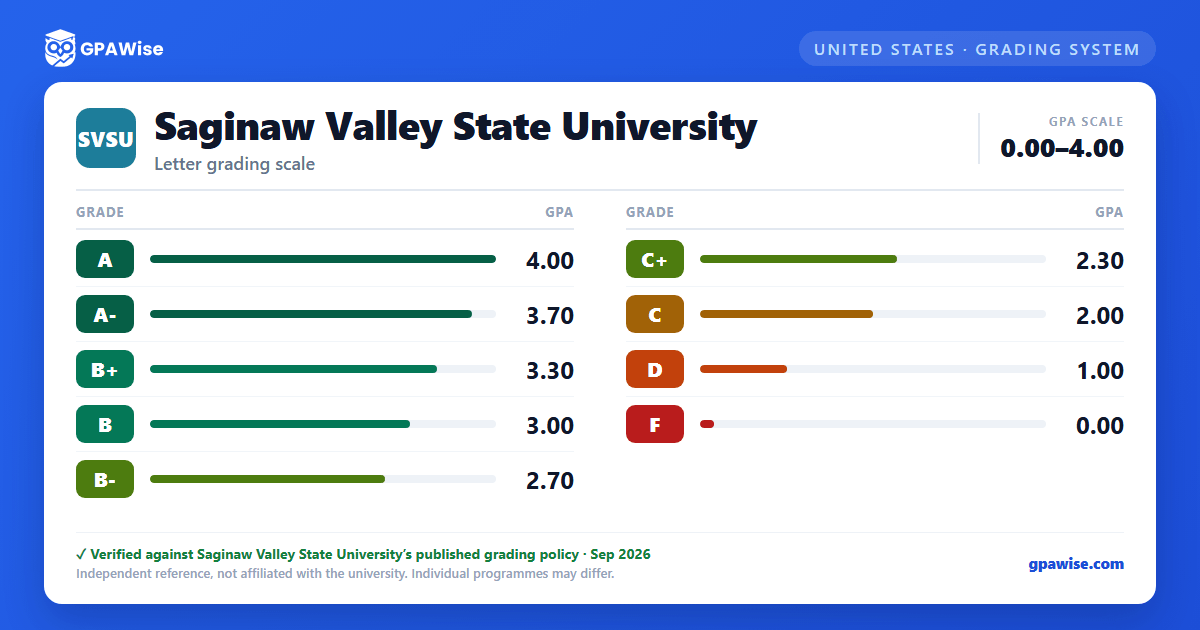

Grading System
SVSU grades on a 4.0 scale using plus and minus grades, implemented in Fall 1999. Grades of P (Pass), W (Withdrawn), WP (Withdrawn/Passing), I (Incomplete), N (No Grade/No Credit), and AU (Audited) do not count toward a student's GPA.
Prior to Fall 2017, F and WF (Withdrawn/Failing) grades were both counted in the GPA; since Fall 2017, WF is treated like a withdrawal and no longer affects the GPA.
Source: Official Transcript Key, Office of the Registrar — verified Sep 2026
How GPA Is Calculated
To calculate a GPA, multiply each course's grade-point value by its credit hours, add the results together, and divide by the total credit hours attempted.
A course may be repeated at SVSU to raise a grade; both grades remain on the transcript, but only the better grade counts in the GPA. A repeated course does not add to a student's cumulative earned credit hours if the student already earned credit in an earlier attempt. No course may be repeated at SVSU more than twice for a grade without the Dean's approval.
Starting Fall 2024, students may qualify for Grade Exclusion (marks a course "X" on the transcript and removes it from the GPA calculation, while keeping the original grade visible) or Academic Forgiveness (for students returning after 3 or more years away) for previous semesters.
Source: Combines Official Transcript Key and Grading System FAQs, Office of the Registrar — verified Sep 2026
Degree GPA and Credit Requirements
Undergraduate degree requirements (Fall 2024 to present): a minimum 2.00 cumulative GPA with a grade of "C" or better in all basic skills, major, and minor courses, and a minimum of 120 credit hours (at least 30 credit hours completed at SVSU).
Graduate students must maintain a minimum cumulative GPA of 3.00 (B) on a 4.0 scale to remain in good academic standing; falling below the minimum standard set by a graduate program can result in dismissal from that program.
Source: Official Transcript Key, Office of the Registrar — verified Sep 2026
Latin Honors and Semester Honor Lists
Undergraduate Latin honors (Fall 1977 to present) require a minimum of 62 credits completed at SVSU, with 45 of those credits graded on the A-F scale:
- Cum Laude: 3.40 - 3.59 cumulative GPA
- Magna Cum Laude: 3.60 - 3.79 cumulative GPA
- Summa Cum Laude: 3.80 - 4.00 cumulative GPA
Dean's List requires a minimum 3.40 GPA, and President's List a minimum 4.00 GPA, each in at least 12 credits of 100-level-or-above coursework graded on the A-B-C-D-F scale. Both lists are published only for fall and winter semesters, after the incomplete-grade deadline.
Source: Combines Official Transcript Key and Grading System FAQs, Office of the Registrar — verified Sep 2026
Repeating a Course at Another Institution
A course taken at SVSU may only be repeated at another institution if it is equivalent to the SVSU course and the original SVSU grade was a D, F, or WF. The other institution must be regionally accredited, and a grade of "C-" or better must be earned in the repeated course. The grade earned elsewhere does not transfer and does not recalculate the SVSU GPA.
Source: Grading System FAQs, Office of the Registrar — verified Sep 2026
Frequently asked questions
What grading scheme does Saginaw Valley State University (SVSU) use?
Where does this SVSU grade scale come from?
Why do I have an NR grade on my transcript?
An NR (Not Reported) grade means the instructor had not yet submitted an official grade by the posting deadline. It is replaced with the correct letter grade once the instructor submits it to the Office of the Registrar.
Source: Grading System FAQs, Office of the Registrar — verified Sep 2026
What is a W grade and how does it affect my GPA?
A W (Withdrawal) grade means a student withdrew from a class; it does not count toward the GPA. Dropping below 12 credit hours can affect financial aid, so students receiving aid should confirm with the Campus Financial Services Center before withdrawing.
Source: Grading System FAQs, Office of the Registrar — verified Sep 2026
What is an Incomplete Contract?
An Incomplete (I) grade is arranged between a student and instructor to allow extra time to finish coursework after the grading deadline, for credible emergencies outside the student's control. Students have up to four weeks into the following semester to complete the Incomplete Contract; the deadline is set by university policy and is not adjustable.
Source: Grading System FAQs, Office of the Registrar — verified Sep 2026
How can I appeal my final grade?
A student who believes a final grade was submitted incorrectly may appeal by requesting a grade change within 30 calendar days of the grade being submitted to the Office of the Registrar, following the Grade Grievance Procedure in the SVSU Student Handbook.
Source: Grading System FAQs, Office of the Registrar — verified Sep 2026
