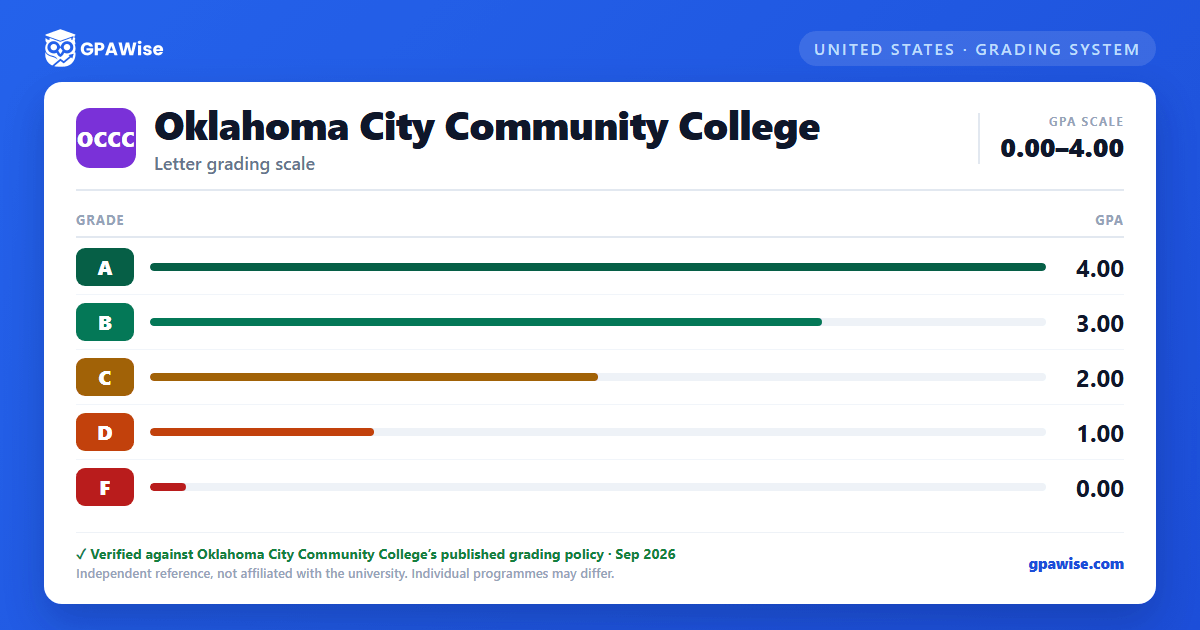

Grade Notations Not Counted in GPA
Beyond the letter grades A through F, OCCC's transcript uses several notations that carry no grade-point value and are never used in computing a GPA:
- S (Satisfactory) — used in a limited number of courses to indicate minimal competencies met, and for all Prior Learning Assessment (PLA) credit.
- U (Unsatisfactory) — indicates minimum requirements were not met in a course designated for S/U grading.
- I (Incomplete) — issued at the instructor's discretion under a completion contract; replaced by a standard grade once work is finished, or becomes permanent after one year.
- W (Official Withdrawal) — automatic for a student who withdraws by the deadline (typically the twelfth week of a sixteen-week semester).
- AW (Administrative Withdrawal) — an institution-initiated withdrawal for disciplinary, financial, or other administrative reasons.
- AU (Audit) — the student receives no credit for the course.
Source: Catalog 2026-2027, Academic Information, "Definitions and Provisions" — verified Sep 2026
Cumulative, Graduation, and Retention GPA
OCCC tracks three related but distinct GPA figures:
- Cumulative GPA includes all coursework attempted, except developmental (zero-level) coursework.
- Graduation GPA is the same as the retention GPA but excludes physical education activity courses.
- Retention GPA includes all coursework attempted, except developmental coursework and any hours forgiven under the Repeat, Reprieve, or Renewal provisions.
Academic forgiveness comes in three forms. Under the repeat provision, a student may repeat up to four courses (max 18 credit hours) in which a D or F was originally earned and petition to have only the later grade count toward the retention/graduation GPA; a pre-existing graduation GPA is not adjusted retroactively. Academic renewal lets a student with at least five years since a poor semester request a fresh start, provided they have since earned at least twelve credit hours at a 2.0 GPA or better with no grade below a C; a student may use renewal or reprieve only once each in their academic career. Academic reprieve covers one or two consecutive terms with a GPA below 2.0, under similar eligibility rules, after a three-year wait. Reprieved or renewed terms remain on the transcript marked with an asterisk and are excluded from the retention/graduation GPA but still count toward the cumulative GPA.
Source: Catalog 2026-2027, Academic Information, GPA definitions and Academic Forgiveness — verified Sep 2026
Academic Notice, Probation, and Suspension
Students fall into academic notice if their retention GPA drops below 2.0 while still above the probation/suspension thresholds. Academic probation applies when cumulative GPA falls below these minimums:
| Credit hours attempted | Minimum cumulative GPA |
|---|---|
| 0 – 30 semester credit hours | 1.7 |
| More than 30 semester credit hours | 2.0 |
A student placed on probation must achieve a 2.0 semester GPA in regularly graded coursework (excluding activity/performance courses) by the end of that semester, or meet minimum retention standards, to continue. A transfer student already on probation or suspension elsewhere, or who does not meet OCCC's own retention standards, is admitted on probation. A student who fails to meet probation terms is suspended for the next 16-week semester; a second suspension bars readmission until the retention GPA is restored to standard through coursework completed elsewhere.
Source: Catalog 2026-2027, Academic Information, "Academic Standards" — verified Sep 2026
Honors Program and Honor Rolls
To graduate with honors, a student must hold a minimum cumulative or retention GPA of 3.25 and complete four honors projects tied to courses in which at least a B was earned. Entering freshmen (or students with fewer than 12 college credit hours) qualify for the Honors Program with a 22+ composite ACT score or a 3.25+ high school GPA; continuing students need 12+ completed college-level credit hours and a 3.25+ cumulative or retention GPA.
Each fall and spring semester, students may also be named to an Honor Roll: the President's Honor Roll requires a 4.0 semester GPA while carrying 12+ credit hours (or a 4.0 GPA across two consecutive part-time semesters at 6+ hours each); the Vice President's Honor Roll requires at least a 3.50 semester GPA under the same credit-hour terms.
Source: Catalog 2026-2027, Academic Information, "Honors Program" and "Honor Rolls" — verified Sep 2026
Credit Through Prior Learning Assessment
OCCC awards Advanced Standing Credit for prior learning demonstrated outside the classroom, always posted with a grade of S (not counted toward GPA). Exam-based PLA credit is available for passing scores on CLEP, AP, DSST, and similar formal exams, with minimum passing scores set by OCCC Academic Affairs; credit posts only after the student completes twelve college-level credit hours at OCCC. Military-based PLA credit is available for military training or experience with an American Council on Education credit recommendation and an OCCC course equivalence, again posting only after twelve completed college-level credit hours. Other forms of PLA (institutional exams or a portfolio) may also be available on request.
Source: Catalog 2026-2027, Academic Information, "Advanced Standing Credit Through Prior Learning Assessment" — verified Sep 2026
Frequently asked questions
What grading scheme does Oklahoma City Community College (OCCC) use?
Where does this OCCC grade scale come from?
What are OCCC's GPA rules?
Source: Catalog 2026-2027, Academic Information, GPA definitions and Academic Forgiveness — verified Sep 2026
What are OCCC's academic standing rules?
Source: Catalog 2026-2027, Academic Information, "Academic Standards" — verified Sep 2026
How are honors and awards decided at OCCC?
Source: Catalog 2026-2027, Academic Information, "Honors Program" and "Honor Rolls" — verified Sep 2026
How does OCCC treat transfer credit?
Source: Catalog 2026-2027, Academic Information, "Advanced Standing Credit Through Prior Learning Assessment" — verified Sep 2026
