
Other academic record symbols
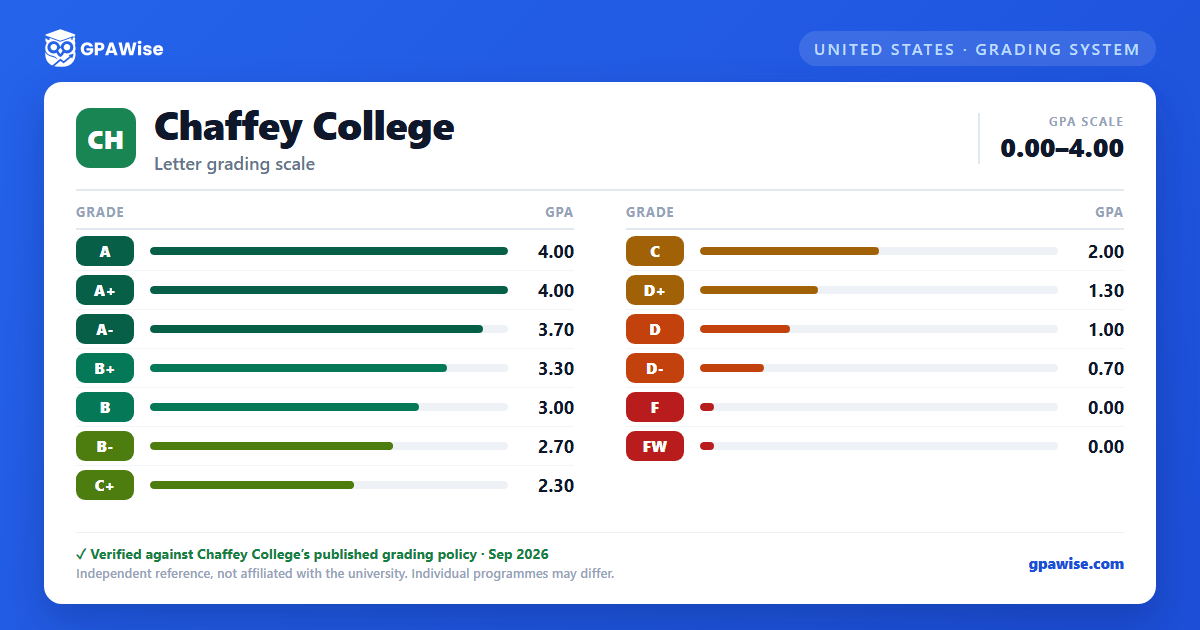
Beyond the standard letter grades, Chaffey College uses several other record symbols. "FW" (Unauthorized Withdrawal) is assigned when a student stops participating in a course after the withdrawal deadline without earning a passing grade and without an approved withdrawal; it is treated as a failing grade (0.0 grade points) for GPA purposes.
Non-evaluative symbols carry no grade points and are not counted in the GPA: "I" (Incomplete, must be resolved within one year or defaults to an alternate grade), "IP" (In Progress, for courses extending beyond the normal term), "RD" (Report Delayed), "W" (Withdrawal, for withdrawals between 22% and 61% of the course), "MW" (Military Withdrawal), and "EW" (Excused Withdrawal).
Source: AP 4230 Grading and Academic Record Symbols, Chaffey Community College District — verified Aug 2026
What counts toward the GPA
The cumulative GPA is calculated using only the evaluative letter grades (A+ through F, and FW). Courses taken on a Pass/No Pass basis are excluded from the GPA calculation entirely — units are awarded for a "P" (Pass) but neither "P" nor "NP" (No Pass) units factor into the grade point average.
Source: AP 4230 Grading and Academic Record Symbols, Chaffey Community College District — verified Aug 2026
Frequently asked questions
What grading scheme does Chaffey College use?
Where does this Chaffey College grade scale come from?
What are Chaffey College's GPA rules?
Source: AP 4230 Grading and Academic Record Symbols, Chaffey Community College District — verified Aug 2026
