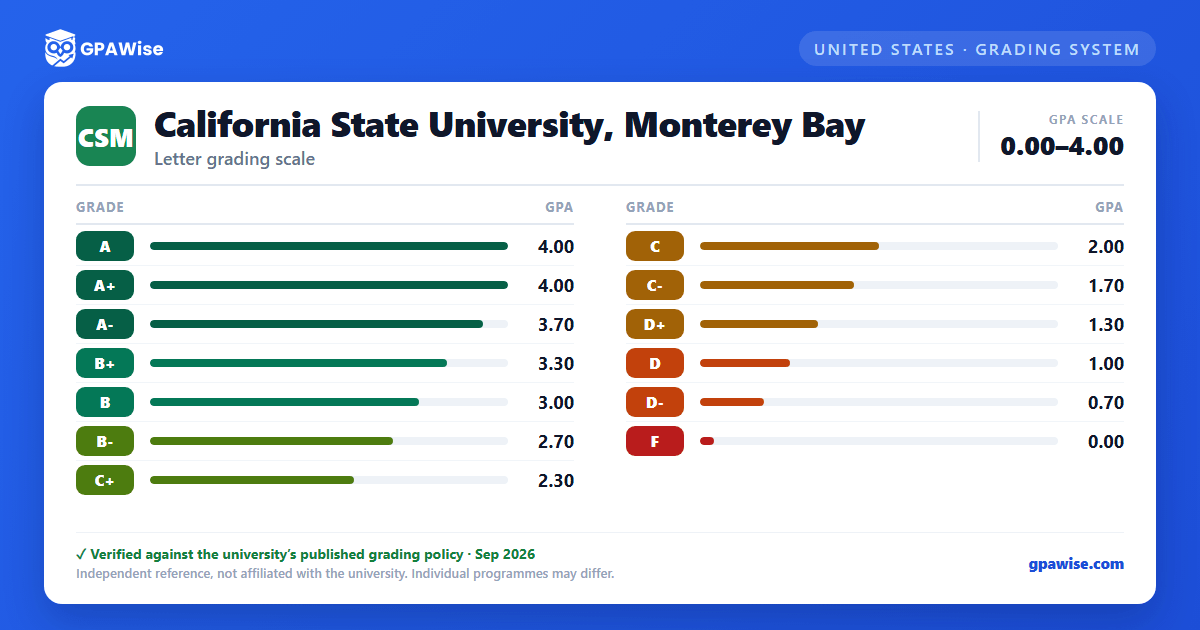

Grading Symbols and GPA-Counted Grades
CSUMB permits either letter grades A, B, C, D, F (with plus or minus designations) or CR/NC (credit/no-credit) grade modes. To earn a CR designation, undergraduates need an assessment equivalent to C- or better, and graduate students need B- or better.
Administrative symbols AU (Audit), I (Incomplete Authorized), RD (Report Delayed), RP (Report in Progress), and W (Withdrawal) are not used in calculating grade point average. IC (Incomplete Charged) is counted as a failing grade for GPA purposes, and WU (Withdrawal Unauthorized) is treated as equivalent to an F for GPA purposes — neither carries a separately published point value beyond that description.
Source: Policies & Procedures, Grading Policy section, Catalog 2026-2027 — verified Aug 2026
Repeated Courses
Only courses repeated at CSUMB may be used to adjust the GPA; grades earned at other institutions may not replace CSUMB course grades.
Undergraduates may repeat a course in which C- or lower was assigned; when repeated, only the highest grade counts toward the GPA, up to 16 units of grade forgiveness (with an additional 12 units possible by petition, in which case both grades are calculated into the GPA rather than the original being replaced). No more than two total repeat attempts beyond the original (three total) are permitted per course.
Graduate and credential-seeking students may repeat for GPA adjustment only a course in which B- or lower was assigned; all grades then count toward the GPA (no forgiveness), and no more than two distinct courses may be repeated in this way during the program.
Source: Policies & Procedures, Repeated Courses section, Catalog 2026-2027 — verified Aug 2026
Academic Notice and Disqualification
Undergraduates are placed on academic notice (probation) if their cumulative or CSUMB GPA falls below a C (2.0). Graduate and credential-seeking students are placed on academic notice if their cumulative GPA (in units attempted since admission) falls below a B (3.0).
Undergraduates on notice are subject to disqualification based on cumulative GPA by class level: below 1.50 as a freshman (fewer than 30 semester hours), below 1.70 as a sophomore (30-59), below 1.85 as a junior (60-89), below 1.95 as a senior (90+), or below 2.0 as a second-baccalaureate student.
Undergraduates not on notice may still be disqualified under Title 5 §41300(c) if their cumulative GPA falls below 1.0 at the end of any term and is unlikely to recover within a reasonable period.
Source: Policies & Procedures, Academic Notice / Academic Disqualification sections, Catalog 2026-2027 — verified Aug 2026
Dean's List and Latin Academic Honors
Dean's List recognizes undergraduates who earn a 3.5 GPA or better in the preceding semester, having completed at least 12 letter-graded units at CSUMB with no incomplete grades, no grade lower than C, and good academic standing.
Latin academic honors (first baccalaureate only, minimum 30 units in residence at CSUMB) are awarded by cumulative GPA including the final semester: Summa Cum Laude at 3.90 or greater, Magna Cum Laude from 3.75 to 3.89, and Cum Laude from 3.50 to 3.74.
Source: Policies & Procedures, Honors section, Catalog 2026-2027 — verified Aug 2026
Transfer Grades and GPA
Grades earned in courses taken at other institutions may not be used to replace grades in CSUMB courses — only courses repeated at CSUMB itself may be used to adjust a student's GPA.
Source: Policies & Procedures, Repeated Courses section, Catalog 2026-2027 — verified Aug 2026
Frequently asked questions
What grading scheme does California State University, Monterey Bay (CSUMB) use?
Where does this CSUMB grade scale come from?
What are CSUMB's GPA rules?
Source: Policies & Procedures, Repeated Courses section, Catalog 2026-2027 — verified Aug 2026
What are CSUMB's academic standing rules?
Source: Policies & Procedures, Academic Notice / Academic Disqualification sections, Catalog 2026-2027 — verified Aug 2026
How are honors and awards decided at CSUMB?
Source: Policies & Procedures, Honors section, Catalog 2026-2027 — verified Aug 2026
How does CSUMB treat transfer credit?
Source: Policies & Procedures, Repeated Courses section, Catalog 2026-2027 — verified Aug 2026
