
How grading works at Bard College
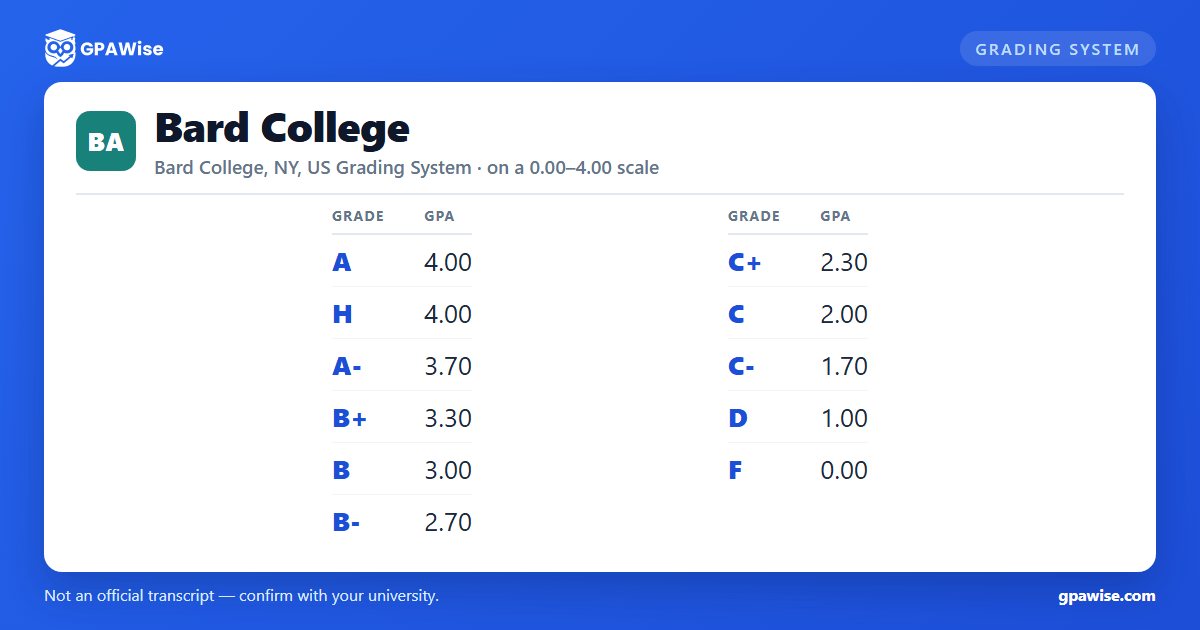
Bard grades on a 4.0 scale from A to F, with plus/minus steps on A, B, and C only: A (4.0), A- (3.7), B+ (3.3), B (3.0), B- (2.7), C+ (2.3), C (2.0), C- (1.7), D (1.0), F (0.0). There is no A+ grade, and no D+ or D- grade.
A restricted H (Honors) grade, awarded only in the Arts Division and for Written Arts, also carries 4.0 points and counts toward the GPA.
Source: Bard College Registrar, Academic Guide (Understanding the Grading Key) — verified Aug 2026
How your GPA is calculated at Bard
Grades of P (Pass), R (Registration Credit/Audit), W (Withdrew), I (Incomplete), M (Missing), S (Satisfactory), and U (Unsatisfactory) carry no grade points and are not counted in your GPA.
Bard adds the GPA to your transcript as a service, but states it is "not used for academic honors or other academic evaluation purposes" at Bard, and Bard College does not rank its students. Prior to 1988, GPAs were not computed or recorded at all.
Source: Bard College Registrar, Academic Guide (Understanding the Grading Key; Grade Point Average) — verified Aug 2026
Academic probation at Bard
Full-time students are placed on academic probation if they complete fewer than 12 credits in a semester or earn a semester GPA below 2.0; first-semester students are also placed on probation for failing the First-Year Seminar.
To be removed from probation, a student must complete at least 12 credits with a GPA of 2.0 or above the following semester, plus any additional conditions set by the Faculty Executive Committee. Students on probation for two consecutive semesters, or who receive three F grades (or two Fs and two Ds), may be dismissed.
Source: Bard College, Bachelor's Degree Requirements and Regulations (Academic Probation) — verified Aug 2026
Degree requirements at Bard
A Bard bachelor's degree requires 128 credits (160 for five-year dual-degree programs), including at least 64 credits completed at Bard's Annandale-on-Hudson campus and a minimum of two years of full-time enrollment there. Students must also complete Moderation and a Senior Project.
Source: Bard College, Bachelor's Degree Requirements and Regulations — verified Aug 2026
The Bard Honors List
You're named to Bard's Honors List for a semester in which you earn a semester GPA of 3.8 or higher, carry a full-time course load of at least 12 credits, take no more than 4 credits pass/fail, and have no incomplete grades or withdrawals that semester.
Source: Bard College Registrar, Honors List — verified Aug 2026
Frequently asked questions
Can I save my semesters and track my CGPA at Bard College?
How do I convert SGPA to CGPA at Bard College?
Can I add past semester GPAs without entering every course?
Is my CGPA tracker data sent to your servers?
Is this Bard College GPA calculator free?
Does Bard College use A+ or D+/D- grades?
No. Bard's Grading Key lists A, A-, B+, B, B-, C+, C, C-, D, and F -- there is no A+ grade, and no D+ or D- grade, at any point value.
Source: Bard College Registrar, Academic Guide (Understanding the Grading Key) — verified Aug 2026
Does a Pass (P) grade affect my GPA at Bard?
No. Bard's Grading Key marks P (Pass) as not used in GPA calculations. A grade of P requires work equivalent to a C or better (equivalent to a D or better prior to Fall 2016).
Source: Bard College Registrar, Academic Guide (Understanding the Grading Key) — verified Aug 2026
