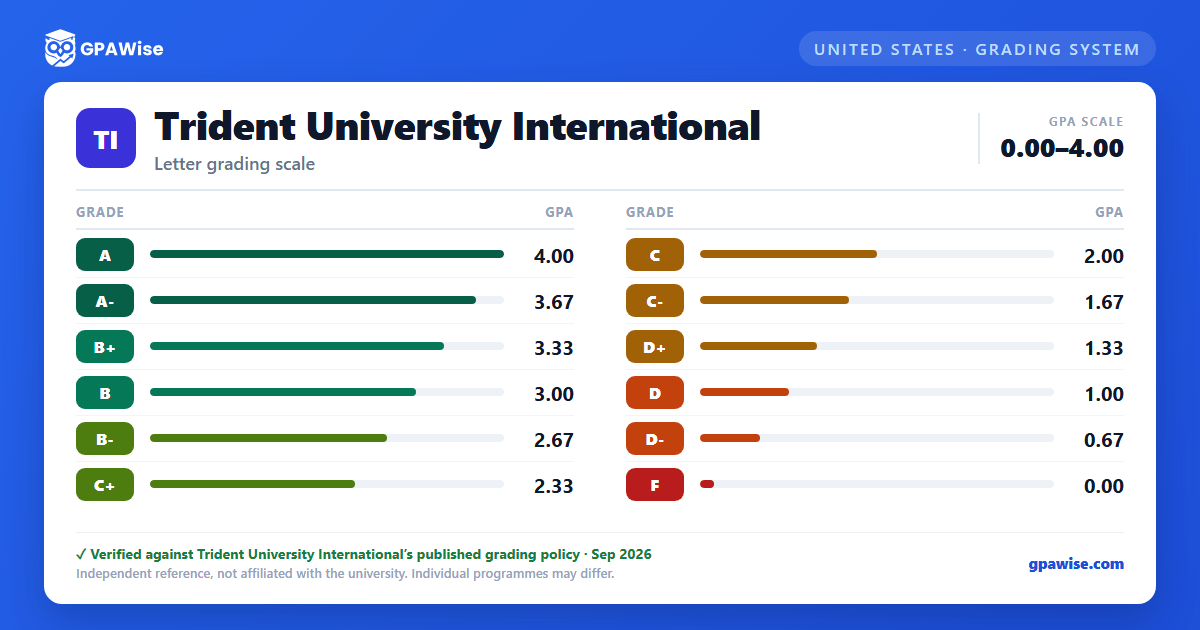

What Counts Toward GPA
Grades of W (withdrew after add/drop), AR (Academic Renewal), I (Incomplete), R (repeated course), NP (Not Passing), PR (In Progress), and P (Passing) are not included in the cumulative GPA calculation.
Plus and minus grades adjust the base grade point by 0.333 in either direction (for example, C+ is worth 2.333); there is no A+ grade at Trident.
When a course is repeated, only the most recent grade is used in the GPA calculation; the original grade remains on the transcript but is excluded once superseded. Transfer credits are not included in the calculation of overall GPA.
Source: Trident 2026 Academic Catalog — Grading and Academic Performance; Repeating Courses; Transfer of Credits — verified Sep 2026
Satisfactory Academic Progress
To maintain good academic standing and financial aid eligibility, students must demonstrate Satisfactory Academic Progress (SAP), measured against qualitative and quantitative standards and evaluated at the end of each evaluation period.
Source: Trident 2026 Academic Catalog — SAP / Academic Warning / Financial Aid Warning / Academic Dismissal section — verified Sep 2026
Graduation Requirements
For undergraduate degrees, Trident requires a minimum cumulative GPA of 2.0 in all undergraduate coursework taken at Trident, a minimum grade of D in undergraduate coursework, a minimum grade of C in the program capstone course, at least 120 semester hours (some programs require more), and a minimum 25% residency at Trident.
Requirements vary by degree level; Master's and Doctoral programs publish their own minimums, not covered here.
Source: Trident 2026 Academic Catalog — Graduation Requirements, Undergraduate-Level Programs — verified Sep 2026
Graduation Honors
Trident offers graduation with honors for Associate's, Bachelor's, and Master's degrees:
- Cum Laude: cumulative GPA of 3.4 through 3.59
- Magna Cum Laude: cumulative GPA of 3.6 through 3.79
- Summa Cum Laude: cumulative GPA of 3.8 and above
Source: Trident 2026 Academic Catalog — Graduation Requirements, Graduation Honors Recognition — verified Sep 2026
Transfer of Credits
Credits are considered for transfer from any CHEA-approved, institutionally accredited college or university; Trident charges no fee for the review of transfer credit. Official transcripts are due by the end of the student's second session of enrollment. Transfer credits are not included in the calculation of overall GPA. Transfer decisions may be appealed to the College Dean or designee.
Source: Trident 2026 Academic Catalog — Admission and Transfer Policies, Transfer of Credits — verified Sep 2026
Frequently asked questions
What grading scheme does Trident University International use?
Where does this Trident University International grade scale come from?
What are Trident University International's GPA rules?
Source: Trident 2026 Academic Catalog — Grading and Academic Performance; Repeating Courses; Transfer of Credits — verified Sep 2026
What are Trident University International's academic standing rules?
Source: Trident 2026 Academic Catalog — SAP / Academic Warning / Financial Aid Warning / Academic Dismissal section — verified Sep 2026
What does Trident University International require to graduate?
Source: Trident 2026 Academic Catalog — Graduation Requirements, Undergraduate-Level Programs — verified Sep 2026
How are honors and awards decided at Trident University International?
Source: Trident 2026 Academic Catalog — Graduation Requirements, Graduation Honors Recognition — verified Sep 2026
How does Trident University International treat transfer credit?
Source: Trident 2026 Academic Catalog — Admission and Transfer Policies, Transfer of Credits — verified Sep 2026
