
GPA Calculation Rules
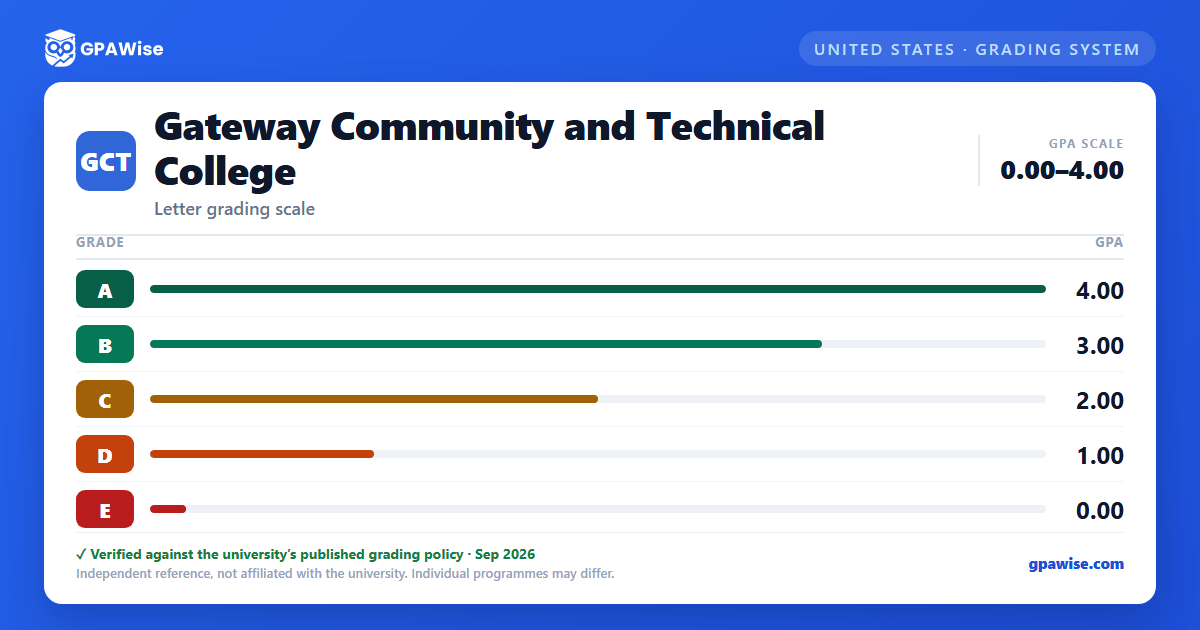
Gateway's GPA is derived from all courses taken at KCTCS institutions. It is the ratio of total grade points earned to total credit hours attempted, excluding courses taken on a pass/fail basis and courses graded W, I, or IP.
A repeated course counts only once: the highest grade earned in a completed course is the only one included in the cumulative GPA, though credit counts once toward a credential.
Students readmitted after two or more years away, who complete at least 12 college-level credit hours with a 2.0 GPA or better after readmission, may declare academic bankruptcy and exclude all pre-interruption coursework from their GPA (usable once).
Source: KCTCS Catalog 2026-2027, Academic Related Policies and Rules — verified Aug 2026
Academic Probation, Suspension, and Reinstatement
A student whose cumulative GPA falls below 2.0 at the end of a term is placed on academic probation, and is removed from probation by earning at least a 2.0 cumulative GPA.
A student placed on probation for two consecutive terms who fails to reach a 2.0 cumulative or term GPA in the third term is academically suspended and may not enroll in courses counting toward a KCTCS degree.
A suspended student may be reinstated after sitting out at least one 16-week semester (two, after a second suspension); reinstated students return on probation and face suspension again if they fail to earn a 2.0 term GPA in their first term back.
Source: KCTCS Catalog 2026-2027, Academic Related Policies and Rules — verified Aug 2026
Graduation Requirements
All KCTCS degrees, diplomas, and certificates require completing at least 25% of the credential's approved curriculum credits at the KCTCS college granting it.
Associate degrees require 60 credits and a cumulative GPA of at least 2.0; diplomas require a minimum of 36 hours with a cumulative GPA of at least 2.0; certificates require the approved curriculum with a GPA of at least 2.0 in the courses required for the certificate.
Source: KCTCS Catalog 2026-2027, Academic Related Policies and Rules — verified Aug 2026
Dean's List and Graduation Honors
The Dean's List recognizes students who earn a semester GPA of 3.5 or higher in 12 or more credit hours numbered 100 or above.
Graduates who complete at least 45 credit hours toward a degree (30 toward a diploma) graduate "With Distinction" at a 3.40-3.59 GPA on all work attempted, or "With High Distinction" at 3.60 or higher.
Source: KCTCS Catalog 2026-2027, Academic Related Policies and Rules — verified Aug 2026
Frequently asked questions
What grading scheme does Gateway Community and Technical College use?
Where does this Gateway Community and Technical College grade scale come from?
What are Gateway Community and Technical College's GPA rules?
Source: KCTCS Catalog 2026-2027, Academic Related Policies and Rules — verified Aug 2026
What are Gateway Community and Technical College's academic standing rules?
Source: KCTCS Catalog 2026-2027, Academic Related Policies and Rules — verified Aug 2026
What does Gateway Community and Technical College require to graduate?
Source: KCTCS Catalog 2026-2027, Academic Related Policies and Rules — verified Aug 2026
How are honors and awards decided at Gateway Community and Technical College?
Source: KCTCS Catalog 2026-2027, Academic Related Policies and Rules — verified Aug 2026
