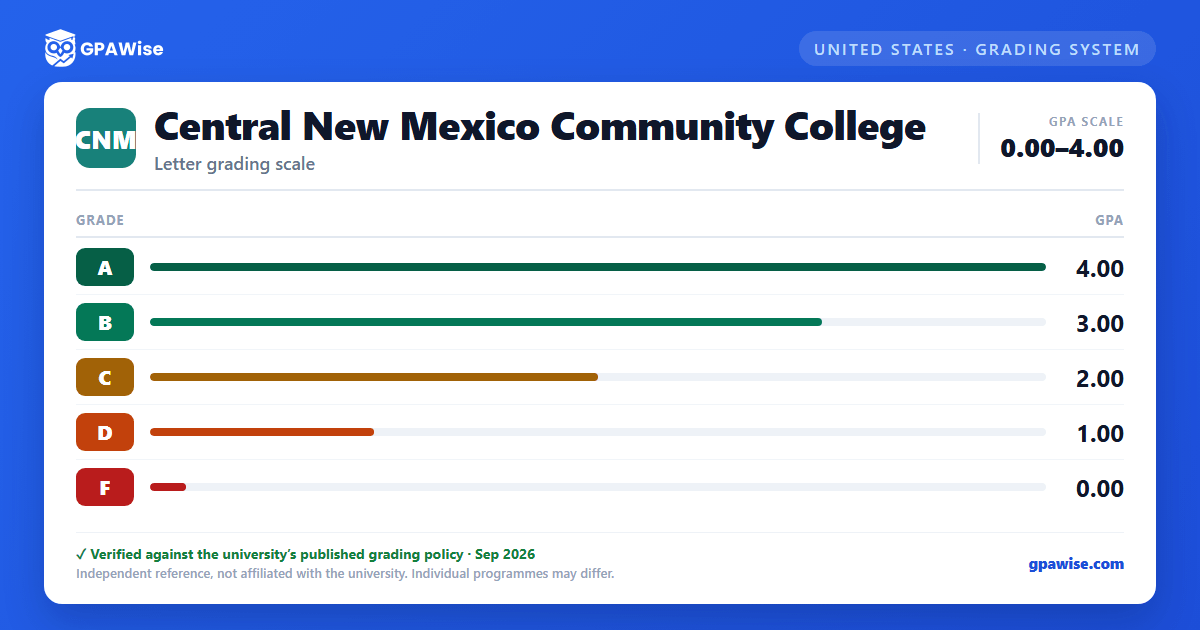

How CNM Calculates GPA
CNM computes grade point average (GPA) by multiplying each course's credit hours by the quality-point value of the grade earned, summing the results, and dividing by the total GPA credit hours attempted. For example, a four-credit-hour course with a grade of A carries 16 quality points.
Grades of I, CR, PR, NC, W, AU, and TR are not calculated into the GPA:
- CR (Credit): equivalent to at least a C, but not computed in the GPA.
- NC (No Credit): not computed in the GPA.
- PR (In Progress): course work not completed; not computed in the GPA.
- AU (Audit): no credit earned; not computed in the GPA.
- I (Incomplete): not computed in the GPA. Must be resolved within five weeks after the start of the following term or it automatically reverts to F or NC.
- W (Withdrew): used for student, instructor, and administrative withdrawals.
- TR/TRD: credit for transfer or nontraditional coursework; not computed in the GPA.
When a course is repeated, every attempt appears on the transcript, but only the higher grade is used to calculate the GPA. This applies to courses with identical abbreviations and numbers, with limited exceptions (topics, problems, internship, and cooperative education courses).
Source: CNM "Grades" page: GPA Requirement, Grading System, Incomplete Grade Assignment, Course Repeat Process sections — verified Aug 2026
Academic Standing at CNM
Good Standing applies to students with a cumulative GPA of 2.0 or higher.
A student whose cumulative GPA falls between 1.75 and 1.99 in a given term receives a Warning. A student whose cumulative GPA falls below 1.75 in a given term is placed on Academic Probation, effective the following term (based on at least 16 GPA credit hours attempted at CNM).
A student is suspended after two consecutive terms of probation when both the term and cumulative GPA remain below 1.75. The initial suspension lasts one term; subsequent suspensions last one year. A suspended student may appeal in writing to the Director of Enrollment Services, with further appeal available to the Student Academic Appeals Committee.
Source: CNM "Academic Standards" page — verified Aug 2026
Honors at CNM
The Dean's List (Honor Roll) is compiled each Fall, Spring, and Summer term for students who complete at least 12 credit hours with traditional grades and achieve a term GPA of 3.5 or higher.
Students graduate with highest honors at a cumulative GPA of 4.0, and with honors at a cumulative GPA of 3.6 to 3.9. The honor is noted on degrees, certificates, and official transcripts.
Source: CNM "Academic Standards" page — verified Aug 2026
Frequently asked questions
What grading scheme does Central New Mexico Community College (CNM) use?
Where does this CNM grade scale come from?
What are CNM's GPA rules?
Source: CNM "Grades" page: GPA Requirement, Grading System, Incomplete Grade Assignment, Course Repeat Process sections — verified Aug 2026
What are CNM's academic standing rules?
Source: CNM "Academic Standards" page — verified Aug 2026
How are honors and awards decided at CNM?
Source: CNM "Academic Standards" page — verified Aug 2026
