
Grading notations
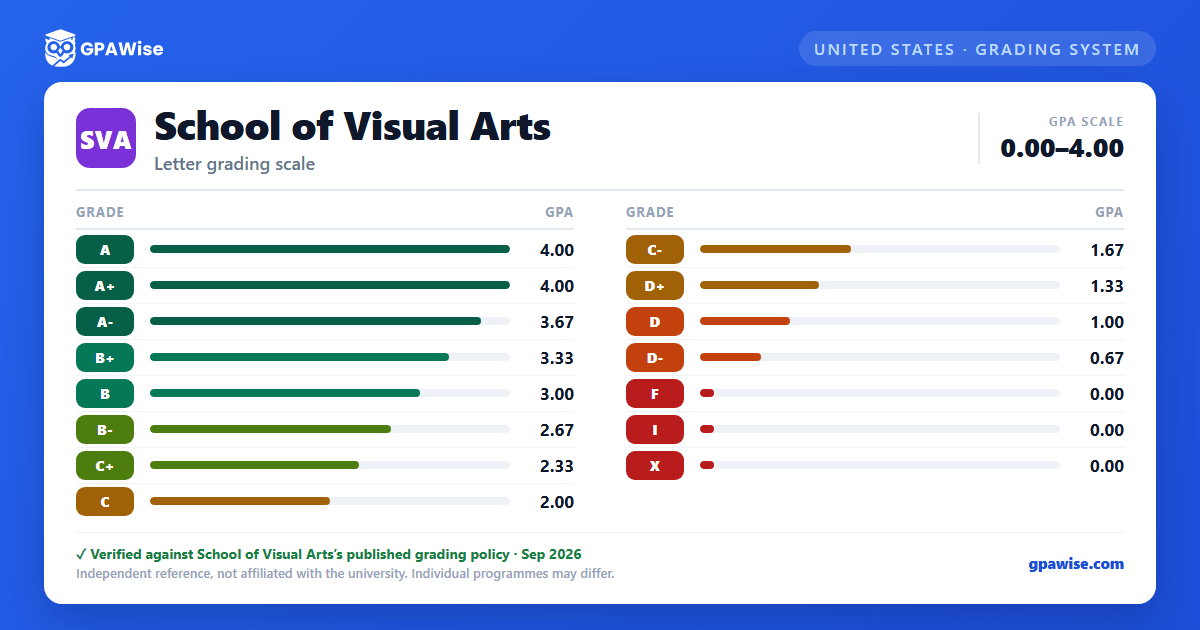
Beyond the standard letter grades, SVA's Handbook defines several other transcript notations:
- I (Incomplete): awarded to give a student additional time to finish a project or assignment. It is tabulated as a failing grade and should be resolved within 60 days of the end of the term; unresolved Incompletes automatically convert to F.
- X: failure for excessive absences.
- W (Administrative withdrawal): does not affect a student's term or cumulative GPA, but appears on the transcript as attempted, not earned, credit.
- P / HP (Pass / High Pass): awarded for successful completion of a course in graduate programs that use a pass/fail system.
Source: SVA Handbook 2026-2027, "Grading Information" and "Incomplete Grades" sections — verified Sep 2026
Repeated courses and graduate grade floors
Repeating a course is allowed only if a student failed or withdrew from it, or if the course content has materially changed since it was last taken and passed. The grade from the most recent attempt is used in the cumulative GPA; grades from earlier attempts remain on the transcript and still count toward the GPA for the term in which they were earned, but not toward the cumulative GPA.
For graduate students, only course grades of B- or higher apply toward the degree; a grade below B- may require repeating the course, though it still counts toward term and cumulative GPA.
Source: SVA Handbook 2026-2027, "Repeating Courses" and "Graduate-Level Grading Policies" sections — verified Sep 2026
Good academic standing and probation
Undergraduate students must maintain a cumulative GPA of at least 2.0 and complete minimum course and departmental degree requirements each semester. A student is not in good standing if their cumulative or semester GPA is 2.00 or below, they complete fewer than 12 credits in a semester without prior permission, they are withdrawn from two or more courses due to excessive absences, or they fall behind minimum credit-completion pace (fewer than 24 credits after two semesters, 54 after four, or 84 after six). Undergraduates are dismissed after two consecutive semesters on academic probation.
Graduate students must maintain a minimum cumulative GPA of 3.0 to remain in good academic standing, and are dismissed from their program after two consecutive semesters without good standing.
Source: SVA Handbook 2026-2027, "Academic Standing and Probation" section — verified Sep 2026
Term Honors
Each fall and spring semester, matriculated undergraduate students who complete 12 credits with no Incomplete grades and whose semester GPA is in the top 20 percent of their major receive Term Honors; those in the top 5 percent receive High Term Honors. Term Honors status is recorded on the official transcript.
Source: SVA Handbook 2026-2027, "Term Honors" section — verified Sep 2026
Transfer credit
Official transcripts are required from all institutions attended to be awarded transfer credit; SVA also accepts secure electronic transcripts via Parchment Exchange (Naviance), the National Student Clearinghouse, and Scrip-Safe.
For graduate programs, transfer credit (including credit carried over from switching between SVA graduate programs) may not exceed 25 percent of a program's total credit requirements for graduation.
Source: SVA Handbook 2026-2027, "Transfer Credits" section — verified Sep 2026
Frequently asked questions
What grading scheme does School of Visual Arts (SVA) use?
Where does this SVA grade scale come from?
What are SVA's GPA rules?
Source: SVA Handbook 2026-2027, "Repeating Courses" and "Graduate-Level Grading Policies" sections — verified Sep 2026
What are SVA's academic standing rules?
Source: SVA Handbook 2026-2027, "Academic Standing and Probation" section — verified Sep 2026
How are honors and awards decided at SVA?
Source: SVA Handbook 2026-2027, "Term Honors" section — verified Sep 2026
How does SVA treat transfer credit?
Source: SVA Handbook 2026-2027, "Transfer Credits" section — verified Sep 2026
