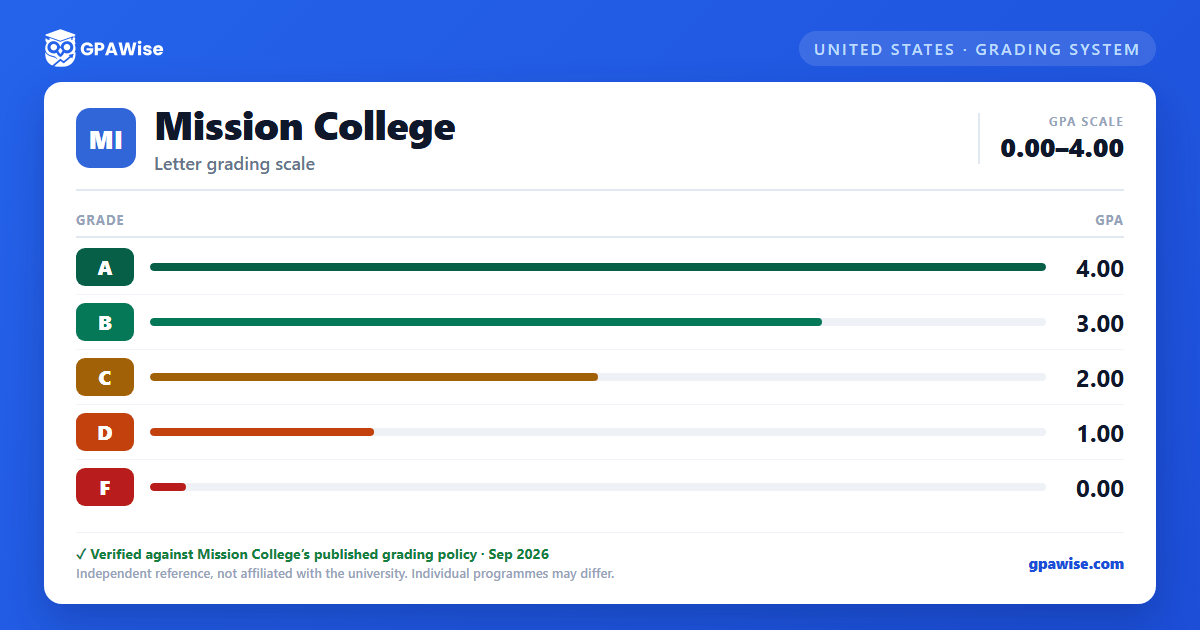

Pass/No Pass and Other Grade Symbols
Some courses may be taken Pass (P) / No Pass (NP); neither affects GPA. Incomplete (I), In Progress (IP), Report Delayed (RD), Withdrawal (W), Excused Withdrawal (EW), and Military Withdrawal (MW) are also excluded from GPA computation.
Source: Mission College Catalog 2026-2027, p.49-51 — verified Sep 2026
Grade Alleviation, Repetition, and Academic Renewal
A student who earns a D, F, or NP may repeat the course for grade alleviation up to three times (a fourth repetition needs a petition); only the most recent grade counts toward GPA. Academic Renewal can disregard up to 30 units of substandard work (D, F, NP, NC) from the cumulative GPA once a term has elapsed and 12 further units are completed with a GPA of at least 2.00.
Source: Mission College Catalog 2026-2027, p.50-51 — verified Sep 2026
Academic and Progress Notice, Dismissal, and Readmission
Students must maintain an overall GPA of 2.00 and complete at least 50% of attempted units. An institutional GPA below 2.00 leads through Academic Notice 1, Academic Notice 2, Subject to Dismissal, and Dismissal; a parallel Progress Notice track applies when unit-completion falls below 50%. Dismissed students may seek readmission via a counselor petition or a one-semester leave.
Source: Mission College Catalog 2026-2027, p.51-53 — verified Sep 2026
Associate Degree GPA Requirement
An Associate of Arts or Associate of Science degree requires the major completed with a C (or "P") or better and an overall GPA of at least 2.0 across all college transcripts. Associate Degree for Transfer (AA-T/AS-T) candidates likewise need an overall GPA of at least 2.0 in 60 CSU-transferable units.
Source: Mission College Catalog 2026-2027, p.33 — verified Sep 2026
Dean's List and Graduation Honors
Students completing 12+ units in a semester with a GPA of at least 3.00 qualify for the Dean's List (6-11.5 units for the part-time Dean's List). Graduates with a cumulative Mission College GPA of 3.30-4.0 receive Commencement honors: 3.30-3.49 Cum Laude, 3.50-3.79 Magna Cum Laude, 3.80-4.0 Summa Cum Laude.
Source: Mission College Catalog 2026-2027, p.52 — verified Sep 2026
Credit for Prior College Coursework
Mission College accepts coursework from other U.S. institutions that are fully accredited or listed as a candidate for accreditation in the U.S. Department of Education's accredited-institutions database. General education approved for an associate degree, CSU GE-B, IGETC, or Cal-GETC at another California Community College applies to the parallel category at Mission College; foreign coursework must first be evaluated by an accredited evaluation service, then reviewed by the Mission College Records Office.
Source: Mission College Catalog 2026-2027, p.53-55 — verified Sep 2026
Frequently asked questions
What grading scheme does Mission College use?
Where does this Mission College grade scale come from?
What are Mission College's GPA rules?
Source: Mission College Catalog 2026-2027, p.50-51 — verified Sep 2026
What are Mission College's academic standing rules?
Source: Mission College Catalog 2026-2027, p.51-53 — verified Sep 2026
What does Mission College require to graduate?
Source: Mission College Catalog 2026-2027, p.33 — verified Sep 2026
How are honors and awards decided at Mission College?
Source: Mission College Catalog 2026-2027, p.52 — verified Sep 2026
How does Mission College treat transfer credit?
Source: Mission College Catalog 2026-2027, p.53-55 — verified Sep 2026
