
Grading System
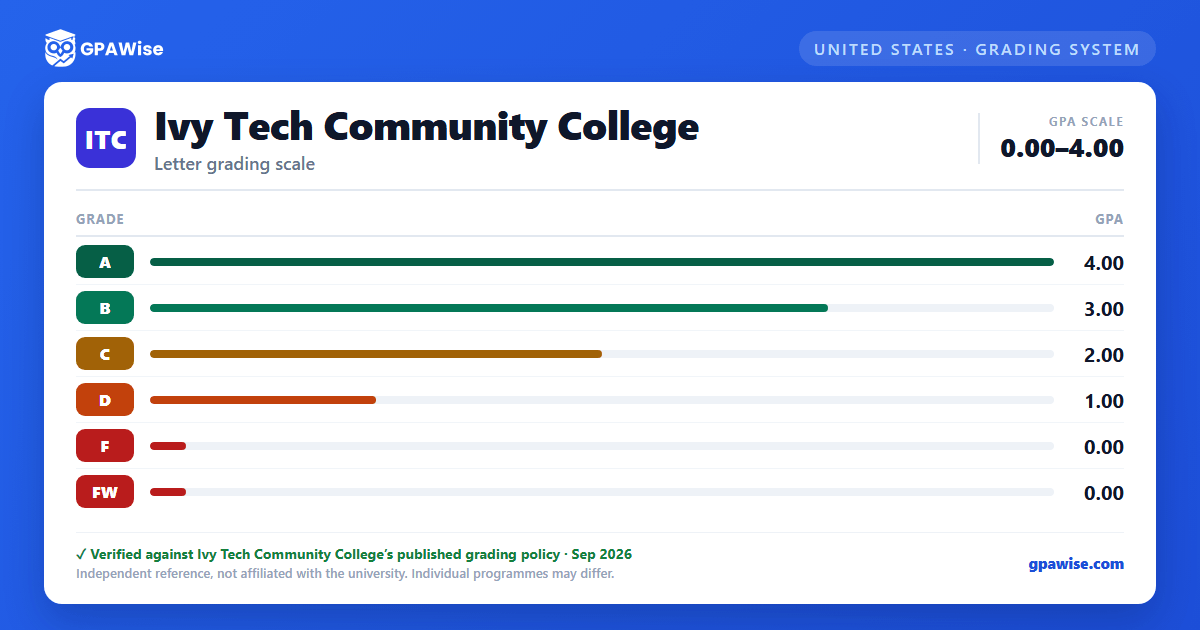
Ivy Tech Community College uses a grading system consisting of letter grades A, B, C, D, and F. Plus and minus grades are not used.
Status codes may be used to indicate a state or condition of a course on a student's record for which a grade has not been awarded: I (Incomplete), AU (Audit), S (Satisfactory), U (Unsatisfactory), V (Verified Competency), W (Withdrawal), and FW, which denotes a failing grade in a course where the student did not complete the last required academic event and acts the same as an F for GPA purposes.
Students may arrange to take some courses as pass/fail, declared at the time of registration: a status of "S" for satisfactory completion or "U" for unsatisfactory completion. Courses graded "S" do not count toward graduation requirements. "U" differs from "F" in that quality points are not computed and GPA is unaffected.
An "S" preceding a grade (e.g. "SA", "SB") denotes an Academic Skills course, equal in value to the corresponding letter grade. Academic Skills courses do not count toward graduation requirements, but credit hours are earned for them.
Source: Class Policies & Grades page, "Grading System" / "Status Codes" / "Pass/Fail Grading" / "S Grades" sections — verified Aug 2026
GPA Calculation and Repeats
Quality points are earned per course as the quality point value times the number of credits (e.g. an A in a 4-credit course earns 16 quality points). GPA is determined by dividing total credit hours attempted into total quality points earned, calculated to three decimal places for both term and cumulative GPA.
Students may repeat a course once to improve a grade. If the repeat grade is higher, the GPA reflects only the second attempt; the first attempt remains on the transcript but is excluded from the GPA calculation.
Under extenuating circumstances, a student may petition the Vice Chancellor of Academic Affairs to exclude coursework from the cumulative GPA. Excluded courses are not counted as earned credit and cannot satisfy program requirements, though the grade remains in the term GPA and on the transcript.
Source: Class Policies & Grades page, "Quality Points" / "Grade Point Average" / "Repeating a Course" / "Grade Exclusion" sections — verified Aug 2026
Academic Standing
Student progress is evaluated at the end of every term, placing each student into one of five statuses: Good, Academic Monitoring, Academic Monitoring Continued, Academic Dismissal, or Academic Reinstatement.
Source: Class Policies & Grades page, "Academic Standing" section; numeric thresholds are defined in a separate SSO-gated policy portal not covered by this document — verified Aug 2026
Dean's List
The Dean's List recognizes academic achievement during a term. To qualify, a student must be degree-seeking, have achieved a minimum 3.50 grade point average in non-academic-skills-advancement courses, have received no D or F grades during the term, have earned six or more Ivy Tech credits during the semester, and have earned at least 12 non-academic-skills-advancement credits total during their enrollment at Ivy Tech.
Source: Class Policies & Grades page, "Dean's List" section — verified Aug 2026
Frequently asked questions
What grading scheme does Ivy Tech Community College use?
Where does this Ivy Tech Community College grade scale come from?
What are Ivy Tech Community College's GPA rules?
Source: Class Policies & Grades page, "Quality Points" / "Grade Point Average" / "Repeating a Course" / "Grade Exclusion" sections — verified Aug 2026
What are Ivy Tech Community College's academic standing rules?
Source: Class Policies & Grades page, "Academic Standing" section; numeric thresholds are defined in a separate SSO-gated policy portal not covered by this document — verified Aug 2026
How are honors and awards decided at Ivy Tech Community College?
Source: Class Policies & Grades page, "Dean's List" section — verified Aug 2026
