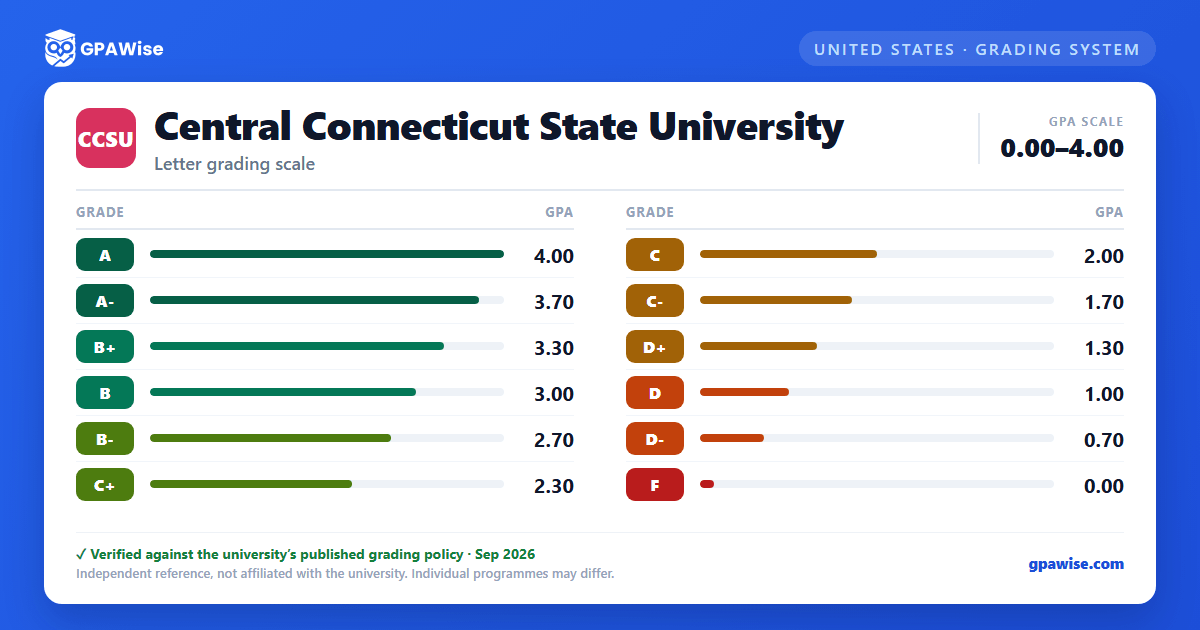

How the GPA is calculated
Grade-point average is computed by multiplying each course's grade points by its semester-hour credits, summing across all courses, then dividing the total quality points by the total credits attempted.
The cumulative GPA (CGPA) covers only work completed at Central Connecticut State University, including summer and winter session courses; transfer credit is not included in the CGPA.
When a course is repeated, only the highest grade earned counts toward the GPA and degree requirements (credit is earned once), though every attempt still appears on the transcript. Financial aid rules cap repeat attempts on any previously passed course to one repeat per course.
Source: Grade-Point Calculation and Course Repeat Grading Policy pages, 2026-2027 catalog — verified Aug 2026
Good academic standing, probation, and dismissal
Students are expected to maintain a cumulative GPA of at least 2.00 to remain in good academic standing. A student who falls below 2.00 after their first semester receives a probation letter; a student still below 2.00 at the end of the following semester is dismissed unless they successfully petition their academic dean for continued probation due to extenuating circumstances.
A dismissed student must normally wait at least one semester before seeking reinstatement, and may enroll as a non-matriculated student to bring their cumulative GPA back to good standing before petitioning for readmission.
Source: Good Academic Standing Policy and Academic Probation/Academic Dismissal pages, 2026-2027 catalog — verified Aug 2026
GPA requirements for graduation
To graduate, a degree-seeking student must maintain a minimum cumulative GPA of 2.00 overall and a minimum GPA of 2.00 within the major and minor, with grades of C- or better in all courses required for the major and minor, and must complete between 120 and 130 credits depending on the major (the School of Education and Professional Studies and the School of Business may set different requirements). Certificate-seeking students must likewise maintain a minimum cumulative GPA of 2.00 and earn C- or better in all required certificate courses, completing at least 50% of certificate credits in residence at CCSU.
Source: Graduation Requirements page, 2026-2027 catalog — verified Aug 2026
Dean's List, President's List, and Latin honors
Matriculated students who earn at least 9 credits in a semester with a 3.50 semester GPA and no incomplete grades qualify for the Dean's List; those who achieve a 4.00 semester GPA under the same conditions qualify for the President's List.
Latin graduation honors for the baccalaureate degree require a minimum cumulative GPA of 3.50 and at least 45 credits completed in residence at CCSU: Cum Laude (3.50-3.69), Magna Cum Laude (3.70-3.89), and Summa Cum Laude (3.90-4.00). Graduating students with a 3.50+ GPA who have not completed 45 credits in residence instead receive the Dean's Distinction award.
Source: Dean's List & President's List and Graduation Honors for Baccalaureate Degree pages, 2026-2027 catalog — verified Aug 2026
Transfer credit policy
Credit is generally awarded for a grade of C- or higher in 100-level or above coursework from regionally accredited institutions; developmental or basic coursework is not accepted. Courses with a passing grade of D- or higher transfer from Eastern, Southern, or Western Connecticut State Universities. Pass/Fail courses are generally not eligible for transfer credit, with limited exceptions. Grades of D+, D, and D- transfer only for students who have already earned an Associate's Degree from a Connecticut State Community College or Charter Oak State College. Continuing CCSU students must obtain approval before taking a course elsewhere for the credit to transfer back. Transfer credit does not count toward the CCSU cumulative GPA.
Source: Transfer Credit Policy sub-page (under Transfer Credit chapter), 2026-2027 catalog; URL omitted, exceeds 191-char column — verified Aug 2026
Frequently asked questions
What grading scheme does Central Connecticut State University (CCSU) use?
Where does this CCSU grade scale come from?
What are CCSU's GPA rules?
Source: Grade-Point Calculation and Course Repeat Grading Policy pages, 2026-2027 catalog — verified Aug 2026
What are CCSU's academic standing rules?
Source: Good Academic Standing Policy and Academic Probation/Academic Dismissal pages, 2026-2027 catalog — verified Aug 2026
What does CCSU require to graduate?
Source: Graduation Requirements page, 2026-2027 catalog — verified Aug 2026
How are honors and awards decided at CCSU?
Source: Dean's List & President's List and Graduation Honors for Baccalaureate Degree pages, 2026-2027 catalog — verified Aug 2026
How does CCSU treat transfer credit?
Source: Transfer Credit Policy sub-page (under Transfer Credit chapter), 2026-2027 catalog; URL omitted, exceeds 191-char column — verified Aug 2026
