
How grading works at Princeton
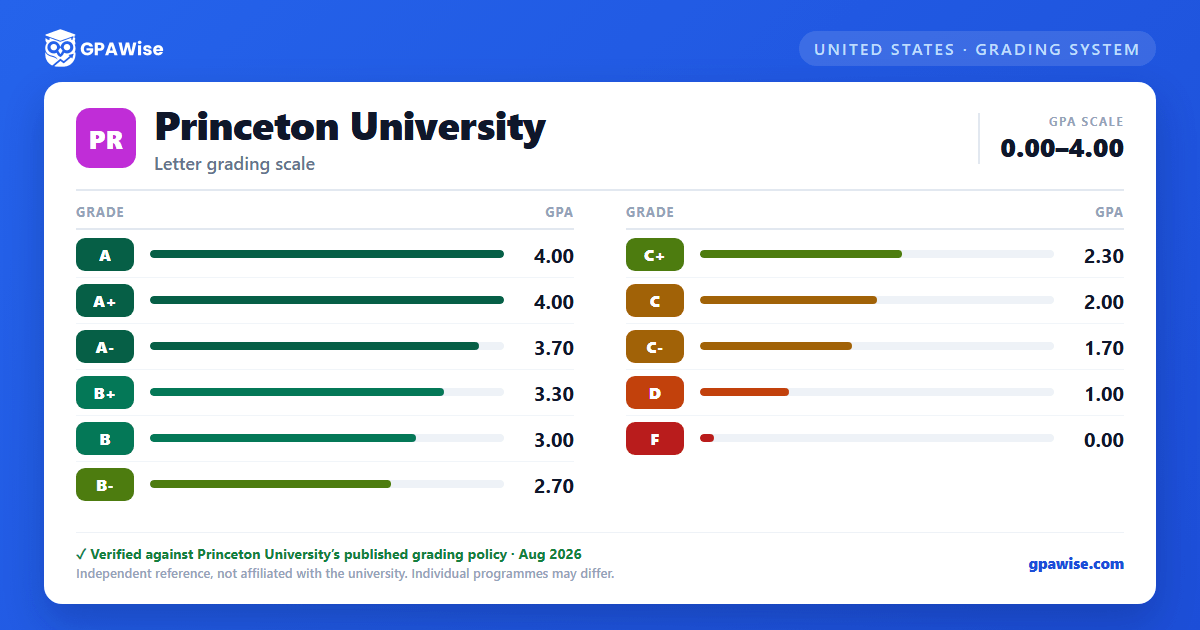
Princeton grades undergraduates on an 11-symbol letter scale: A+, A, A-, B+, B, B-, C+, C, C-, D, and F. A+ and A carry the identical point value (4.0) — A+ is not a higher cap than A. There is no D+ or D-; D is the lowest passing grade. Princeton does not officially compute or certify a grade point average or maintain class rankings, but its Office of the Registrar publishes the conversion scale below for students who need to submit a GPA for an external application.
Source: Registrar, Calculate Your GPA (Step 1); Undergraduate Announcement, Grading (Grading Symbols) — verified Aug 2026
How your GPA is calculated at Princeton
Each letter grade converts to points: A+ = 4.0, A = 4.0, A- = 3.7, B+ = 3.3, B = 3.0, B- = 2.7, C+ = 2.3, C = 2.0, C- = 1.7, D = 1.0, F = 0.
Multiply each course's point value by its semester hours (most regular courses are 4 semester hours), add the results for all courses, then divide by the total semester hours.
Courses graded AUD (Audit), P (Pass/D/Fail), Inc (Incomplete), or W (Withdrawn) are not included in the calculation. A failing grade (F) is averaged in at 0 points.
Source: Registrar, Calculate Your GPA (Steps 1-3) — verified Aug 2026
Academic consequences of D grades at Princeton
A grade of D is the minimum acceptable passing grade, but carries real consequences: most departments require at least a C average in departmental courses, so a D in a departmental course can jeopardize the major. Earning two or more D grades in a single term is treated as evidence of serious academic difficulty and can lead to academic probation, and a student already on probation who earns two more D grades may be required to withdraw.
Source: Undergraduate Announcement, Grading (D-grade exceptions) — verified Aug 2026
Grade requirement for courses taken outside Princeton
A student taking a preapproved course outside Princeton must earn at least a C to receive credit for it — a D or F earned elsewhere does not transfer, even though a D is a passing grade for a course taken at Princeton itself.
Source: Undergraduate Announcement, Grading (D-grade exceptions, item 5) — verified Aug 2026
Frequently asked questions
Can I save my semesters and track my CGPA at Princeton University?
How do I convert SGPA to CGPA at Princeton University?
Can I add past semester GPAs without entering every course?
Is my CGPA tracker data sent to your servers?
Is this Princeton University GPA calculator free?
Does Princeton officially calculate or report a GPA?
No. Princeton does not officially compute or certify a grade point average or maintain class rankings, and no GPA appears on an official Princeton transcript. The Office of the Registrar publishes its letter-to-point conversion scale so students can compute an unofficial GPA if one is required for an external application.
Source: Registrar, Calculate Your GPA (opening statement) — verified Aug 2026
Is an A+ worth more than an A at Princeton?
No. Both A+ and A are worth 4.0 points under the current scale. A+ was worth 4.3 prior to the 2000-2001 academic year, but that value was retired; today A+ and A share the same top value.
Source: Registrar, Calculate Your GPA (Step 1) — verified Aug 2026
Does Princeton award D+ or D- grades?
No. Princeton's grading scale runs C+, C, C-, D, F — there is no D+ or D- grade. D is the lowest passing grade a student can receive.
Source: Undergraduate Announcement, Grading (Grading Symbols); Registrar, Calculate Your GPA (Step 1) — verified Aug 2026
How does the Pass/D/Fail option affect my GPA at Princeton?
Choosing the Pass/D/Fail ("PDF") option for an eligible course means grades of A+ through C- appear on the transcript as P, which carries no point value and is excluded from the GPA calculation entirely. A D or F earned under the PDF option still shows as the letter grade and is treated normally.
Source: Undergraduate Announcement, Grading (Grading Symbols; Pass/D/Fail Grading Option); Registrar, Calculate Your GPA (Step 3) — verified Aug 2026
