
How GPA Is Calculated
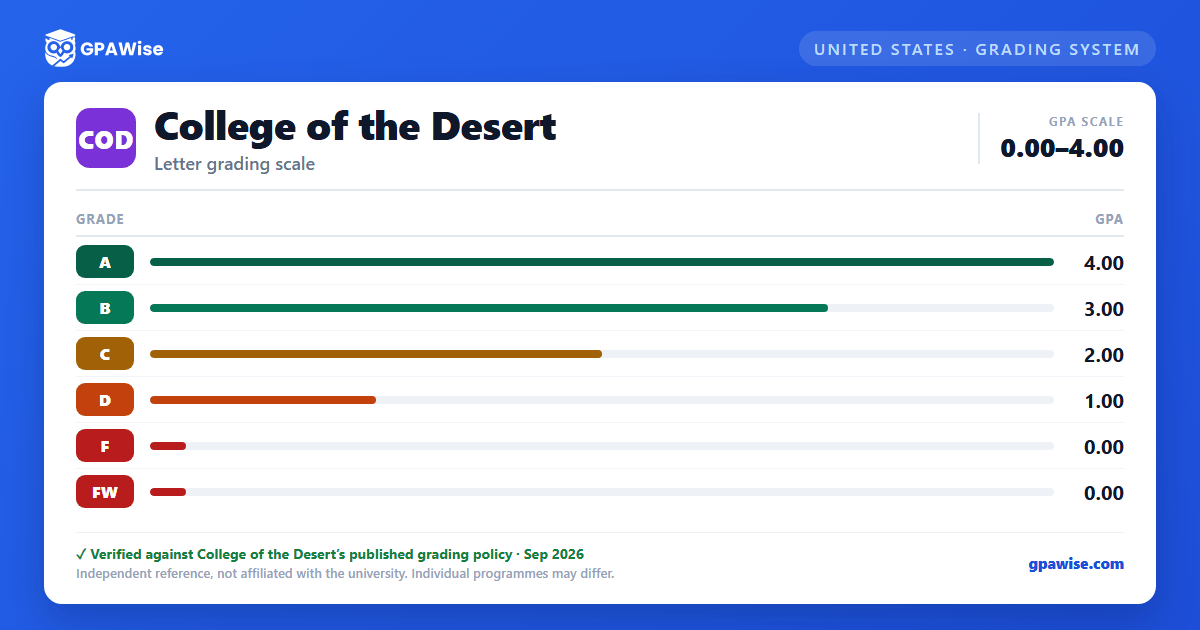
Grade point average is computed by dividing the total grade points earned by the total units attempted in courses graded A–F. Grades of F count as units attempted and are computed into both semester and cumulative GPA.
The marks I (Incomplete), P (Pass), NP (No Pass), MW (Military Withdrawal), and W (Withdrawal) carry no assigned grade point value and are not included when calculating GPA.
Source: College of the Desert Catalog 2026-2027, Grading > Grade Points and Grade Point Average — verified Aug 2026
Academic and Progress Probation
A student is placed on academic probation after attempting at least 12 units with a term grade point average below 2.0. A student is placed on progress probation after attempting at least 12 units with a grade of W, I, NC, and/or NP in 50% or more of units attempted. A student can be on both types of probation at the same time.
Academic probation ends once cumulative GPA reaches 2.0 or higher; progress probation ends once the percentage of W/I/NC/NP grades drops below 50%.
A student on academic probation is subject to dismissal after three consecutive semesters with cumulative and semester GPA below 2.0. A student on progress probation is subject to dismissal after three consecutive semesters with 50% or more W/I/NC/NP grades. A dismissed student may apply for reinstatement no sooner than one semester after dismissal.
Source: College of the Desert Catalog 2026-2027, Grading > Probation, Disqualification, & Reinstatement — verified Aug 2026
Grade Requirements for an Associate Degree
All associate degrees require a minimum cumulative grade point average of 2.0 across all coursework taken at all accredited institutions, including College of the Desert. Courses used to satisfy major or area-of-emphasis requirements must be completed with a minimum grade of C, or P if taken Pass/No Pass.
A student may repeat a course in which a substandard grade (D, F, FW, NP, NC, W, or EW) was earned to alleviate it, subject to Title 5 repeat limits; the earlier attempt's units and grade points are then excluded from GPA totals. Academic Renewal separately allows up to 30 units of substandard (D or F) coursework to be disregarded from the GPA once a student has achieved at least a 2.0 GPA in 12 consecutive semester units and one semester has elapsed since the coursework; academic renewal does not count toward graduation honors.
Source: College of the Desert Catalog 2026-2027, Grade Requirements for an Associate Degree; Repeating Courses; Academic Renewal Regulations — verified Aug 2026
Academic Honors
Students earning 12 or more units in a semester with a term GPA of 3.50 or better are named to the Dean's List; students with a term GPA between 3.00 and 3.49 are named to the Honor Roll.
Associate degree graduates may earn graduation honors based on cumulative GPA: Highest Honors (3.90–4.00), High Honors (3.75–3.89), and Academic Distinction (3.50–3.74). Academic Renewal coursework does not count toward graduation honors eligibility.
Source: College of the Desert Catalog 2026-2027, Grading > Academic Honors — verified Aug 2026
Frequently asked questions
What grading scheme does College of the Desert (COD) use?
Where does this COD grade scale come from?
What are COD's GPA rules?
Source: College of the Desert Catalog 2026-2027, Grading > Grade Points and Grade Point Average — verified Aug 2026
What are COD's academic standing rules?
Source: College of the Desert Catalog 2026-2027, Grading > Probation, Disqualification, & Reinstatement — verified Aug 2026
What does COD require to graduate?
Source: College of the Desert Catalog 2026-2027, Grade Requirements for an Associate Degree; Repeating Courses; Academic Renewal Regulations — verified Aug 2026
How are honors and awards decided at COD?
Source: College of the Desert Catalog 2026-2027, Grading > Academic Honors — verified Aug 2026
